
Display transform manipulators associated with hotkeys
Right now when you use the transform hotkeys Move (G), Rotate (R), Scale (S), transform manipulators are off by default. Transform manipulators can be turned on with the

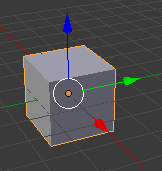
It would be great if there was an option similar to how Maya works where the hotkeys automatically show the associated transform manipulator on. For example Move's G hotkey would show something like this:
 Meanwhile, the R hotkey would show the rotate transform manipulator on and the scale would show it's manipulator on. (while the other manipulators are off, only the manipulator associate with the hotkey would be on, the other ones could be turned on additionally with the menu) This feature could be toggled on/off for hotkeys within user settings. Coming from Maya the transform controls without the transform manipulators can be confusing, I think this feature would be very helpful for new users to blender to make transform navigation easier.
The pie menu's Ctrl + Spacebar for navigation is helpful but isn't as intuitive as the hotkeys defaulting to having the transform manipulators on by default. It would be a helpful addition if possible.
4 Comments
I'm very much not in favor of this being the default behavior for the G, S, and R hotkeys. I find that the transform manipulator gets in my way way. I it off when modeling because I want it off and I only want it on when I explicitly turn it on. Having the manipulator pop on after I've explicitly disabled it would make for a very frustrating experience.
As I mentioned on your stackexchange post, there is already the option to do this: blender.stackexchange.com/questions/19352/hotkey-for-selecting-transform-manipulator-type
Another way to do it : darrinlile.com/blog/shortcut-keys-for-blender-manipulators
That can be an addon. I have tested that (newbie to Python version !) and you can find it here blender.stackexchange.com/questions/58934/global-variable-visibility-during-script-operator-execution (it works even if I have posted a question on it).