
Improving camera widget
A lot of suggestions are done for the camera, but here is a different one.
Blender 2.80 has lots of new widgets and I think this one could be particularly useful to manipulate the camera directly in the 3D View.
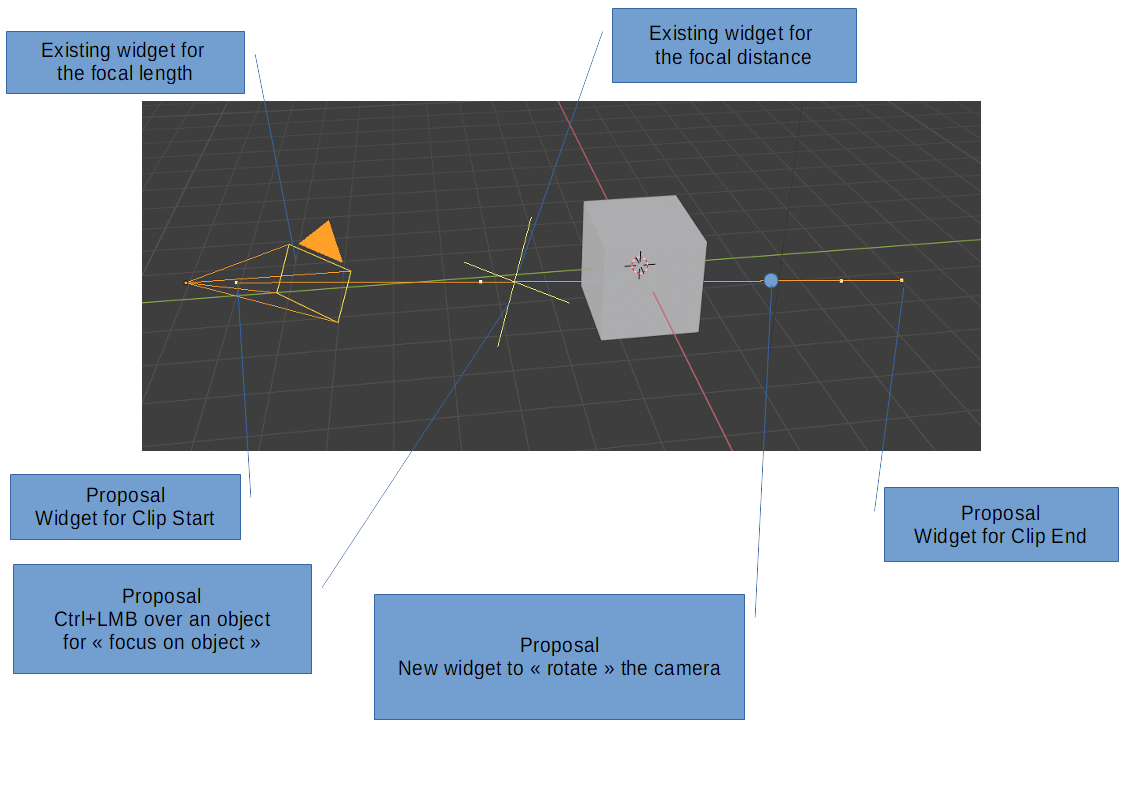
Curently, we have a camera widget that allows us to define:
- the focal length by moving the rectangular "eye" of the camera
- the focal distance by moving the cross along the axis
What do you think about adding the following visual editing:
- dragging the point at the start of the line to control the "Clip Start" property
- dragging the point at the end of the line to control the "Clip End" property
- using the Ctrl key while dragging the focal distance to set the focus on the object under the mouse cursor
- adding a dedicated "floating" point on the axis to allow rotating the camera to a target
I know that could be probably be done with an add-on, but probably be best as a standard built-in tool.
1 Comment
I suggest also that those widgets should be visible as soon as you select the camera, without having to check "limits" and/or "mist" in the "Camera/Viewport display" panel. On the other hand, deselecting the camera automatically hide the widgets.