
Minor Quality of Life Improvements - Lock Other Axis
Addition & Room for Improvement: Extra Lazy
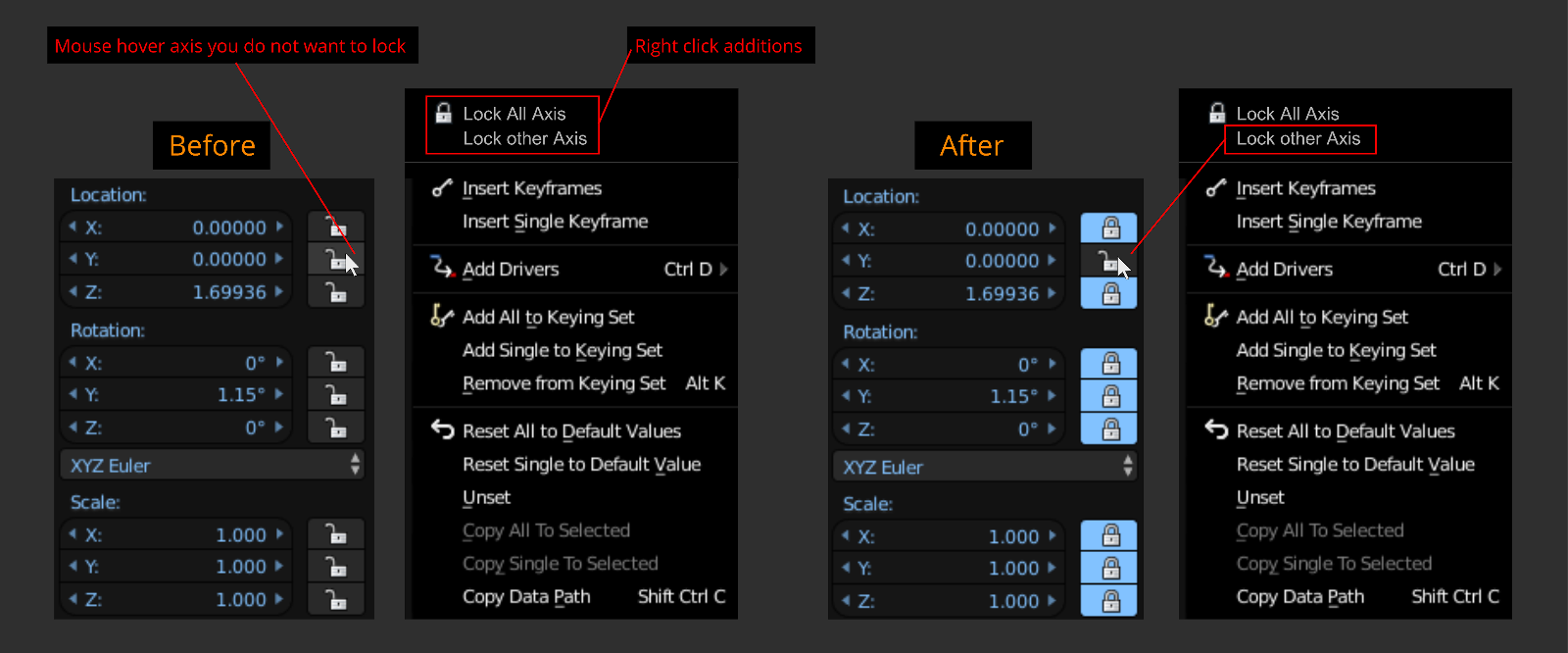
- Sometimes you only want to work with only one type of axis, especially during animation where you want to isolate one axis of an object. You want to lock the other axis a tad bit faster compared to the current methods.
Life Improvement: Right Click - 'Lock other Axis' & 'Lock All Axis'
- Simply mouse hover over axis you want to keep unlock and right click select 'Lock other Axis'. Other axis lock. 'Lock All Axis', self-explanatory. Also yes I am aware of left click hold/drag locks all axis in one mouse stroke, but 'Lock All Axis' added to the right click menu is a nice addition for users who are not aware of the left mouse stroke hold method.
3 Comments
CTRL+Click on the lock to invert could also work.
I swing back and forth on whether I like this one. It's an easy enough option to add (as would be <kbd>Ctrl</kbd>+clicking a lock button to lock/unlock all of the axes other than the one you clicked). However, one of the interface complaints folks have made is the ability to do the same thing more than one way. Sure, it's flexible and I personally like having multiple approaches... but if the concern is complexity for newcomers, I dunno. But maybe it doesn't matter and I'm overthinking it.
See? Back and forth I go! :)
@Jason van Gumster: Yes adding Ctrl click as a shortcut would be nice. Annotate it next to the right click menu item would inform users immediately there is a hotkey option. Blender really needs to up its game communicating its shortcuts for simple tasks without googling or reading online documentation. You know, only a year ago did i find out f12 was the shortcut for render... It baffles me if you hover over the render button, it doesn't show the hotkey. The only place where it does via the interface is hitting the search spacebar and typing render. How often do you think users type render into the search? I'm sure many users have experience, "oh damn, I wish I knew that before!" moments for many simple things haha.