
Wave modifier : z motion
Hello, Just a small feature : In the wave modifier, we have the x and y axis available for the motion but we don't have the third axis, it would be great to have it instead of turning the mesh 90°.
mockup :
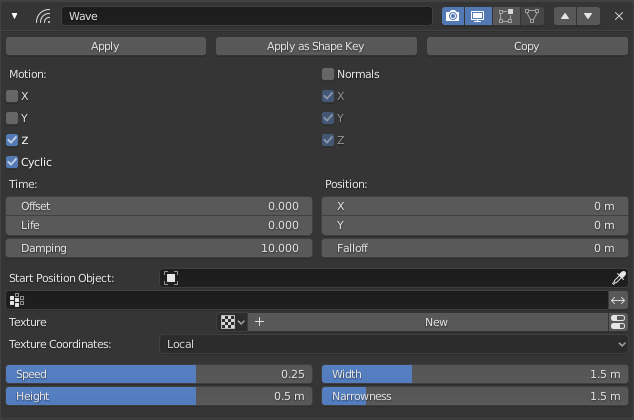
Hello, Just a small feature : In the wave modifier, we have the x and y axis available for the motion but we don't have the third axis, it would be great to have it instead of turning the mesh 90°.
mockup :
3 Comments
Use normals XY. If you want more complex movement — use RGBtoXYZ Displace. Wave is simple sine function, running across surface. For most custom result use Animation Nodes.
* @ Vyacheslav * hey thanks for the response, normals XY is not equal to a sine function in the z axis so it's not really a real replacement ! I just want the sine function in z ^^ it doesn't really make sense to have a sine fonction in x and y available in a modifier and to be force to use an add on for the z axis.
* @martin.bailly19 * I agree it is not the same. BUT X is not X actually, It is Z-displace with sine, that moves along X and streches along Y. Take a plane with X-wave, rotate X 90, apply rotation and look at result. That is why there is no Z: if it will work the same logic, wave will go along Z, but where it should displace vertices? To ±X? or to ±Y? And in case with X, you will be in the same situation, when you need to rotate object. The reason why there is 2 Axis instead one — is ability to have bulges and pinches {attachment 37142650jpg} Waves will be still oriented and new Z axis will not change it at all.