
Animation Workflow view toggle iconography to save clicks and moves
Case
With the new horizontal view toggle panel, being visually easier to interpret, unfortunately has also introduced another mouse angle, distance and difficult movement - and still hasn't resolved the issue with the extra clicks to get to a subview. There still is a lot of clicks and mouse moves (or even keyboard shortcuts) needed to quickly toggle your animation views to the correct one you'd want. Way too many.
Second issue is that there are now two Dopesheet toggles in two areas.
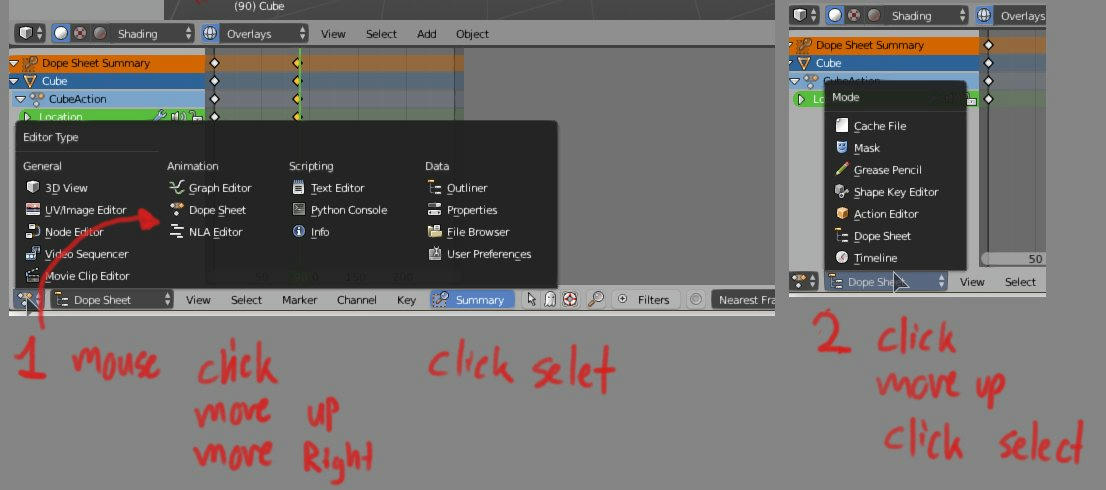
Case Example: Goal - get to the grease pencil dopesheet from NLA
- Move to first view toggle, Click - move up, move right, select Dopesheet. = 5 actions
- Move to other sub view toggle - click, move up, select. = 4 actions
Total = 9 actions - with hold drag, you save 2 clicks for 7 actions.
OR click, press a memorized hotkey, then move again to next toggle and click then press another memorized hotkey. 3 mouse actions + 2 hotkeys. Total = 5 actions (with two memorized hotkeys)
Task
Add a mouseover view controls with iconography for animation workflow view toggles to save on a few clicks and complicated mouse moves = making time faster and life easier.
Task Example
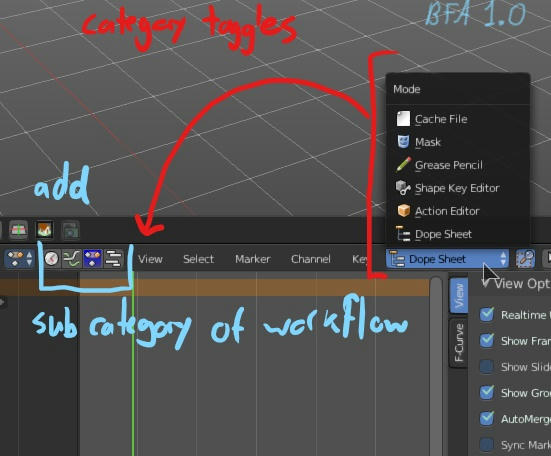
Again, using a UI fork of Blender Bforartists, I have gotten used to the efficiency of a quick header icon set to quickly switch animation views. I can't live without this anymore. An improvement to BFA/Blender would also move the subview categories over close to the animation view toggles.
Goal - get to the grease pencil dopesheet from the NLA
- move mouse and click icon to go to dopesheet = 2 actions
- Move to other sub view toggle - click, move up, select. = 4 actions
Total = 6 actions - with hold drag, you save 1 click for 5 actions
OR
- move mouse and click icon to go to dopesheet = 2 actions
- click, press one memorized hotkey = 2 actions
Total = 4 actions (with one memorized hotkey)
This too would be more efficient by moving the toggle by the icon row of the animation viewport toggles.
Arguement
Clearly, having things exposed neatly and close in distance saves on mouse moves and clicks, even on the fastest keyboard assisted method in 2.8. These are valuable miliseconds. These extra actions are stress creating under pressure. This suggestion is improvement of everyday tasks and quality of life.
If these icon bars are used in the header, it can be also proposed that the Animation View toggle system will only need ONE entry in the "All View toggle" system, and that entry would be "Animation" - then that will load the animation view system with the icon bar and their sub categories. This would also be a huge save on the other view areas that won't have to move over all the animation view toggles to get to what they want.
I've had my animators and myself use this system in the fork Bforartists for quite some time now, and it has been a godsend. We save so many little seconds and mental work just switching views around without having everything open spread out over multiple monitors. People go home less mentally tired. It would be so nice to have these little details also in the main sourcecode and not only in the fork.
5 Comments
This would be great (the addition of the graph editor helps save screen space) and to add to this, have the option to (Ctrl Tab/Ctrl Shift Tab) to cycling through each editor whilst hovering over the general space to make it a little more faster; similar to how you can cycle through the "Properties" window.
@fudushae: Yes, exactly - CTRl scroll and change over also would be a similar workflow.
Perfect, One Animation Editor .. Similar to the Node Editor with Icons to switch between Type of Node.
@darkstarmail: You get it!
Yes please.