
Element select in edit mode
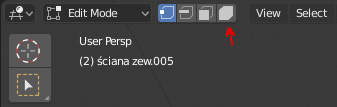
In my opinion, there should be the 4th type of selection in edit mode, instead of selected linked with L - element select. With new shortcuts 1 is for vertex select, 2 for edge, 3 for face and 4 should be for elements. That would be easier for new users to even know, that there is a possibility to select the whole element when you are in edit mode. Right now this is not so obvious. Selection should work just like other types (with border, circle etc ).
EDIT: Updated UI to 2.8.
20 Comments
I made a double click shortcut for linked selection so it became much easier to handle and double click wasn't in use, so I don't feel that max-like selection is nessesary, because vertex/edges and faces are components of any mesh object.
@slayerdude93: Not a bad idea. :) But again, new users has to know that this kind of selection is even possible. I think it would be easier with deticated button/selection mode.
@azjarosz: There is some truth in that. For me it took quite a while to realize that. Interestingly in the UV editor the equivalent is available with 'island select'.
@slayerdude93: Finding tools and options easily is not only important for new users but also for sporadic users who don't use the software all day every day.
This to me is SUPER important. as a professional game artist there are absolutely 4 selection types that are needed as standard.
a fast workaround is to set "Select Linked" to DblClick. You can test this form mesh edit and UVs in this keymap that also features DblClick for Collection in Object mode blenderartists.org/t/a-proper-keymap-for-blender-2-8/1145406
* @Ge Ro * yes, I know you can do it. It is not the point of this proposal. The problem is that some people doesn't know about that being possible. In my opinion it should be as easy as toggling between vertex/edge/face selection.
Agreee......
this add on will auto select edge face vert at once...
artstation.com/marketplace/p/y1P6V/auto-select-for-blender
this one will allow you to make all objects editable.
artstation.com/marketplace/p/wwVq7/edit-all-addon-for-blender
blender ui is crazy!!
I need this too. Why does Blender force the user to press a shortcut???
it's better than hotkey "L", just click! so I vote!
Yep together with left right Box selection!
Definitely agree. I always select one vertex and press L, but Element Selection would be much better and faster.
and also elements should marked by unique ID so it could be easily separated in shader editor
I'm generally for this idea but I think this should be a toggle between "select connected" and not. While verts, edge and face select can be enabled at the same time, element select cannot.
Yes please! I believe it should be quite easy to implement as well.
I completely agree with this proposal. This is something that is much needed!
I did the same suggestion 3 months ago . ^^
@loic.dautry: Guess there is need for a moderator to merge similar proposals. Maybe a site feature for users to request just that would help with that.