
The infamous "Terminator Shadow" problem
Hi ! I'm wondering if that would be possible to get rid of (or atleast reduce) the terminator problem.
This effect appears in most ray-traced engines but some have found the solution like Mantra (Houdini) or VRay.
This problem happens when using smooth shading on a low poly mesh. I guess the rays from the rendering engine hit some of the faces but not others which results in those ugly shadows.
Now I know this is not a bug since that's the way ray-traced engines are supposed to work but a lot of blender users don't have super-powerful computers (or render farms) so we have to decrease the poly-count and use tricks like normal maps, bump maps,... to get the details back in but then the problem kicks in.
For a single image render, it is possible to bump the subdivisions up and hide the effect but for a complete animated short it is just impossible.
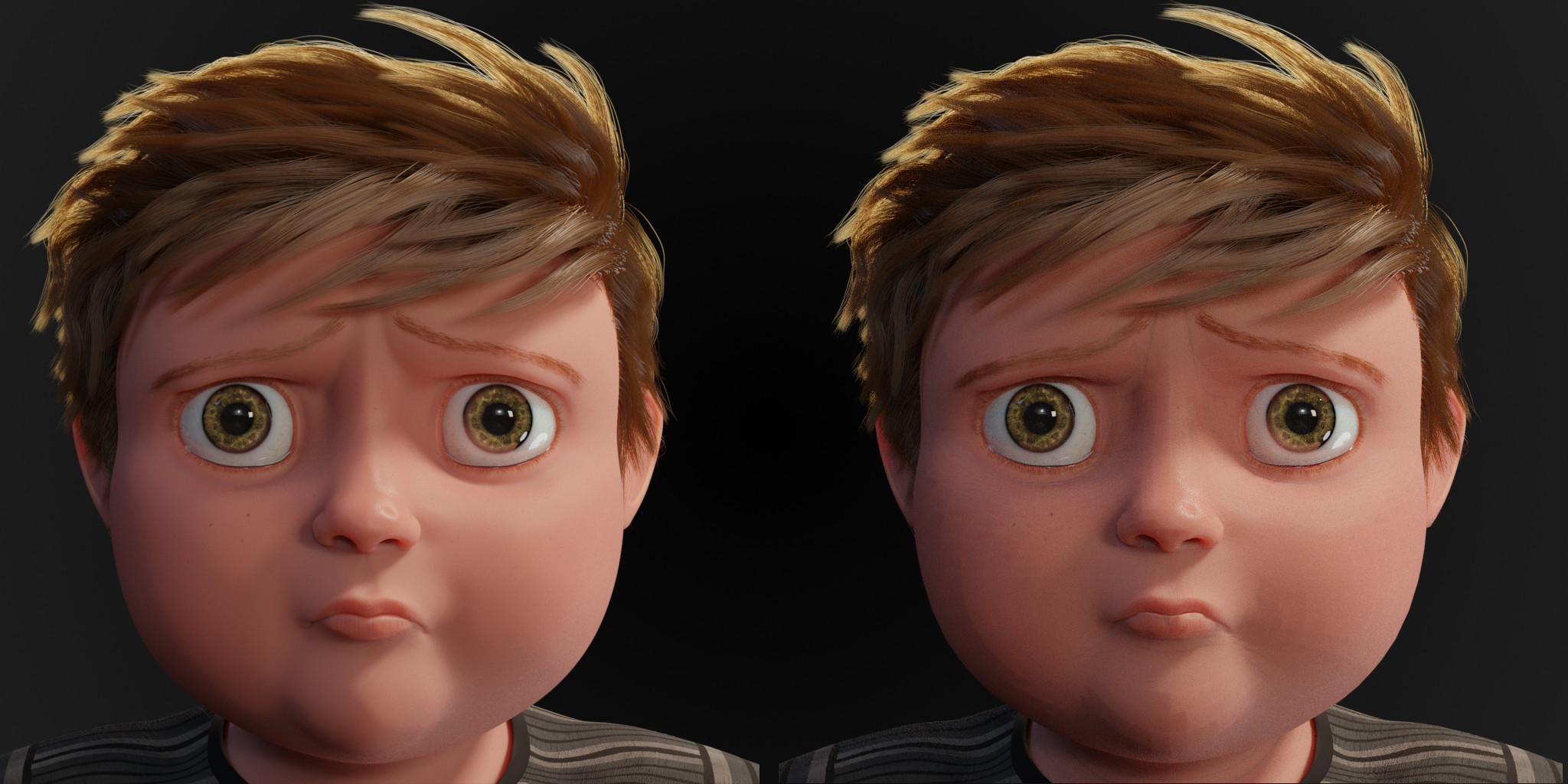
Here's an example of the problem (left : 4 subdivisions levels - right : no subdivisions) It is especially visible on the chin.
4 Comments
check: developer.blender.org/D7634 its almost there
* @ThinkingPolygons * Amazing 👍 ! Thank you for the information !
the fix is already in 2.9 daily build.
Not a fix, a workaround that can cover some cases.