
World Standart of Parenting
Hello! In a blender, parent to object does not work as would like.
In other programs, after executing the parent command, the child object remains in place and inherits the local coordinates of the parent object. I would like to have the same parenting algorithm as in other programs.
The solution: after the Parent command, the child object remains in the same place and inherits the coordinates of the parent object. This greatly simplifies the work.
Disadvantages of the existing method:
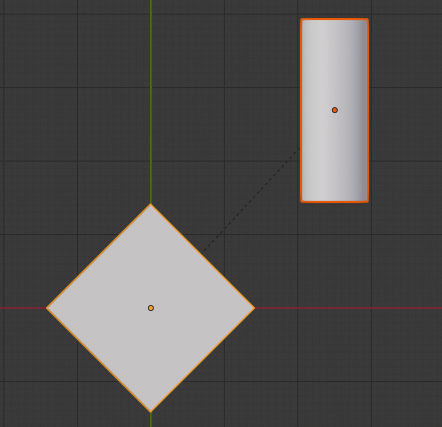
- Parent to object is created relative to global coordinates and there is no inheritance of coordinates parent object:

- When the coordinates are reset, the distance the parent object was moved remains:

- If we attach an object, and then use Cleare inverse, then it shifts the child object by the value of the offset parent object:

- Parent (Whithout Inverse) immediately moves the child object to the center of the parent object with the Zero Location and Rotation. After that, putting the object in its original place is difficult:

After binding, the child object should remain in place and inherit the coordinates of the parent object.

If you need to move an object in global coordinates after binding, you can make a switch as in the Global-Local editing mode

27 Comments
solution found!
just slap this in a text editor and try it:
* @Roman * Thank you! Works like a charm. This is gold.
* @Roman * Excelent script, Thanks !!!
Yes. This is how it works everywhere. I consider it as a bug.
Some one should bring this to devtalk. blender just bad at parenting.
Hi, I made fork for addon, that allows to parent without jumping and with inverse github.com/hitrpr/blender-apply-parent-inverse/tree/patch-1 here it is. And yes, It should be an option.
You can do what you ask* by Ctrl+A and "All transforms to Deltas"
*(or maybe not)
* @ Lsscpp * Please show me how to achieve the same effect as in 3dsmax! Thank you!
Can you show an example how it works in other apps, please? It's a bit hard to understand what you mean. I don't really understand why it should be good to set the child origin coordinates automatically to the parent object origin coordinates after parenting.
If you just want to have the transform values be the same like the parent, you have a plenty possibilities. One easy way is just to copy the parent object rotation value to the child rotation e.g.
EDIT: Before I forget it: Do you know Delta Transforms in Blender? Maybe this is the solution you need. I've watched some maya object parenting videos and I can't see a difference in compare to Blender. All looks the same. But maybe I don't really get what you mean. So a better decscription of your problem would be nice. Thank you!
* @Christoph Werner * So it works in 3dsmax I found this video as an example
vimeo.com/171228762
I found this video as an example
vimeo.com/171228762
* @Christoph Werner * The solution is simple: after the Parent command, the child object remains in the same place and inherits the coordinates of the parent object. This greatly simplifies the work.
* @Roman * Exact!
I think this one can be considered implemented since now we have now "Object (Keep Transform Without Inverse)" option in Ctrl+P, which is basically what author was looking for.
I agree with this post! Just remove the movement after parenting with clear inverse !! cmon Blender guys!!
I've been waiting for years for Blender to adopt the same system of parenting and coordinates as all other software (Maya, Modo, 3DMax, C4D, Softimage, Unity etc.). If everyone does it one way and you're the only one doing it differently or you're a genius or or you're making a serious mistake.
IMHO, Blender lacks of two operations:
I guess those operations does not exist because it will not work if child have rotation and parent non uniform scale (I think, not really sure). But it worth it anyway. If the operation does not do what you expected, you still have Ctrl-Z...
Agree. I work with Unity engine, when I want to align one object to another all i have to do is to parent object A to object B, so object B is inside A and select object B, reset position and rotation to 0 then unparent it. At the end I have 2 objects that are in the same place and rotated in the same way.
...while in blender when you zero out child object it runs to the center of the scene instead of center of the parent object
"...while in blender when you zero out child object it runs to the center of the scene" --> if you didn't move the parent after parenting. If you moved the parent, the children is somewhere you cannot predict with just the coordinates of the parent and the child.
exactly
Yes some property doesn’t get updated properly after adding the child object.
As a workaround: You can force it to update by going to Object Properties -> Relations and set the Parent Type to “Object” once again. (in the child object)
If you did this the coordinate system of the child is treated correct as relative to its parent.
And if you call Clear Parent it will be positioned as if its local coordinates were worldspace coordinates. Use the second option in Clear Parent to transform its coordinates to worldspace ( that way it will keep its position and orientation, but its values change)
* @sketchblock * "You can force it to update by going to Object Properties -> Relations and set the Parent Type to “Object” once again. (in the child object)".
The same thing happens after applying Clear Inverse (gif № 3)
* @Roman * If that is a question I don't really get it. If you set the child to location 0,0,0 (after the forced update step) do their origins fall together or not? If the relationship is fixed, then location 0,0,0 would make the child sit at the parents origin. But what is currently set in its transform values depends alot on the steps you did before.
* @Debuk * In all the software when you parent an object it remains still (keep the transform). In all software, except in Blender, if you move the father and then try to put the child's coordinates at 0,0,0, the child moves to the center of the father. In Blender at 0,0,0 child moves to the center of the world, but the worst thing is that if you move the father and then the child to 0,0,0 the child moves to the point that corresponds to the displacement of the father from center of the world. In a nutshell we are lost and we have no reference. I've been waiting for years for Blender to adopt the same system as all other software (Maya, Modo, 3DMax, C4D, Softimage etc.). All the systems proposed to workaround this problem are not very effective, the child moves and must then be repositioned in the right place.
I'm not sure I understand: you mean that when parenting the child objects coordinates should use parent object as 0,0,0?
* @ Lsscpp * Yes, same algorithm as in 3dsmax, modo, cinema4d, maya
* @ Lsscpp * The child must have the coordinates relative to the father. Otherwise, when we move the father the child no longer has a center of reference.