
Move Node Chain
This is something I have wanted for a long time and it would be great to have in 2.8. When you are working with nodes and you have a chain of nodes, it would be great to be able to move a node and every node that is connecting that node moves as well. This will obviously be activated when you hold a key and click and drag the node around.
For example, instead of just LMB clicking and dragging to move a node, you would hit ALT+SHIFT+LMB click and drag and that would move the chain of nodes.
At the moment one has to box select of shift select all the nodes they want to move, I feel this new behaviour will increase speed in the node editor for shader creation and compositing!
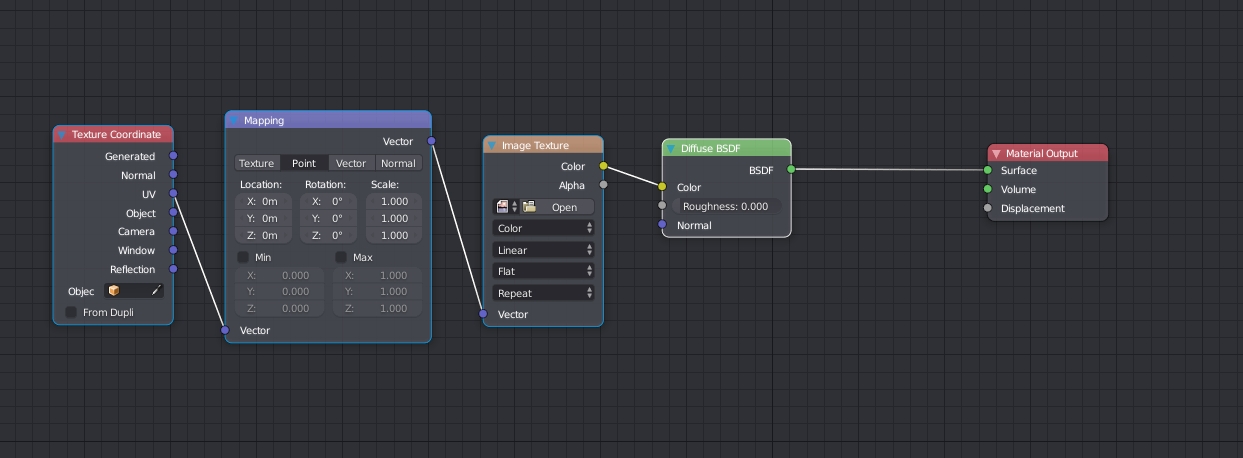
In the example below, the Diffuse node would have been selected using ALT+SHIFT+LMB and all the nodes connecting to the Diffuse node also get selected, then when you move the Diffuse node, the rest move with it!
3 Comments
This could probably be done pretty easily with an add-on... at least in part. We already have selection operators for selecting nodes before a selected node (<kbd>L</kbd>) and after the node (<kbd>Shift</kbd>+<kbd>L</kbd>). It wouldn't be hard to write an operator that selects all connected nodes. Then, from there, the regular grab operation would do everything you need.
I would have moved the output instead in that case... Just kidding. :) I think we should be able to just move all the selected nodes by simply dragging them as right now dragging without G works for just a single node but then for more than 1 you got to use G which IMO makes zero sense.
Yeah, you could use the hotkeys then change them to a modifier for selecting with mouse, so when you select it select the branch.