
Also select with left-click when using Select Border tool
If I'm using the SELECT BORDER tool, I want to "select things", right? Well, I was thinking it would work better making the single left-click for this tool behave just like the right-click: SELECT.
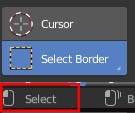
If I want to move the 3D cursor, I'm going to use the CURSOR TOOL, which is right above it, does it makes sense?
Here is my point. This could solve this whole dilemma of LEFT/RIGHT click select once and for all! It would never mess up with the right click select that has been in Blender since birth, but would add the option to single select with LMB if you are using this tool.
Here is what it would look like:
SELECT BORDER:
[ LMB ] Select / [ LMB drag ] Border select / [ RMB ] Select
What you guys think?
6 Comments
Hahaha ... I just realized all the irony. Guy who use
Right Clickfor deselect - writes posts in web page called " Right - Click Select ".@forestgumpovu4: LOL
Totally agreed, especially when the prompt says that a left click does selection.
My input settings. Maybe it help you.
But there is one issue ( or not issue... ) . Because it start by
Left Clickit select elements if they was to close to point where you make thisClickto start border. But after some time i find it even better because it handy wen it need to select few item and then few other & other - it no need to do " Deselect " action. Also if in same time u have standard " Border Select " not linked to mouse click - it work same way it have to work and " Add " to already selected in any situation.Deselect for such " Border Select " I make -
Altafter start border. It deselect all inside border. Just deselect all I link toRight Clickbecause press all the tameAnot handy. Place 3D Cursor -Shift + Mid Mouse@forestgumpovu4: Yeah, I see... Already tried to customize like this, but using Select with Left from Preferences, you start messing around all other Blender editors.
That's why I came up with this idea, it's harmless. It doesn't change the way you interact with other editors, it's only about the 3 Select Tools (Border, Circle, Lasso).
The bottom line is that it would please people from both teams: the Left and the Right Clickers. No more war :)
@rdrehmer: ...but using Select with Left from Preferences, you start messing around all other Blender editors.
Dont find any problems in other editors... If u swap setting " Select With " from right to left it change in all editors. Am I wrong?
Only I have to say fi those who may want to deep customize inputs - start from Blender default. First time I try Blender ( I came from Max ) - I change input preset to Max and than try to customize. It was big mistake... :) I miss lots of tools. Right way to customize - start from Blender default inputs and change only what necessary & if it necessary but don't touch all other.