
Color Pick Boxes makes it hard to select color value
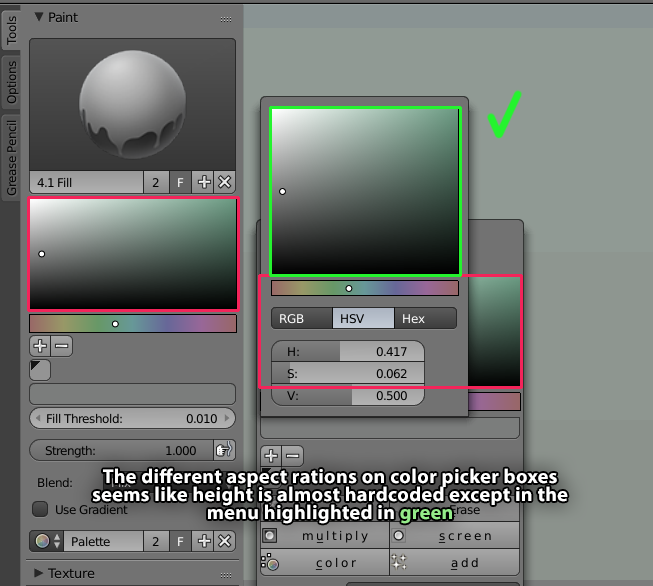
I find it hard to select right value of color, because the color picker boxes are in some cases cropped on height. There's only one that has 4:3 or almost 1:1 aspect ratio and that's illustrated in green.
(since value are y-axis, hue is on x-axis)
In some cases it's almost 2:1 aspect ratio on the color picker box, which makes hue picking have almost the double precision compared to try and adjust the value. This is so inaccurate for me I almost always use the HSV and just use the sliders, but it's like 4-5 times as much clicks as having a more accurate color picker box.
In my opinion, it would be nice if the color box reads the width value and tries to make the height as close as possible to a 1:1 ratio. It will eat up some px in vertical real estate but again, in my opinion, color pick when painting is quite a high priority.
3 Comments
Well, since when you click on the color swatch it opens a popup, the solution maybe to have it sized(huge) at will, letting the user decide how much in the preferences, where you also choose the type of colorwheel.
I think the pop-up is pretty decent in size, but best part the color picking area is perfectly square. Making hue & value (width & height) match up.
well it ruins all the other elements in the toolbar, my problem is not the actual pixel size. It's that in the pop up dialog the color picker is perfectly square, but in the toolbar and other places it becomes wider, so when testing colors and picking them the hue (width) has almost the double precision than the value (height) ... makes it really weird to be precise a tiny tiny movement in y-axis makes a huge difference in the value of the picked color.