
Overhaul of the Scripting workspace
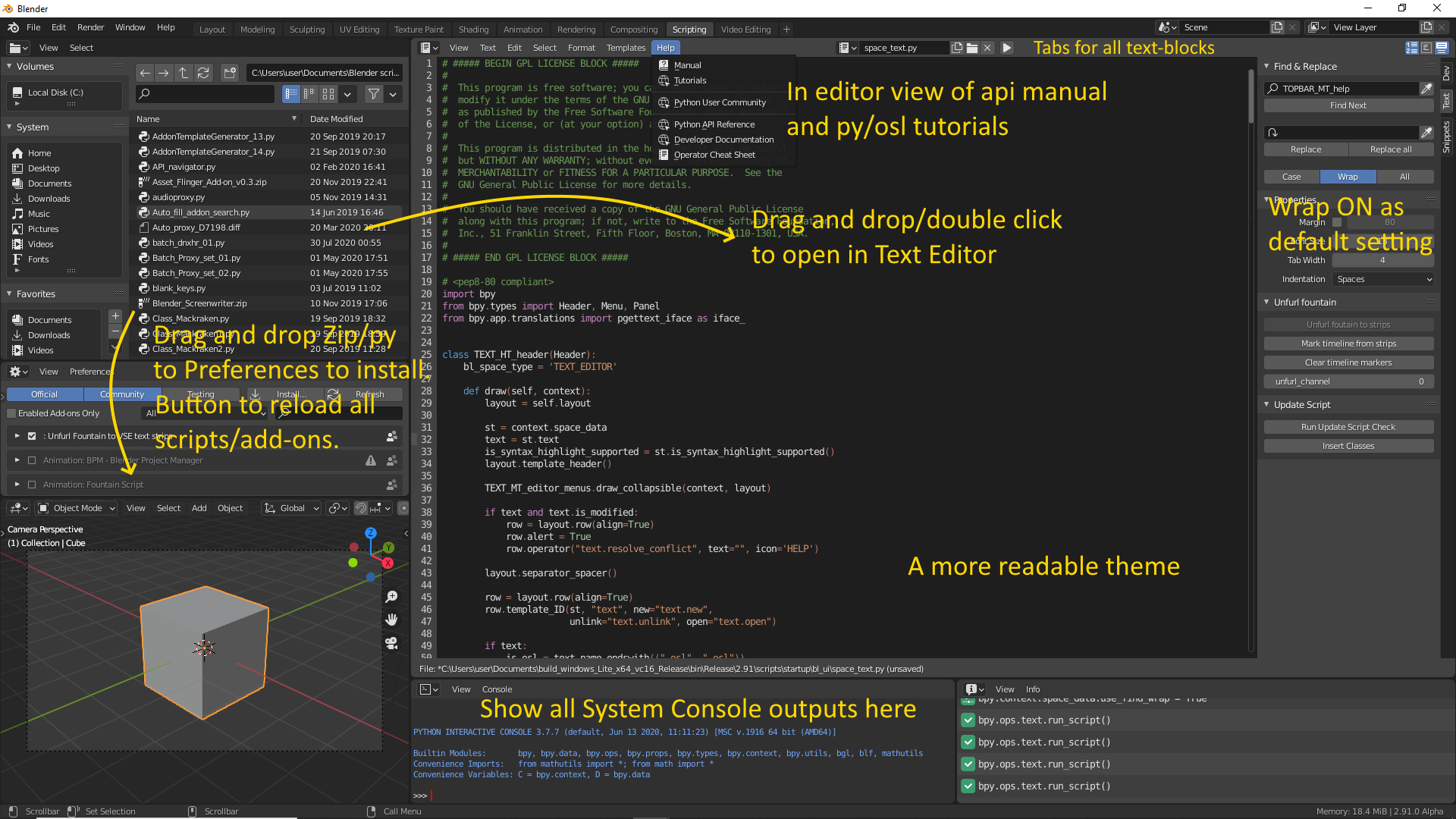
As the current Scripting workspace doesn't really fulfill it's potential, Here are some improvement suggestions.
Remove:
- Outliner x2
- Properties
Add:
- File Browser
- Preferences/Add-ons
Functions:
- Add double click/drag and drop of text/scripts from File Browser to Text Editor to open files.
- Add drag and drop of zip(+double click) and scripts from File Browser to Preferences to install add-ons.
- Show all texts from System Console in Python Console.
- A more readable/contrasty theme for the Text Editor.
- Add Help menu with access to all helpful links/material for add-on development.
- Wrap should be on as default setting.
- Tabs in the header should show all loaded text-blocks.
3 Comments
I think it would be a mistake for wrap to be turned on by default - especially since Python is a language where indentation is so important.
* @kidtempo * Wrap in the Find section means continue searching from the top, when the bottom is reached.
* @ tintwotin * Ah, sorry. I thought you meant line-width text wrapping in the editor...