
Option to delete pose in Pose Library.
Hello. Would be good to have this option.
Right click select on a pose, to have the option 'delete pose' in the context menu.
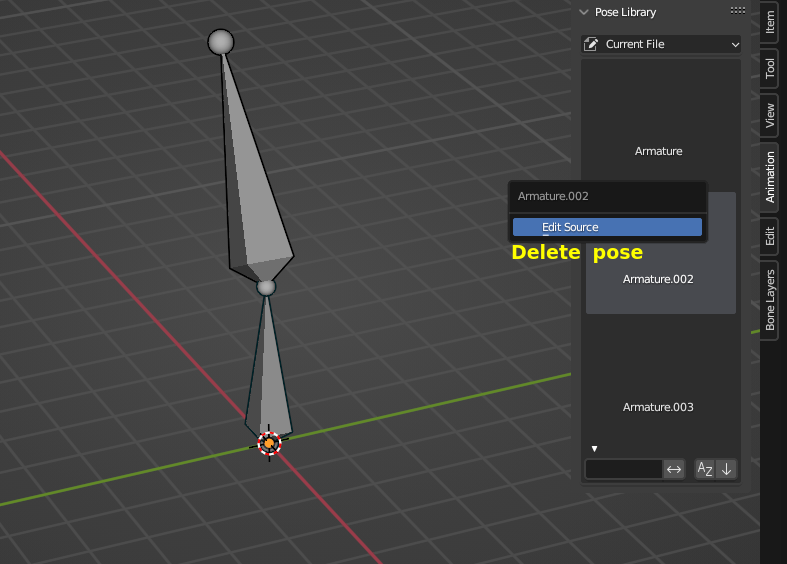
Hello. Would be good to have this option.
Right click select on a pose, to have the option 'delete pose' in the context menu.
6 Comments
Isn't pose library addon basically being replace by the asset browser to begin with?
Source?
the source would be the fact that all Blender open movie projects since Sprite Fright have used the asset browser as the pose library. The addon is still used to create the asset, but I'm not aware of anyone using the addon to browse/manage poses, at least not in 3.0+
Well to me, it's pretty clear the BF has been pushing to make the Asset Browser the main thing to use any kind of assets in Blender. And the pose library system in particular is quite clearly being deprecated as it is slowly but surely implemented in the Asset Browser itself:
Reference/Release Notes/3.0/Animation Rigging - Blender Developer Wiki
Reference/Release Notes/3.2/Animation Rigging - Blender Developer Wiki
Reference/Release Notes/3.5/Animation Rigging - Blender Developer Wiki
To me it looks like the Pose Library addon is more of a transition phase from the old system to a new one fully based on the Asset Browser. Much like what is happening with brushes, hairs and whatnot.
The Pose Library functionality in the asset browser were moved to a new Asset menu, as well as the pose asset context menu.
===========================================
Ah. Now I see. To understand the new pose library I only searched the manual docs.blender.org/manual/en/latest/animation/armatures/posing/editing/pose_library.html
In no part of the manual I saw that the options were moved, from that section to the asset browser section.
I couldn't have deduct, like you did, that the old pose library, was going to be replaced, by a new pose library plus the new asset browser, in order to later deprecate the new pose library too, to only use the asset browser. Seems logical.
Which I originally thought was that the new pose library was developed to be used in conjunction with the new asset browser, or isolated. That was my mistake. The wiki link has been the thing I needed to understand it.
So now, let's see if I have understand it:
If I want to create a pose and use the option 'select pose bones', and the other important pose options, I have to have opened:
-A part of the screen with the 3d viewport to work in the character's pose. -A part of the screen with the action editor, to reach the 'create pose button'. -A part of the screen with the asset browser, to select the pose's bones with the right click option in the menu and access the options.
When before I could make all of these things just accessing the side panel in the 3d viewport.
Great. Just great.
Also. For my suggestion, that was to have there a delete pose option, by right clicking the asset, as I see, in the asset browser you have an option called 'clear the asset'. But that option doesn't delete it. It only unmarks it as an asset, and then the pose becomes a normal action. So still, If I want to get rid of it because maybe I have hit the 'create pose' button by error, still, I have to go to the Outliner>BlenderFile>Actions, search the action, right click on it, and press delete. All superfast. Better than just having the 'delete pose/action' there.
Ok. Enought sarcasm for an account in which I'm using my real name.
Ok. In 3.4 we had even more options that in 3.5 have been lost. In that menu I had the option to force select all the implied bones in the pose. Which was useful...