
The Combined Dopesheet/Timeline
This is an idea that I've had for some time and it is partially implemented in the latest 2.8 builds. I mentioned it in @darkstarmail 's post titled "2.8 Timeline Proposal" but thought it might be good to create a separate proposal since at first glance all of the ideas proposed there are addressed in the latest builds.
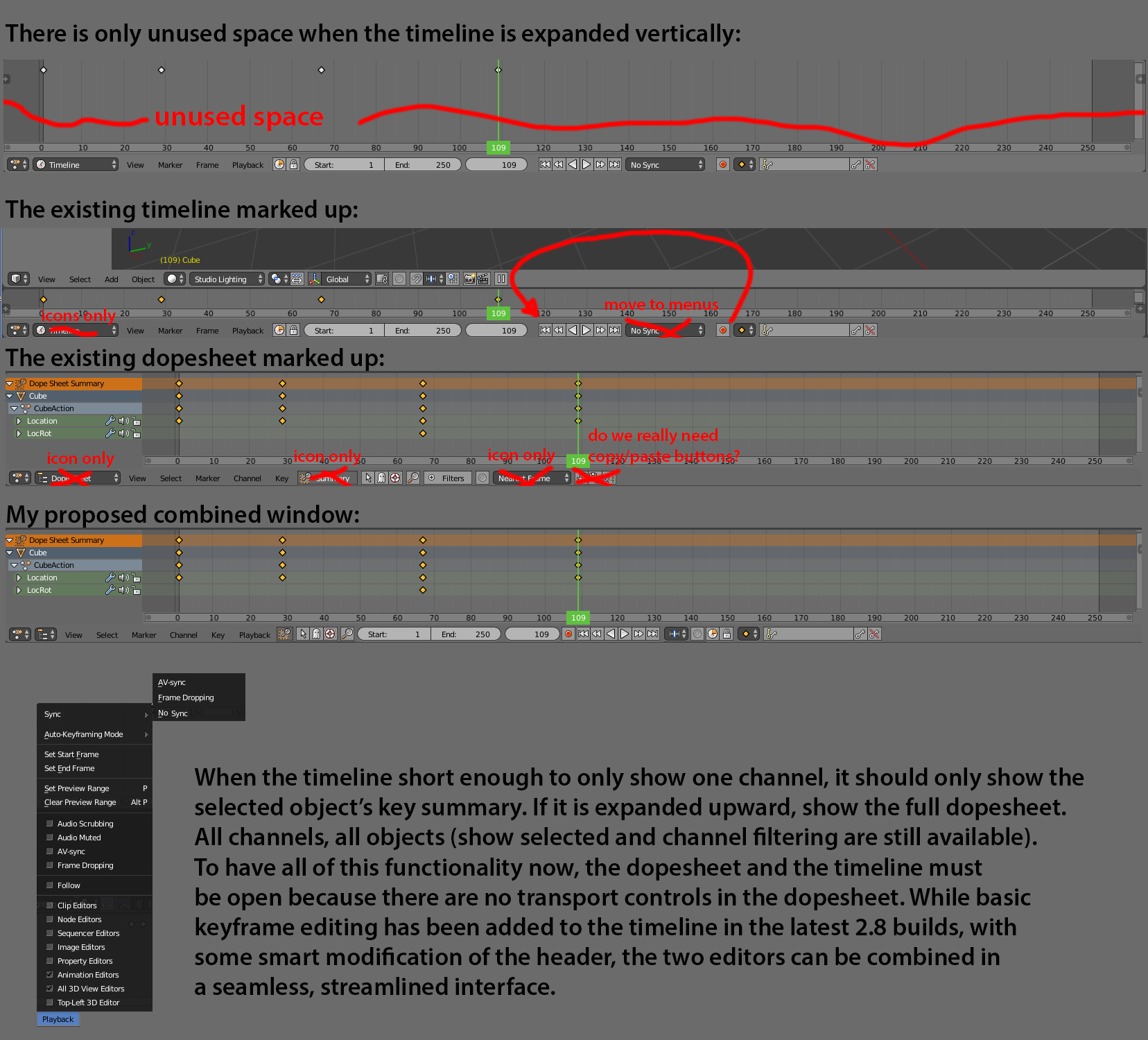
The dopesheet and the timeline can be combined in a very seamless way that isn't intrusive to people only needing timeline functionality or to those needing the power of the dopesheet. The dopesheet can almost not be used without also having the timeline open because playback, animation, and range functionality is located only in the timeline. Similarly, there is never a reason to have the timeline expanded vertically since there is no new functionality gained by seeing a taller timeline, only extra space bellow the keys.
The timeline as it exists today:

So why not make the timeline magically turn into the dopesheet when it is expanded vertically? If the area is only large enough to show a single channel, put the keyframe display in selected channel only mode or overview. If the area is expanded vertically, switch to showing all channels that would normally be shown in the dopesheet. Much of the functionality is repeated and there are many items on the header that may fit into the menus better. Also, the existing menus can be combined in smart ways, dropdowns and buttons can be reduced to icons instead of text (sometimes text AND icons), and buttons like copy and paste can be removed completely.
Markup:


Proposed:
 Notice that even with all menus and tools on the two headers combined, there is less space taken up.
The extra menus and the sync dropdown from the timeline can be all added to the Playback menu.

It could be argued that you may not want all icons on the header at all times. I agree with this and think we need the ability to enable and disable widgets on this and all headers. Another possibility is to not show the dopesheet functionality unless the area is expanded vertically to show more than one channel. Thanks for your consideration and feedback.
Edit: the externally hosted images were hard to read, so I combined them into a single image at the end of the post.
15 Comments
There are some interesting ideas here - and indeed, it's a valid question to ask whether we even need a timeline at all. I don't necessarily agree with the specific changes/layout tweaks made here, but those are really "implementation details" that we can refine over several iterations.
The good news though is that we will be working on some further tweaks here :)
@Jason van Gumster: I normally break up animations this long into smaller chunks. In my mock up I reduced the start/end fields by probably two digits. Maybe they could expand if you set higher numbers. I have the feeling that the amount of space taken up by these fields has resulted in many hundreds of hours of list time due to all of the blender users having to scroll around the header And that this time far out paces the amount of time that has been saved for people doing animations hundreds of thousands of frames in length.
@dpdpforlife: My situation is a bit of a special use case where it's not uncommon for me to generate animations with 8k, 40k, or even 120k frames. As long as the hard limit on frame count isn't capped, I'll be fine. (Though I do think you overstate the case of header scrolling)
@Jason van Gumster: It may be overstated, but with 500,000 downloads per month...maybe.
@Jason van Gumster: it is capeed, you can only have 1048574 frames.
@Jason van Gumster, just I like to know the state of this, if somebody have considered this. Thks :)
* @jordi torres * I haven't heard anything. So, probably not something happening for 2.80.
I'm using both of them stacked (video editor style) with collapsed timeline (header visible). How about merging headers for dope sheet?
+1 for collapsing timeline and dopesheet!!! Simplify and save space is a must for all the people we work in little screens
also the timeline in blender "only" supports up to 1048574 frames, but the space for the frames is there all the time yet nobody ever goes above 5 digits in real life, so maybe the start, end and current frame number could be shrunk to the 4 or 5 digit mark and if the number gets bigger than that grow it.
@Luciano Muñoz: I have had animations with over 100,000 frames that I've had to render out.
@Jason van Gumster: yes, that can happen, but im not saying that it wont go that big, im saying that it should only enlarge, stretch / expand and take the space when those cases happen, because you work animations on a shot by shot basis, and to say that 5 seconds is an average for a shot is already too long. even with editing, usually videos are 30 mins to an hour, its much more rare someone editing a feature film or your weird very very very special case.
@Luciano Muñoz: Mine is certainly a weird special case. :) If we're both at Bconf later this year, I'll tell you more about it.
@Jason van Gumster: im down for that!
super nice, i was getting this when reading your previous post, as a side thing I also made this small document that I think can be a complement docs.google.com/document/d/1Yqo1hvz9cQFNF2QKoHbUoOsrP5udO86-AJoHZ-q4mNo/edit