
improvements to extrude with right click
Right now it is possible to create edges by extruding a selected vertex using right-click + control, also it is possible to keep going so you can draw a sequence of edges.
a workflow I use is to draw some edges, and then close the loop. The problem is that to close the loop you need to select both the start and end vertex and press "F" to create an edge.
It is weird to draw the first group of edges using right clicks + CTRL, and then complete the operation with left clicks + "F" , I often end tripping myself.
What I would like is to be able to complete the loop using right click + CTRL.... so if you extrude a single vertex to create a new segment, and the extrusion target happens to be another vertex, to weld both vertices effectively closing the loop
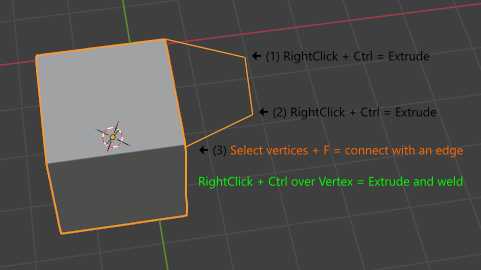
In this image you can see the process: vertices 1 and 2 are created by extruding the previous vertex.
In order to achieve step 3 and connect vertex 2 with the mesh, right now you need to select the two vertices and F (orange).
it would be more natural to complete the operation in the same way, using RightClick + control over the target vertex (green)
In any case, I think the whole thing of using right clicks to extrude edges is a hack. It would be much more convenient to have a specific tool, like Annotate, that would allow free form edge drawing with regular left clicks.
1 Comment
I think would be cool, not just for vertices, but for faces as well.