
Transformation offsets of Copy Rotation, Copy Location, Copy Scale constraints
Right now we have
Copy Rotation
,
Copy Location
and
Copy Scale
constraints that copy corresponding transforms from target bone/object. But there is no way of adding any offsets to copied transforms through bone transforms or constraints options (there is a workaround with empties that I'll describe later).
To simplify everything I'll describe only Copy Rotation behavior but Copy Location and Copy Scale constraints behavior is pretty much the same.
Default
Copy Rotation
constraint behavior
 Both rigs have an arm bone chain with different bone rolls of upper arm bone. If we simply copy rotation of that bone we'll end up with different arm orientations on bone's local Y axis (one can notice that - wrists are not aligned). And there is no way of fixing that.
Child Of
instead of
Copy Rotation
also will not help here because rest pose of both rigs is different.
Workaround with
Empties
 Here instead of
Copy Rotation
directly from target bone we:
-
Create an
Emptyand addCopy RotationandCopy Locationconstraints with bone from which we want to copy rotation as target; -
Create
Empty.001and make it child ofEmpty; -
Add
Copy Rotationconstraint to the bone to which we want to copy rotation withEmpty.001as target; -
Add all the rotation offsets you want to
Empty.001
That's the most common way of doing retargeting from one rig to another in Blender and used in such addons like UEtoRigify. As one can see that's a bit overcomplicated way of handling offsets and also overloads a scene with lot of empties.
There are few ways of how we could solve that to be more user friendly and to unlock more options to riggers and animators in use cases different from mocap retargeting:
Proposed №1:
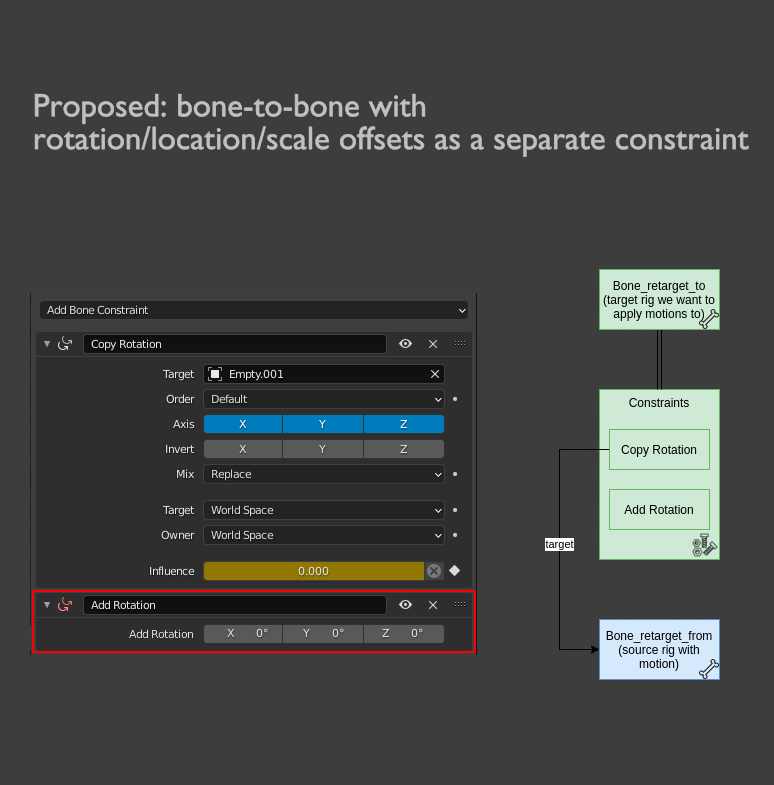
Add Rotation
constraint
 The best way IMO is to add additional constraint that adds
Rotation
,
Location
or
Scale
offset to bone/object. Basically this constraint will just add defined values to rotation, location or scale. That also will open a whole new world to riggers.
Proposed №2: Add
Offset
option to existing
Copy Rotation
,
Copy Location
,
Copy Scale
constraints
 We could also have additional option in
Copy Rotation
,
Copy Location
,
Copy Scale
constraints where one could define offsets of constraint.
Proposed №3:
Delta Transforms
 Empties and other objects have this option by default, one can specify delta transforms. These are the transforms added to original transforms. But there is no such feature for bones! So implementing bone delta transforms also is an option here. But that implementation has a limit of just one delta transform. With
Proposed №1: Add Rotation constraint
approach theoretically we could have as much transformation additions as we want.
Copy Rotation constraint example .blend file
4 Comments
An offset would be nice in the constraint; it would also be nice if by default it was created so that the bone didn't transform (or you could have a set offset button, or both)
As far as the 'add rotation' button, what would be really cool is to have a 'transform' constraint, with an option to be used for 3D transform - and then the gizmos in 3D could attempt to set it (there's some space calculations/reverse calculation involved depending on your constraint stack setup, so it might not be that nice in every situation, but it could be nice - also it would be a bit annoying as you could potentially have multiple transform keys in your animation)
I would also love this
Can't you use the Transformation constraint and offset rotation via its mapping? (It's a question, not a suggestion).
* @Stanislav Blinov * Yesterday I got a response from Juan Pablo Bouza about how to achieve proposed behavior with constraints. So yes, that's possible:
Transformationconstraint in local space after theCopy Constraintwhich is in world spaceTransformationMixtoAfter OriginalMap ToThis is already much better than having a lot of dummy empties! However requires one additional dummy bone. Also it's not very user friendly.
Example .blend file