
Recording/mixing audio
A possibility to record/mix audio would be great. It would be for example a good companion for video editing. No more switching between different programs.
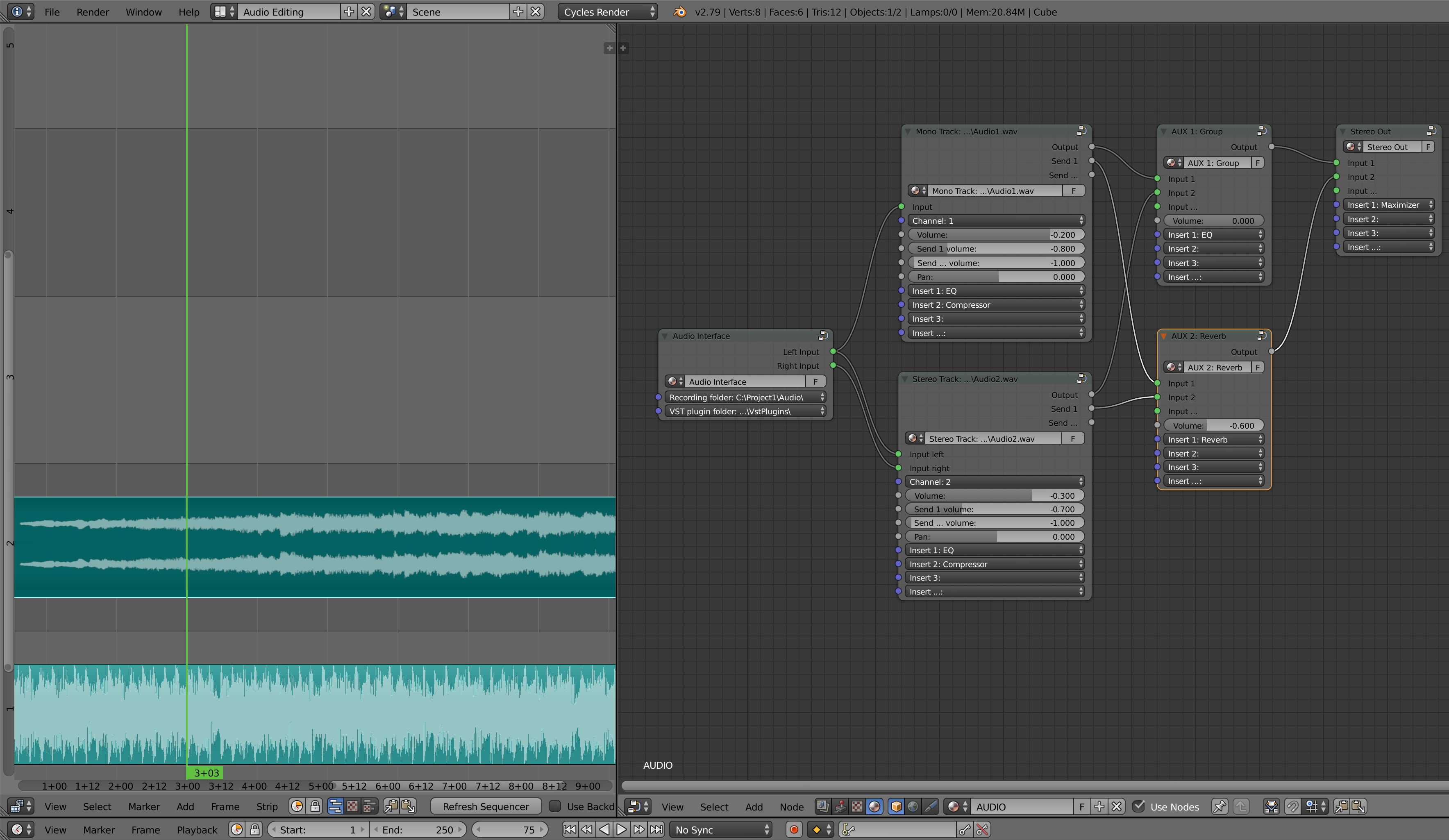
I came up with this idea of node based audio handling. Everything would be controlled with one node just like in the compositor.
RECORDING:
- In the node editor you would need to add "Audio Interface" node where you would find all of your available inputs. This could be also a good place to determine where the audio would be recorded.
- Then you would need to add one or more "Mono/Stereo Track" nodes and connect the inputs with the "Audio Interface" node the way you want the audio to be recorded. Here you could also give a name for your recording (for example Audio1.wav).
- In the video sequence edior you would need to select one or more tracks depending do you want to record just your microphone or for example a drum set with ten microphones on different tracks.
- Then you would need to choose a location (a frame number) where to start the recording.
- And finally you would just need to press a record button to start and stop the recording.
MIXING:
In the node editor on the "Mono/Stereo track" nodes there would be just the basic volume/pan controls and insert slots where you could load your VST plugins**. "Output" you could connect to "AUX" node or straight to "Stereo Out" node. "Send" outputs would be basically the same but it's good to separate them so you can quickly see what is the main output. Muting a node could be easy enough just by disconnecting the output and soloing could work with "Node Wrangler" ctrl+shift.
With "AUX" nodes you can create group nodes and effect nodes to simplify the mixing. They also reduce CPU usage*** because you don't have to use so many VST plugins. In my example I connected both audio nodes to "AUX 1" node where I was able to do the final EQ (Insert 1: EQ) for both of the audio nodes at the same time before connecting them to "Stereo Out" node. "AUX 2" I created to have a little bit of REVERB (Insert 1: Reverb) for both of the tracks.
"Stereo Out" node would be the final touch where you could for example make things louder as I did with the "Insert 1: Maximizer".
**There is a lot of great VST plugins available (even for free) so the support would be enough. No need to do any build in plugins. I put the VST plugin folder in the "Audio Interface" node but maybe "User Preferences" would the right place for that.
***Node freezing/baking could be also a good idea to reduce CPU useage if necessary.
In the future this could be transformed to something even more powerful with VST instruments, midi tracks, possibility to draw automation (for example in the graph editor) etc. but this would be a good start.
6 Comments
I think a nicely designed integration (audio track updates) with external audio editing software would make much more sense. It will be easier to implement than building a whole new editor.
Last night I came up with a similar idea of making Blender a complete audio workstation.
Being a musician with experience in music composition, recording, arrangement, mixing and mastering in professional studio DAWs (Digital Audio Workstations), I believe the user workflow and audio signal flow are conceptually identical to Blender's Compositor logic.
In other words, Blender's Compositor is already a COMPLETE and powerful DAW. We just need a python script to make its audio power accessible to end users.
There is just no single aspect of any professional DAW today that has not been covered by VST-Plugins. From songwriting to MIDI notation, from live MIDI sampling to recording, from live procedural synthesis to audio sampling, from live audio IOSync to DSP render, the list goes on... However, we've got a long list of other audio plugin formats (AU, AAX, RTA, TDM, DirectX, MFX, LADSPA, DSSI, LV2, etc.)
Musicians today need video to showcase their art. But It takes time and effort to learn and master a professional DAW. Same with professional Photo Editors, 3D Graphic Editors, VFX Compositors, 2D Compositors and Non-Linear Video Editors.
The road to mastery of the entire pipeline is a nightmare to freelancers.
Blender is doing a good job in putting the entire pipeline into a single app. Unluckily, as of the current version 2.82, although Blender's engine is by far capable of the most professional of audio works, there is no UI implementation that permits its end users to harness that power.
So, how can we make Blender's Audio power accessible to its users? We can begin with a VST-Plugins loader script that does three essential things:
That should do the job. Here's the logic:
Each "VA-Track" node you add in the compositor will be the final node of your audio signal chain and corresponds to an audio track in Blender's Video Editor. Your audio VST-Plugins will go into some categories and subcategories within the menu to keep things tidy (e.g. input, monitor, edit, arrange, mix, AB, mastering, etc.)
Within the Compositor, how you will input signal, process and route things into your VA-Tracks is up to your imagination.
... This may be an interesting holiday project for me though...
I'd be wiling to spend holidays on this too! Did you get anywhere with this idea?
This is a great idea, however, this is something that I think extends beyond the scope of blender. Audio recording/editing/mixing is a huge thing. There are giant programs out there for this (i.e. Ardour, FL Studio). Trying to integrate a DAW (Digital Audio Workstation) into blender is a huge task. I'm not knocking the idea as this is a great idea, but a completely dedicated development team would need to be put onto this task. I do like node based audio mixing as I use it with JACK.
In my personal opinion, this is beyond the scope of blender and is better left to dedicated software. Blender should have some basic audio editing features, but adding a DAW would make blender a lot more clunkier of a program.
This is an enormous feature request that basically asks for a whole new editor to be added to Blender. To really help with such a proposal, this should really have a lot more mock-ups that show how things should look and how users might work with a feature like this in Blender's interface.
@Jason van Gumster: I'm more than willing to help by giving examples and ideas if someone starts working on this. Basically those four different nodes and a possibility to choose a track where to record in VSE would be enough. I found a video where someone is experimenting with audionodes. Hopefully something like this could be upgraded to include my idea. youtube.com/watch