
Drag and drop support for grease pencil layers
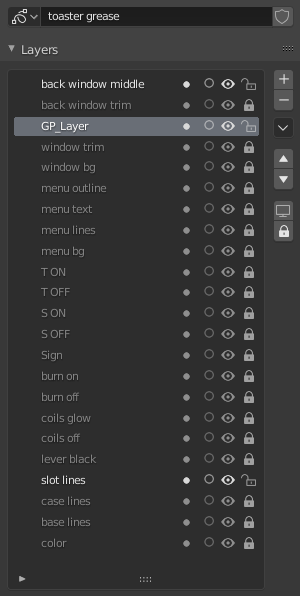
 v2.9 of Blender will introduce drag and drop for modifiers, which is great! Lately I've been working with grease pencil and felt that feature would be great for grease pencil layers. As you can see from this image this is an example from a project I'm working on, and it has quite a few layers for one grease pencil object. Trying to get a layer to the top or bottom of the stack takes forever. I propose a few things:
- Be able to drag and drop a single layer by clicking and dragging it around
- Be able to shift select multiple layers and drag them to reorder as a group
- If the up and down arrows are to be kept, maybe add shift + clicking the up or down arrow to send them to the very top or bottom of the stack like zbrush layers?
Anywhere Blender currently has stacks and the arrow buttons I'm sure there could be a benefit to adding drag and drop support, but especially the grease pencil layers as their ordering is not just for organization but also visibility ordering.
2 Comments
This is a good idea! I think drag and drop support should be added to all menus where it'd be useful in Blender. It's a huge time saver. As a bonus, it'd be cool to select multiple layers to drag and drop at one time.
* @BlenderSplendor * I agree. I can see this being useful in all list fields such as Materials, Vertex Groups, Vertex Colors, Shape Keys, Grease Pencil Layers, etc.