
Harden Normals option in Bevel Modifier.
If we set smooth shading to object with bevel modifier we get bad shading. Even with high number of segments base faces of a mesh have slightly bent vertex normals. Meshes like that look strange in rendering and cause big issues in baking.
I propose to add option to Bevel Modifier to harden normals based on mesh base faces.

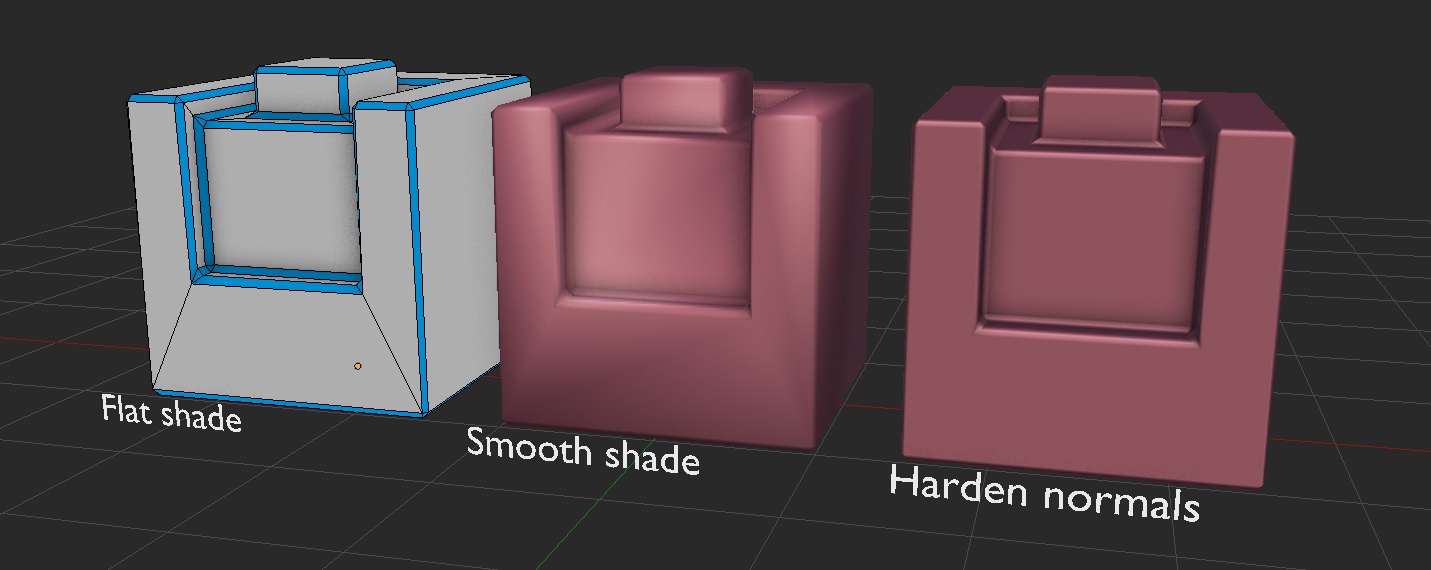
First object is result of bevel modifier with flat shading. Base geometry is gray, new geo added by bevel is blue. Object in the middle visualize how normals on this object are calculated right now (averaged). Mesh on right has exactly same geometry as previous objects but vertex normals of base faces (gray ones in leftmost object) was hardened using YAVNE addon. Resulting normals looks good and object geometry is lightweight. You can read more about vertex normals on YAVNE addon page linked below.
Blendfile: pasteall.org/blend/41616 YAVNE addon: github.com/fedackb/yavne
11 Comments
This indeed looks useful. As bevel developer, I will add this to my todo list.
Thanks again! :)
I think we have this now in 2.8 lol
You can achieve a similar result using the data transfer modifier (edge corner data), referencing the original object, but that workflow is a bit annoying.
If the bevel tool and modifier had an option which adds an extra segment (loop) to both sides of the bevel and make those flush/parallel to the adjacent face of the existing geometry (and maybe a certain fraction of the width of the other segments), the problem would go away. Be it with additional geometry.
Isn't this more or less what you get when you use the edge split modifier after the bevel modifier?
No. Edge split make is discontinuity in shading as it, as name suggests, split geometry in edges. In vertex normal editing approach object will be all smooth whole mesh.
Totally agree with this. It would be awesome to have the improved normal calculation method ()face weighted normals) available in Blender by default - preferably written in C for speed. It's a fairly simple algorithm, and this kind of technique to improve normals is used very frequently in real-time asset creation.
Here's a small bit of info on the technique: bytehazard.com/articles/vertnorm.html polycount.com/discussion/85809/face-weighted-normals
I think it could be great to have this as an option for default normal calculation OR an extra calculation type in the normal edit modifier. Putting on the bevel modifier as suggested might also work really well too.
I like this, if possible, hope this function can be one modifier, it's will very useful with the bevel modifier, good for hard surface.
can't you already solve it with autosmooth?
No. Autosmooth create hard edges (splits). We are talking about modifying vertex normals without splitting. Look at YAVNE addon page.