
Compression or quality ? Output properties consistency.
Edit : It's just a problem of documention. See comments below. Thanks !
In Output properties > Output, it seems like Compression and Quality are the same things but only inverted. Like : 10% compression = 90% quality
This is what's written in the manual .
Compression : Used to reduce the size of the image file. How this is done >may vary depending on the file format and settings used.
Quality : Similar to Compression but is used for JPEG based file >formats. The quality is a percentage, 0% being the maximum amount of compression and 100% is no compression.
Not in the manual :
- Compression is used by : PNG
- Quality is used by : JPG, JPG 2000, WebP, Avi JPG,
Why not replace "Compression" with "Quality" in the PNG output ?
I made a few mistakes at times when switching between JPG and PNG. Now I'm used to it, but it could help prevent errors for new users.
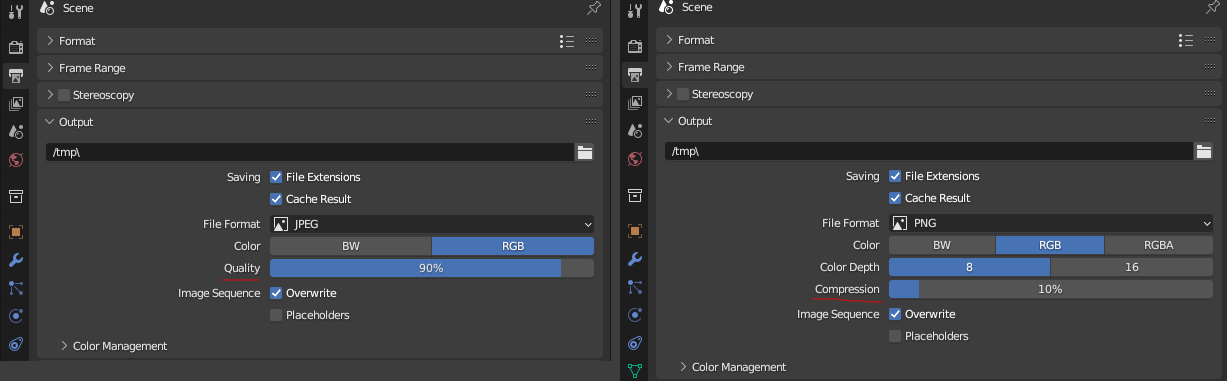
10 Comments
PNGs are the same quality no matter how much they are compressed, as the compression is lossless. Using quality would be incorrect and not make any sense. You are probably completely misunderstanding the terms. As the others say, that is what is used.
The quality of a JPEG is the more important aspect, and the size (->compression) is secondary. While it can get very small, people care more about when it starts to look too disgusting.
These terms fit, and I see no reason why Blender should obscure formats' settings. If anything, I'd even prefer it if we were allowed to skip the presets for h264 quality, give me the constant rate factor or a bitrate or something. OBS does!
Very interresting. Thanks !
I better understand now but the manual is not as clear as you : " The quality is a percentage, 0% being the maximum amount of compression and 100% is no compression. "
If I am not wrong, these are standard therms defined by the formats specifications from how they function internally. And therefore that's what most softwares show.
You could in theory change just the GUI so that we show the same setting everywhere, but that raises the question of whether it is worth "lying" to the user about what's happening, and confusing the users that actually know the format and as thorn mention: " how the rest of the image world discusses them ".
Thanks for the explanation. As i understand better now the difference, I will archive this post.
I better understand now but the manual told that Quality as equivalent to compression ( which is false as Vik explained ) : "Quality : Similar to Compression but is used for JPEG based file formats. The quality is a percentage, 0% being the maximum amount of compression and 100% is no compression." docs.blender.org/manual/en/3.4/files/media/image_formats.html
You don't need to copy paste your reply under each comment, one is enough x)
The terms used are accurate to what those features are, and match how the rest of the image world discusses them.
Thanks for the explanation. As i understand better now the difference, I will archive this post.
I better understand now but the manual told that Quality as equivalent to compression ( which is false as Vik explained ) : "Quality : Similar to Compression but is used for JPEG based file formats. The quality is a percentage, 0% being the maximum amount of compression and 100% is no compression." docs.blender.org/manual/en/3.4/files/media/image_formats.html