
Change the color picker type in the color picker itself instead of having to go into the user preferences
Blender has multiple types of color picker widgets that can be selected by going to user preferences and there into interface tab.
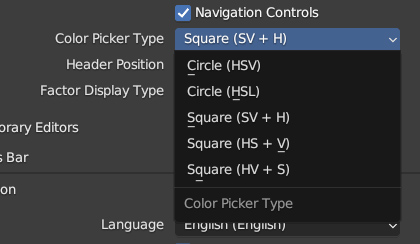
However, instead of having to jump into those settings constantly changing the color picker type to the preferred one, my suggestion is that the color picker widget in the future will be having tabs where you can select the type of color picker you prefer for the task you are working with.
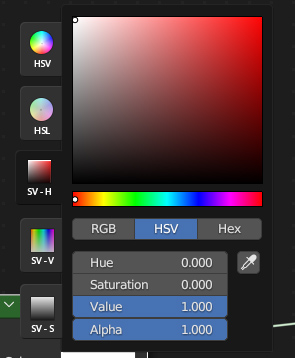
Note, this is a very fast mockup of to demonstrate what I was thinking how the tabs for example could be added.
5 Comments
Could be a tool button that pops up the Nav controls in the lower right of all panels, teach a person to fish rather than give them the fish. Also less clutter maybe?
I like the idea, although UI should be very minimal, this one adds way too much bloat, and Blender UI already is pretty messy and riddled with questionable design choices.
I agree, I also myself like minimal UI, but for sake of demostration I didn't take much time with this to simplify it.
A helpful [?] icon would suffice. I agree to disagree, burying everything in the name of aesthetic leads to more lost users. What we need is a standard Design Language, so users can look at a glance and know what something does and where to find it. A hamburger button on each popup to lead to help and other utils for the pop up would be such a thing.
I agree that this would be a good QOL improvement. However I would prefer that they first fix the saturation bug with the HSV color picker.