
Blender should have a project history window, similar to Photoshop
With the full implementation of Greasepencil into Blender and talks about improving undo history, the developers should consider adding a history window as either an editor type or a tab inside properties. Being able to see a timeline of your work would be very useful (both for 2D and/or 3D work), and seeing how Blender has become a 2D art program as well, taking a few pointers from other 2D art programs would be a welcome edition.
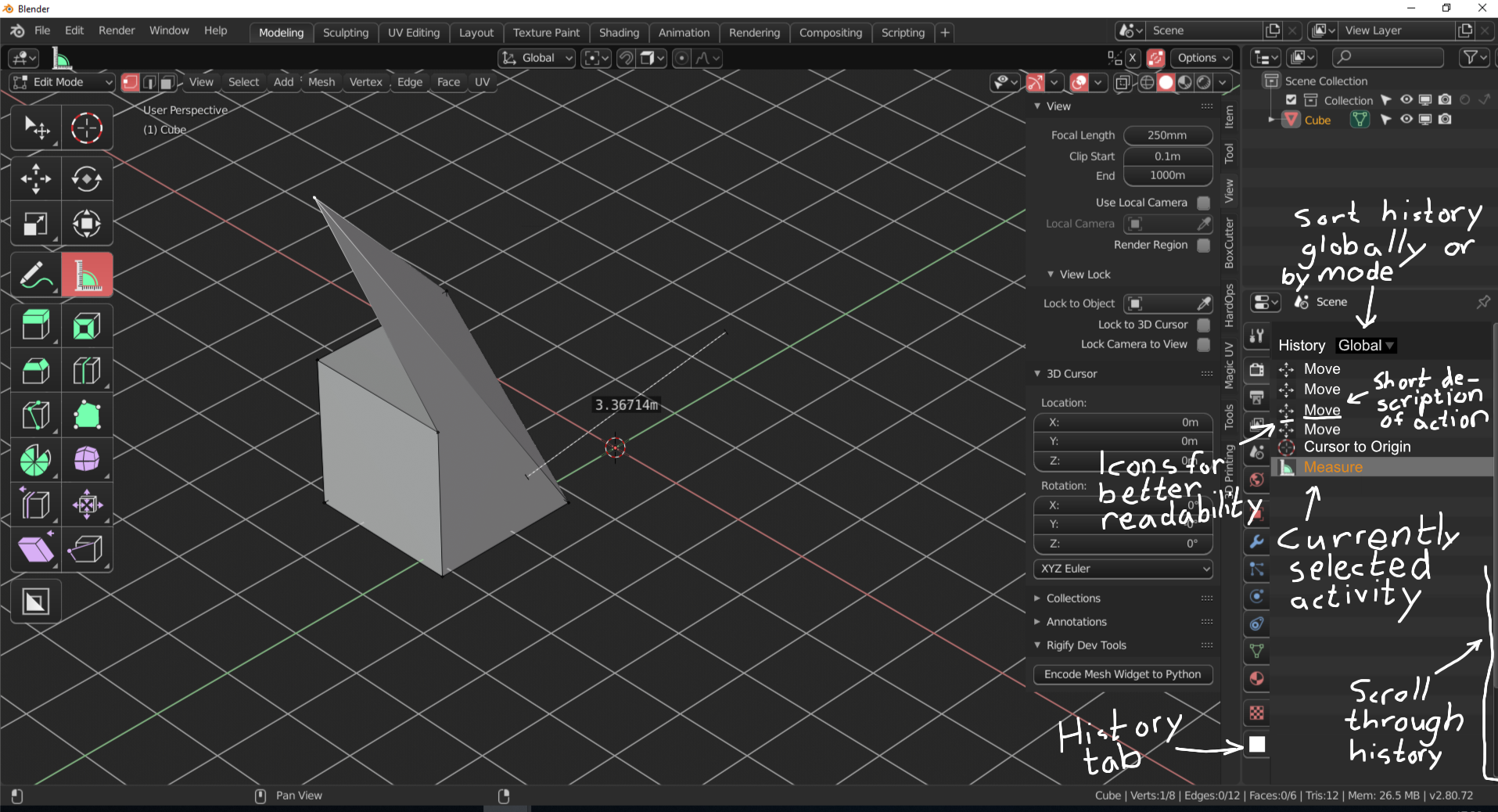
Edit: I took the liberty to make a quick sketch of a history tab inside the properties window, as well as descriptions of some basic features it could have. Based on the feedback from OscarNebeAbad, you would also be able to sort actions globally and by mode, so you can go back and undo what changes you did in only edit mode, or sculpt mode, and so on.
35 Comments
I think that undo list is necesary, but it works better globally, and maybe with filters/autofilters for workspaces or modes like Grease Pencil or Sculpt, with the look similar to Outliner without the brackets and other icons.
* @Oscar 'Nebe' Abad * This is a good point about context. Currently, Blender's undo history is a global stack. While it would likely require a substantial rewrite to the undo system, it might be interesting to think about how the undo stack could be organized by context and how that might get referenced in the interface.
* @Jason van Gumster * maybe some flags in the action related with tool / mode / workspace could just do all the stack filterable for that cases, you might think about remove random actions in the stack could crash, but its intended to undo actions by parts. Anyway I dont know if its better to separate or just global, but the undo list is useful
* @Jason van Gumster * {erase}
* @Jason van Gumster * {delete}
* @Oscar 'Nebe' Abad * I made this quick sketch of basic features for a history tab in the properties menu. I took into account your idea of sorting based on global or mode. You could either only show history for the current mode you're using (i.e. object mode or edit mode), or sort through every mode.
{attachment Undo_History_sketchpng}
* @Frozen Death Knight * this is a gimp like.
docs.blender.org/manual/en/latest/interface/undo_redo.html
* @Bo Shi * Thanks, I didn't know that menu existed actually.
However, I'd rather have it as a scrollable list (this menu creates rows instead, which can take a lot of space over time) that can be added as a window rather than a menu. You also can't have the menu open the entire time, making it less useful. Having it as a tab in the properties window or as an editor type would make it function more like the example given (Photoshop), which I think is a better design for an undo history feature.
* @Bo Shi * good info. but what i understood now. he want to see it in direct
* @Frozen Death Knight * I found a very simple solution I think see my comment in the main tread. and for more details you would have shift ctrl z...
* @zgorg2004 * {erased comment}
I would rather have it as its own window like outliner
{attachment undo_historyjpg} if you are not under 2.7 keys pref
Have the undo history back in 2.8 prefs keys:
create the new key in screen>screen global pressing add new
put in the balck box ed.undo_history then in the orange box press your key. at once if several like this (alt+ ctrl+ Z shortcut 2.79 and logic!) press enter save your prefs that's it
Where in Blender's interface would you put it? How would it differ from the Undo History that Blender already has?
* @Jason van Gumster * I could see it being put in the properties window as a tab (I gave two examples in my post, but we can go with that one for now). The idea is to make a more simplified version of the history tab with only symbols and names of each action you take (this is a separate feature from the current, much more detailed info window), and you will have a way to jump several steps back in your project history by scrolling through all your previous actions and click on where you want to go back to, instead of having to use undo for every step. It's to make it a bit more comprehensible to people coming from an image editing background.
Since a lot of the tools already have symbols, you could use them as well as the names of the tools in a list of actions taken the same way as in the image example. For instance, if you use the boolean tool 4 times in a row, you will see 4 of that symbol+the name of the tool in the history tab as well, and when you switch from edit mode to sculpt mode, they will also appear the same way in the history tab, and so on.
* @Frozen Death Knight * As Bo Shi pointed out, I'm not talking about the Info editor. I'm referring to the Undo History menu we already have. In the 2.7x keymap, it's bound to <kbd>Ctrl</kbd>+<kbd>Alt</kbd>+<kbd>Z</kbd>. So is this a different visualization of that same menu?
* @Jason van Gumster * Yeah, I just saw that. Good to know that exists. Thanks! :)
Still, I do think it could be improved over the current menu version by making it a part of the UI rather than a menu that disappears after using it. Making it a scrollable list rather than expanding rows would be preferrable over the current design (also, the list should update from top to bottom, with the latest action at the bottom, not at the top). It would also allow room to expand on the feature by introducing stuff like history branches later down the line if possible (a feature in Affinity Photo where history is saved in branches if you go back and start editing earlier in the timeline).
Edit: Yes, but as mentioned before, it also has the added benefit of not disappearing after clicking on the timeline like the menu.
* @Frozen Death Knight * in window up would be more logical
* @Jason van Gumster *I found a very simple solution I think see my comment in the main tread. and for more details you would have shift ctrl z...
* @zgorg2004 * "in window up would be more logical"
From my own background with image editing programs like Photoshop, Illustrator, etc., the undo history window starts from the top and builds down to the bottom. This is the case on Windows too, so I'd rather follow those standards.
* @Frozen Death Knight * ok I see what you mean now.
* @Jason van Gumster * why can't we erase messages in the comments? if an idea is obsolete. or I will just write obsolete? lol
* @zgorg2004 * Probably best to make a new post under the Meta tag for that.
* @Jason van Gumster * ok I do it thks
* @Jason van Gumster * ok done
An "Undo History" Editor Type would be much appreciated. I don't care about the context tabs. The undo system automatically switches between the different contexts globally when you undo, plus that'd be more work to implement than not having it. All you have to do is put the Undo History from that huge menu that no one uses into an Editor Type as a list, and voila.
{attachment undojpg} (n.b:why this is not possible to delete old message in the discussion? Undo ;))
there is no point in writing a complicated system of history even with "be able to sort actions globally and by mode" all this we can have automaticaly when blender will obtain this blenderartists.org/t/everything-nodes/1116074 I'm for programmers to work on everything nodes - their time is very expensive and their number is small.
* @Bo Shi * But Blender already has an undo history menu built in with most of the functionality, so how is this more complicated other than the time it takes to make it function as a tab as well as programming the GUI?
How will everything nodes solve the issue of having no undo history window as a part of the UI? I am unfamiliar with that type of system, so if you have an example you can give to help me understand would be appreciated.
* @Frozen Death Knight * In fairness to Bo Shi, a node-based system is non-destructive, so there's much less need for an Undo history since to reverse any change, all you have to do is disconnect a node.
That said, contrary to the name, everything nodes is not really everything . Modeling (without modifiers) and sculpting, for example, will likely remain in their current state. So a robust undo history could be helpful there. However, I wouldn't undersell the difficulty in designing and implementing a robust undo system with the kind of contextual control you're talking about. It's no picnic.
* @Jason van Gumster * Thanks for the info, I appreciate it. Sounds pretty interesting actually. Looking forward to seeing how that system will work out.
I would say that an undo history is useful for working with Greasepencil as well since that part of Blender has the most in common with 2D art software, but if this everything nodes system is as powerful as people say, I am willing to give it a shot. First time I would be working with 2D without having a traditional undo history window (will this affect layers too?).
* @Jason van Gumster * common - blender devs not have time to do undo system - simple fast - just fast - and all you want something else...
talking about undo there are a lot of lag with the undo of text and 3D View together. without very frequent save doing an addon you can loose big parts...
indeed could be improved to see it in direct