
Shader Node's "Input→RGB" node should be renamed to "Color"
Aside from the fact that I was using "Combine RGB" for input colors for years before I realized this existed, there are a few objective technical reasons for this.
To begin, it outputs a color, not a representation thereof. We could just as easily describe it with HSL, HSV, YCrCb, CMYK, or any other color space, as long as the transform is affine. So it isn't really RGB.
In truth, if I'm doing something funky with my color processing in my shader, the representation is actually valuable to me—you can represent the same color with HSL and RGB, but you can't expect the same values. It's a different color space with different meanings, and requires a transform to get there. So, if it were a simple uninterpreted RGB value, I would need to use a transform to go to HSL or HSV; but it's a color, and this is automated.
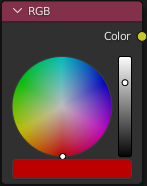
Second, the actual selector is a color wheel, which is more of an HSL feature than RGB. In fact, we can't even easily fill in RGB fields; it's just a mouse selection of the color. There aren't any text boxes for the various fields (nor, in my professional opinion, should there be for RGB).
I feel that as useful as the RGB node has been, it's wholly misnamed, and fewer people are likely discovering it because of that. Unless you're a web designer, "RGB" just isn't intuitive.
To expand, this could also be applied to "Mix RGB" under the "Color" heading; as it also simply takes a color as input, not a vector per se. The internal representation might, maybe, be RGBA but it is, intentionally and thankfully, not even exposed to us.
(I will admit that what makes me craziest is that "RGB" is one of the most arbitrary—there's no guarantee that one "R" is the same as another "R"—and most difficult-to-communicate systems ever used; and it's just not how I think as an artist. sRGB is marginally better. The only thing I can come up with that's worse is RGK.)
(Thanks for letting me rant.)
7 Comments
+1 for this, mostly because whenever I want to use this node I search for "color", and then get confused when it doesn't come up - somehow I never remember that its name is "RGB".
This is not accurate, there are textboxes when the bottom color box is clicked. For example, clicking the red box in the image you posted opens the textboxes.
It gets exposed in all controls across Blender whenever the color box is clicked. Otherwise it would be impossible to enter values manually.
Sounds like a good idea! Opened a patch for this: developer.blender.org/D14202
Though the proposal to change the name makes sense to me, I'm a bit confused by your justifications as to why rename this into "color".
It outputs a data stream made out of four float values, which are interpreted as the R G B A channels of a color (which makes the node's name wrong in the first place, it should be RGBA).
But sure! Why name this node RGB? Vector nodes are not named XYZ!
The way you set the color in the graphics interface has little to nothing to do with how the data that is actually transmitted in the software. Plus, you have a bunch of pickers available. docs.blender.org/manual/en/latest/interface/controls/templates/color_picker.html
If you click any color field input, you have the full color picker widget with the text input of your choice:
That's a first one for me. Any artits I know that works with textures knows very well what it is, especially when dealing with nodes which require to understand data seams very well if you want to do anything more than bitmap-to-principled-shader setup.
I guess the thought behind this naming is to just stay consistent with all the separate/combine nodes which, in this case, make more sense to mention the channels. But surely I don't see either why it's not better to just have "color node" and "mix color", the same way we have shaders, mix shader, ...
As part of my day-to-day job, I often have to communicate colors to other designers and developers; which ultimately requires everything out to the context the color is in. Realistically, describing a color as 0xADD8E6 isn't usually enough; it could be CSS "light blue" in one circumstance; a sea green if it's in sunlight late in the day, or pale white in the middle of the night.
(Needless to say this kind of consideration is also very important in the compositor.)
These values work on monitors, sure (to a limited extent); but many of us are planning to go beyond digital models and perhaps 3D print and paint these projects; or are designing something that will be built in the real world. The whole sRGB standard was created to have a medium where each rendering system could apply adjustments to produce the exact same profile on that device (though there have been a few mimics since).
Since if I'm talking about paint colors, RGB is relatively obscure in the context of distinctly not-RGB pigments (titanium white, ultramarine, cadmium yellow, etc.) which would be used in paints. So, when technical artists talk about color, we usually discuss it in forms of HSL (or until a couple decades ago maybe, HSV).
It's a question of convenience. Of course everyone knows what RGB means, but there are a whole slew of questions after that. Sure, 0xFFFF00 is yellow... but how yellow? We need context when we're dealing with pigments. HSL is more of a technical tool which I've learned to love; it's less about the pigment and more about the color itself; whereas RGB is mastered entirely by pigments which our monitors likely don't personally even use.
I'll grant you that to a programmer, these are just different spaces; but as more of an engineer I would love it if the world would just give Hue-Saturation-Lightness a chance.
That's just me though... the lonely, lonely, color nerd, laughing at his own jokes...
If you need help understanding a color (There are way too many color shades in the world), you could use rgbcolorcode.com , couldn't you? The site has all the information on colors in every format except for HSL
The RGB node isn't called RGBA because it does not have an alpha channel output socket. While you can select an alpha value there isn't a way to access the selection.
The color sockets in the shader editor just carry RGB values. That is why other nodes such as Vertex Color / Image texture / etc. have an alpha socket in addition to the color socket.