
Draw Influence at Constraints header
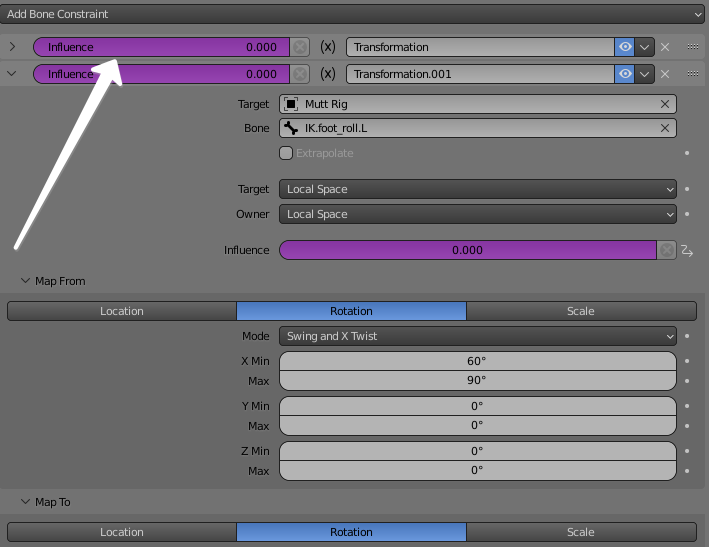
For those who work much with constraints and constraints' influences drivers it would be very helpful to have influence slider drawn in the header of the constraint, so that it'd give you quick access to this channel for both expanded and collapsed views.
2 Comments
While it does help for quick access, it also creates a bit of UI clutter and inconsistency.
I'd rather wish for a system to make them quickly accessible from the viewport's sidebar. After all, this is litterally THE area for quickaccess by design.
Riggers often manually create UI in the sidebar to give animators access to these sliders. Either by python scripting or by driving them from custom properties. But both systems are a bit clunky and heavy usage.
If Blender could just do it by itself, or give a system to easily assign a property display on the sidebar, that would make everyone's life better.
Presence of the constraints in the RigUI is practically nonexistent. The sliders from UI at 99% refer to Custom Properties, not Constraints. And th whole work with constraints is being done exactly in the Constraints tab, so I don't think the UI is a proper place for Constraints.
About clutter: this slider for the header can be done much more narrow and it still would be more helpfull than no slider at all