
Enhanced search in node editor
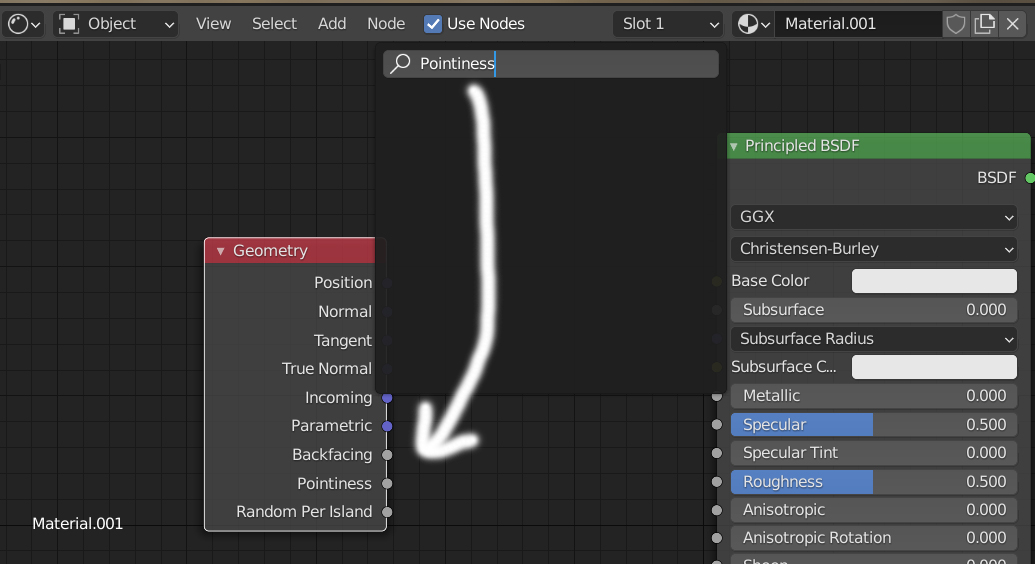
I would be very helpful, if you can not just search the node itself, but also the content of the node. For example: If you are searching for "pointiness", then you have to search for "Geometry", because "pointiness" ist a CONTENT of "Geometry". It would be nice, if you can just type "pointiness" and then vthe "Geometry" node will appear...
6 Comments
When you search for normal now - you got 2 nodes. With this feature you will got real mess instead. Maybe it need some primary/secondary results something? On top show straight nodes found results then separator line and then all others?
Upvoted! Another fantastic addition could be the following: imagine that you look for a Math or Vector Math operator, like Smooth Maximum. The search shows both Math and Vector Math as a result for the search. When you choose one of them, the Math/Vector Math node that is created already as "Smooth Maximum" as the selected option.
Yes, this is the most obvious use case I think, as Math and Vector Math nodes both have so many functions. Currently, it's totally unclear that you need to look for 'Math', as 'Add' is not shown in search results or the menu itself.
If I search for 'Add', the results should show 'Math: Add' and 'Vector Math: Add', and selecting them should create the node and set it directly to 'Add'.
+1 , same for math nodes operations
I agree with you, beginners can take some time to found nodes, like math nodes where the name of the node change depending on if it's multiply, divide, modulo etc...
I agree I'd love to see this in blender.