
Select on mouse Press NOT Release/Click
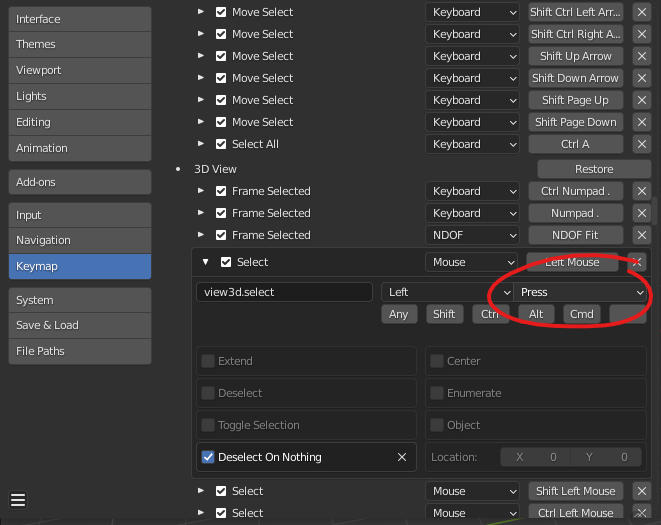
With default settings Blender selects when you release the mouse button on Click . This creates an unpleasant delay in selection that feels bad.
This can be corrected by creating a custom keymap, exporting it and doing a Search/Replace on the py file in Notepad, changing ALL instances of "type": 'LEFTMOUSE', "value": 'CLICK' to "type": 'LEFTMOUSE', "value": 'PRESS' . Save the result, Import, and now you can select on Press .
NOTE: except Select hotkeys in Outliner, Node Editor and Sequencer , which must be set back to Click , otherwise it creates a conflict that breaks group selection and click & drag input.
While users can make this correction themselves, it would be better if Blender selected on Press instead of Release/Click by default, with above exceptions.
This suggestion was originally inspired by this blog post (so I'm not the only one):
nothing-is-3d.com/article33/make-click-responsive-again
6 Comments
Does that interfere with the system that detects if you hold or not, for the cases where you are clicking a gizmo over an object, in which case it will consider you want to use the gizmo instead of selecting the object?
It does, and it would also interfer for box selection.
It doesn't interfere with box selection at all . I can use Box Select just fine after making these changes. Also it's really not very difficult to click somewhere other than on the gizmo to select. Literally everyone who uses other software does this without any issue. Simply change via hotkey to a selection tool when selecting and a transform tool when transforming.
The inconvenience of having to wait for click release to select (imo) is far greater than the negligible inconvenience of not being able to select through the gizmo like you would with right-click select.
I just tested it. And it does prevent to select through the gizmo.
I am not talking about box selecting, but literally just clicking. This is impossible with selection on key press. Which people do very often when, you know, selecting a single thing close to another.
Sure it's not difficult to click somewhere else when your object is bigger than the gizmo, or change to another gizmo that has a smaller hitbox. But it's extra steps all the time, and annoying.
Litterally everyone who uses other softwares, me included, have to do extra steps in order to be able to select something. How is that a better solution? And how "everyone does this" could be an argument? Everyone being forced to do wayarounds is not proof that wayarounds are a better solution, it actually underlines that there's an issue.
Is that so? I prefer to wait a few milliseconds for my selection to be done rather than having to spend my time extra-clicking each time I have to select one thing that's already under my cursor.
I am an animator, i often have to select things that are underneath the gizmo. And that's something I always HATED in Maya.
Especially when working in an area where controllers are close together (which is basically always the case), or when in a phase where every transform I need is a rotation, whose gizmo toolbox is huge and almost always has tons on controllers hidden behind.
And the best of the worse, is when both situations combine! Like Facial animation! Tiny little controllers pixels appart and no way to simply click them! Sometimes even with the translate gizmo and I have to deselect everything instead!
When working on Blender, I just click and it selects. Period. I can animate. On Maya, I spend a tenth of my time just pressing W click E click W click E click W click E click W click E click all the time.
And it gets even worse when working with a stylus because Maya somehow does not always think you clicked where you put your stylus down, which makes precision clicking non-existent and tool switching even more frequent.
Now maybe we could speak about solutions rather than trying to find out whose user case has priority.
Some might like to select on key press, some will prefer on key release. You will find many imperatives for both cases.
Maybe the issue here is that there's no way to quickly and easily change the click behavior.
Fair enough. I would still argue the default should be Press but perhaps there could be a preference option like on the default keymap in Preferences and on the Splash screen that lets you choose between select on Press or Click.
I talk about this issue, why it's a problem, and how to currently work around it in this custom keymap tutorial: youtu.be/Qfg4Y4rbsXs