
Shut All Panels By Default - for a Cleaner UI
The UI would be instantly cleaner - and more user-friendly - if ALL Panels were initially CLOSED by default.
BeginRant: One of the main contributions to the sheer amount of clutter in the UI is that most Panels are invariably open by default, with all their parameters on show, regardless of whether the options and parameters are relevant. There may have been a time, long long ago, when a mouse-click may have been saved here or there by having a Panel already open, but as more and more stuff has been added to Properties, for example, and then more and more stuff is added via the addons - Yeesh! Now, countless clicks and scrolling actions are needed to slash through the forest to find the Panel that is required. EndRant.
The User may close Panels to clear some screen estate and then save that state in the start up file. But this is somewhat tedious and long winded, even if all Panels were available, because their visibility is (rightly) context sensitive.
From the Python API documentation concerning Panels , 'bl_options' controls the initial state of a Panel, and is specified as:
"Type: enum set in {‘DEFAULT_CLOSED’, ‘HIDE_HEADER’}, default {‘DEFAULT_CLOSED’}"
Ignoring 'HIDE_HEADER' for now, that tells me that the default state of a Panel is intended to be CLOSED . However, if a Developer decides that a Panel should be closed on initial display, then this must be implemented by adding the line "bl_options = {'DEFAULT_CLOSED'}" to the python script that defines that Panel. That is, all Developers are assuming that Panels are OPEN by default - which they are!!
There are a few related postings around suggesting that this inconsistency may be a bug, but the reaction seems to be that it is not. e.g.
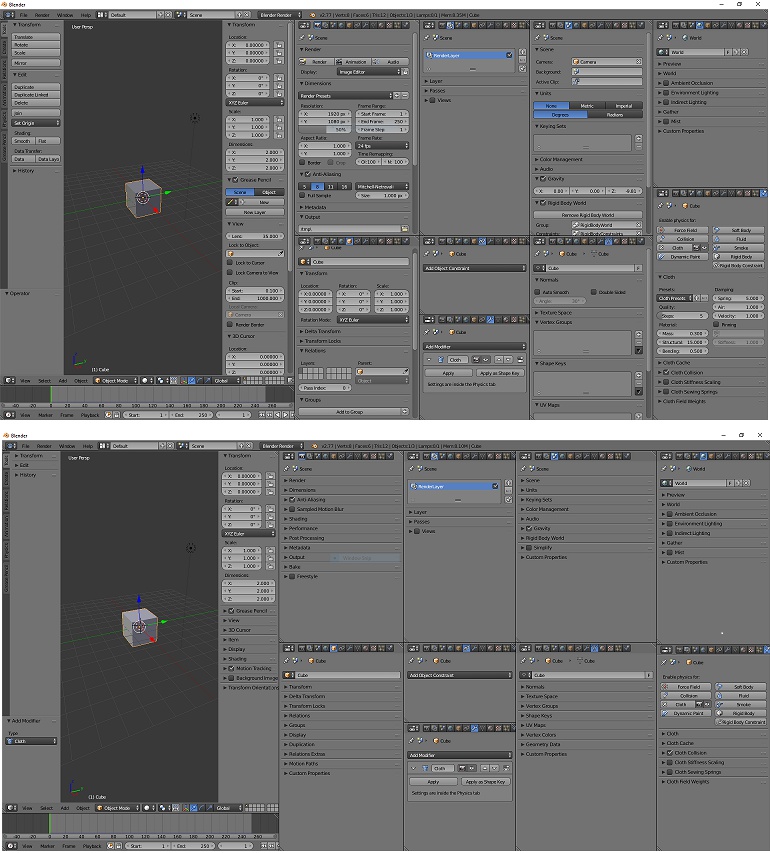
Whatever. Here's a simple, one-line edit to a key Python script that illustrates the difference. The attached screen-shot shows the default view with several Properties editor windows open (above) with the current, 'bomb-burst effect with Panels (mostly) OPEN , and (below) after the edit, with Panels mostly CLOSED .
The edit is to the Blender Python script file defining the Panel class: 'modules\ bpy_types.py ' (after line 713 in vsn 2.78 ):
class Panel(StructRNA, _GenericUI, metaclass=RNAMeta):
    bl_options = {'DEFAULT_CLOSED'}  # insert this line, remember 4 space indent
    __slots__ = ()
This affects all Python scripts that import 'bpy_types.Panel' when creating the various UI panels. Before voting, I suggest you carefully try the edit for yourself and relaunch Blender - it's easy to un-edit that line.
OK, so I'll back track a bit, maybe, because there are cases where it makes sense for a Panel to be OPEN by default, but then there should be a 'bl_option' option to explicitly make it so.
4 Comments
All panels closed are just black text lines on gray background to my eyes, they don't help "visually" to find the tools I need. I prefer to see some familiar slider/textbox etc to "orient" myself in the interface. A few tips: Open blender, open/close all the panels you need, Save startup file. This way you make your own standard compromise instead of using the devs one. Ctrl+A on a panel to close all <i>other</i> panels. To quickly close all panels, close the top one, and slide down while keeping mouse left button down
I'm coming back to this after a year, because I still feel it's an issue. Apart from being a bug (probably).
I have a fat Swiss Army kniife with sixteen tools all folded up. All you can see are steel edges - and that's a rather good thing. If you prefer to carry one of those around with all the tools opened up - that will probably ruin many pairs of jeans. And cost you much in the way of elastoplasts.
As said above, I use the Harry Potter edit as soon as I install a new version of Blender - to implement what it says in the specification! - so most of the time I don't get troubled by all those useless things that jab me in the eye.
I personally disagree with the premise that closed panels are more user friendly. That's like saying a closed toolbox is more user friendly. Closed panels reduce discoverability of features, hide functionality, and can measurably slow down a working artist.
My opinion doesn't matter much in the grand scheme of things, but I would not welcome such a change.
I like the equivalence between Panel and toolbox. And because toolboxes rarely come with manuals, you usually need to look inside a toolbox to see and handle the tools, to learn their purpose and usefulness, feel the weight, etc. So I do agree that visibility aids discoverability.
But I don't agree that it slows down a working artist (which I am not, BTW). A working user will have the right tools to hand from long-term habit, i.e. will have opened only those toolboxes/Panels that are relevant to that user's working practices), and the project in hand. I don't think you are advocating that all toolboxes in your artist's studio should be always open whether you are using them or not. Or maybe you are that kind of working artist. Not all Panels are OPEN by default - the developer has already compromised somewhere and chosen not to display all options. That means that many options are hidden anyway. There's no getting away without, at some time, referring to the manual/tutorials.
Here's the problem with too many toolboxes: if you have a small workbench (screen) and dozens of toolboxes, and more arriving from speciallist suppliers (addons), there is no room to have all toolboxes open at the same time. Your workspace becomes more cluttered as you open/close/move toolboxes. There's less room on the bench for the thing you are actually working on. The tools take over.
When I install a new version of Blender, I use the quick fix edit above in the way that Harry Potter might use a spell to organise an untidy classroom after a messy lesson, and put everything back in its place on the shelves. Perhaps it would be better as a spell (script) which is available in the 'User_Preferences.Interface' area.
And thanks, your opinion does matter. I respect the karma system here.