
Roughen surfaces sculpting brush
We already have the smooth brush, which is a very powerful tool, but sometimes I think we would need the exactly opposite. Something to clarify the details you already have on your object.
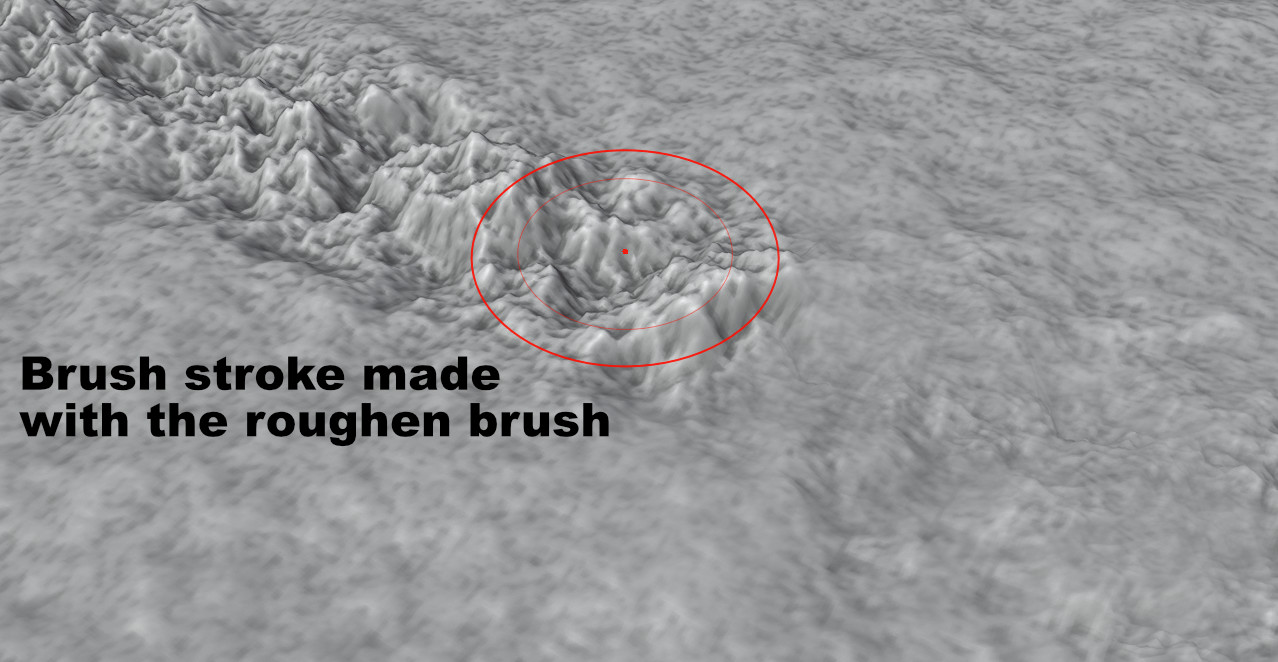
I would call this kind of brush to be "roughen brush". The way how it would work is that if there is any, even small details on the surface, the brush would scale and increase the roughness of those details. The image will show it better than what I can explain.
I made the image by scaling area of the object along z-axis with proportional editing tool.
4 Comments
Try the flatten brush with the Control key pressed to invert it.
* @Antonio Puentes * Oh, that was it. I will mark the proposal to be finished. Tho the feature is not very clearly marked in Blender UI.
I used to take time to try to invert smooth brush with ctrl, but had no effect. For some reason the flatten brush never came to my mind that it would do it properly.
I think the toolbar of brushes would do to have also the negative versions of them behind the hover menu. So hover over flatten brush a second and you would have an additional menu with roughen brush.
I think it would be intuitive, because it would help the users to understand what's possible.
What I'd like to see is a "texturize" brush, which would add texture to a flat surface, digging down in dark areas and pushing up in bright areas of the texture (which is a displacement map). It could perhaps support vector displacement, too. And of course, it would have a customizable mid-level, too.
Have you tried the Mesh Filter brush set to Noise on an area? (mask what you don't want roughedup)