
quick subdivide access
have a way to click a check box in preference panel > input>...
I changed my mouse scroll wheel and would like to speed up subdivide. hardly ever use more than 10 so this would be perfect.
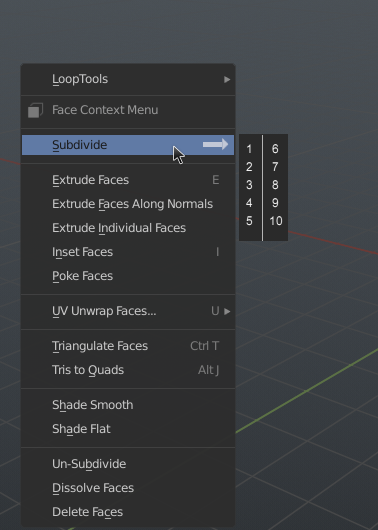
You would click hold and menu on right would appear. then Hover above one amount you want and on release it applies.
6 Comments
Are you aware of the shortcut Ctrl+<number> to add the subdivision modifier? For eample, create a cube and hit Ctrl+3 to add a subdivision modifier set at 3?
@joe: cool. though kind of hotkeyeded-out atm (precisely because i've yet to implement other similar kinds of features found elsewhere). It doesn't have to be in the default, having it as an addon would be nice and searching addons under a [workflow preference] tag.
* @joe * ctrl+number is for object mode. i'd like something along the lines of a mesh.subdivision_set keybinding
Ah - I see. Well, another suggestion would be to add the "Subdivide" command to your Quick Favorites menu, then once you've used it, hit Shift+R to subdivide again (but that's a hotkey again ;)
I'm not saying this is a bad idea - just giving options that you may or may not be aware of. I use the Quick Favorites menu ALL the time - very useful ... whereas at first, I thought, "What would I use THAT feature for?" ... now I know ;)
Useful. I like this proposal. Less reliance on keyboard shortcuts. Itis good to have options for different workflows.
I think holding the click will just hide the feature and make it impossible to find. Especially when holding your mouse button does not reveal any new menus anywhere else in blender.
I'd just display that menu always but the Subdivide text should also act as a button. That way you can quickly add a subdivision and use the tool menu to increase or decrease it (pls devs add mousescroll wheel support there) or just add the preferred number of subdivisions directly by using your menu. Best of both worlds. No need to remember a special trick to find it, also quicker to use and still allows the old ways of doing it.