
Making a FULLY FUNCTIONAL touch interface for Blender 2.8 on a tablet for use with a Stylus
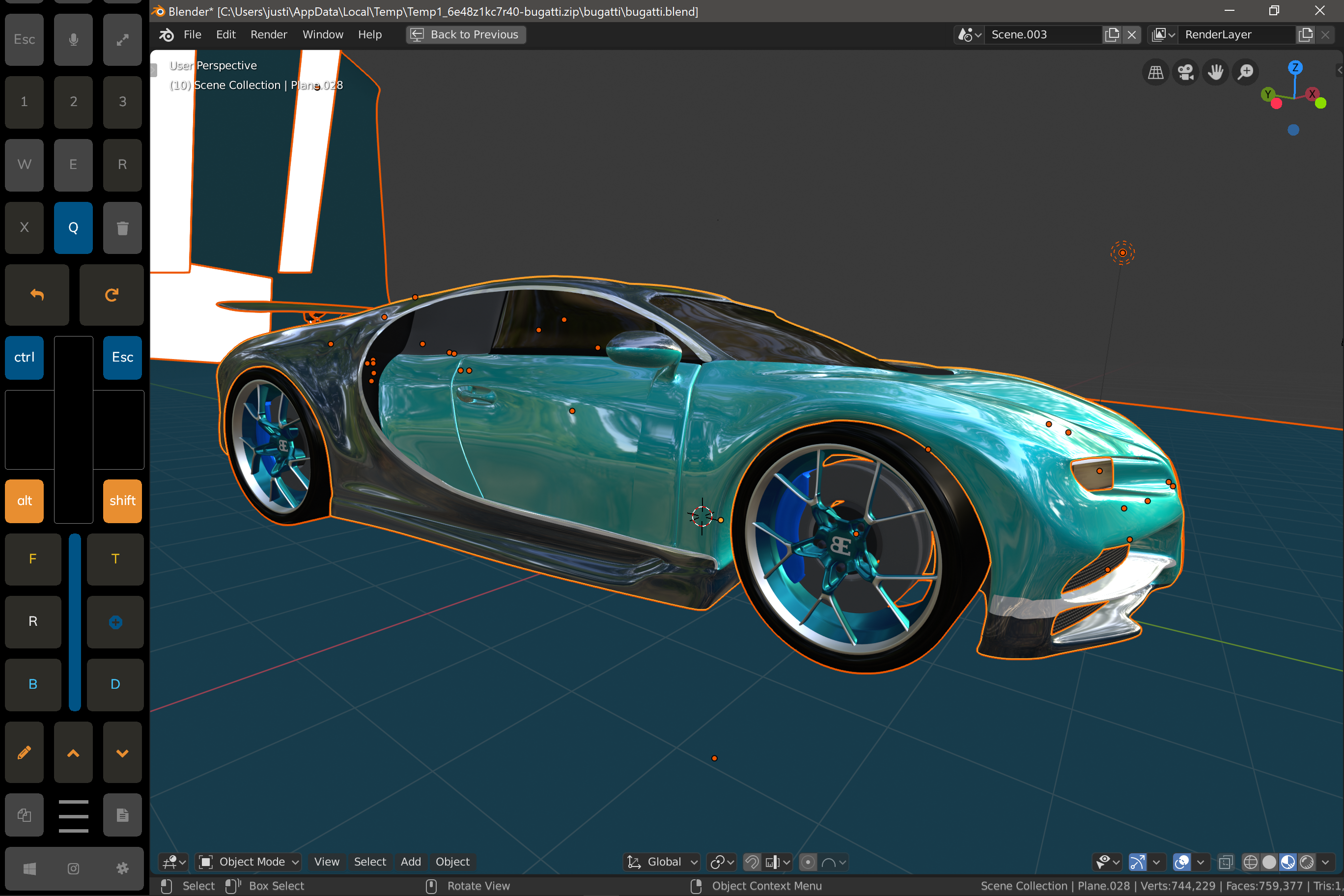
I'm trying to make Blender tablet ready. What settings or options do you need? I'd love your feedback!
I think the best way to make something great is to get the wisdom and expertise of people who are constantly doing what you want to do. I need help knowing what are the most needed keyboard shortcuts to add and getting this touch user interface to flow. I've been trying to get Zbrush setup for a long time and I've just realized that Blender is a much smarter direction to go and that we have a far greater chance of making something amazing with help from the Blender community.
I'm working on making a touch panel for Blender 2.8 to allow full scale blender projects to be done while sitting on the couch and using a windows 10 tablet like it was an ipad.
here is a short video for those who need to see what I've got working as of now. youtu.be/bD3OWqfKtHQ
works decently so far but I'd love to make the process perfect by getting the newer touch api from microsoft implemented into Blender.
Please vote this up if you'd like to see blender fully usable and enjoyable in tablet mode.
11 Comments
I'd love to see a tablet interface. I just bought a Surface Pro and, while I can sculpt OK in tablet mode, I need to use keyboard and mouse and the full interface to get the most out of it. On an airplane or cafe it'd be great to be able to sketch some ideas or work on a project in tablet mode without the need for the other accessories
* @Alec Fredericks * I totally agree. I think if we can make some progress here it would be a really nice addition to be able to work where ever you want.
Also a full multi touch support for the gestures (such as pinch to zoom) would be appreciated. Really interested in it!
any news guys?
Here is a set of basic ideas to start. devtalk.blender.org/t/2-8-touch-gestures/1591/3 I WOULD LOVE YOU TO WORK IN BLENDER.
I would love to have that feature for my surface book
looks definitely interesting.
I think the best way might be to create a custom editor type, either through addon or directly in source (if it gets accepted). Having it integrated tightly in Blender itself would be amazing, so I'm really curious where this project's going!
"works decently so far" Where can I find your scripts? Are they available anywhere (GitHub/GitLab?) for testing/contribution?
Yes! I'm no Blender expert, but this kind of a tool would be incredibly useful for me and I'm sure many others. I am using a surface pro 4 and would love to be able to use multi-touch combined with the pen. Also the little extra bits and pieces you can do in Blender with the scroll wheel on a mouse would be lovely to be able to do in this Tablet mode.
I have a little XP-Pen Star G430 : xp-pen.com/product/46.html drawing pad. I love it for sculpting and texture painting. Vertex modeling I still prefer to do with a mouse.