
Blender 2.8 Viewport Ruler (For User Preferences)
Hello Guys I would like to suggest for Blender to have a view port ruler. This would come handy for precise object moving or scaling.
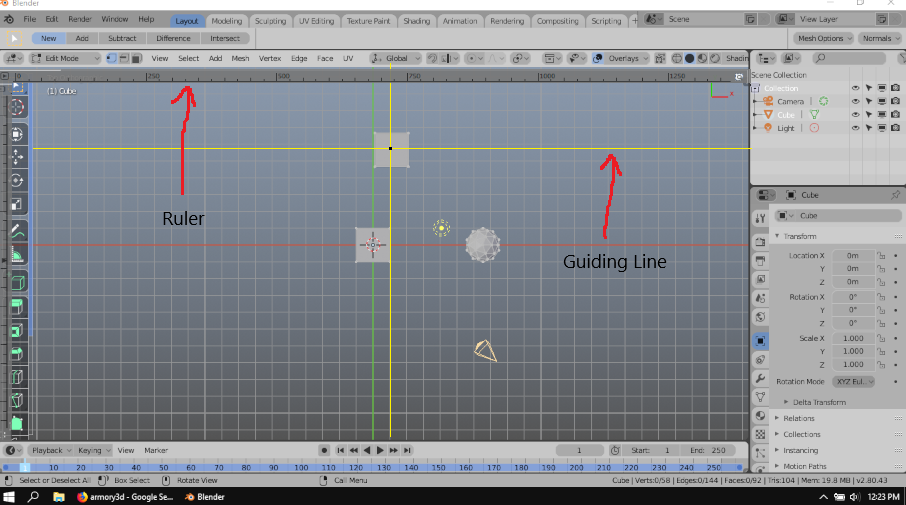
The picture in the sample is just a rough visualization of the tool. I would leave it to the developers. I have added a ruler from the top and left edges of the view port and also a helpful guiding line (yellow). The next feature would be to have it available in all views(Perspective/Orthographic,Top, Left, Right, Bottom), where there would be an option for it to working in local and global angles.
Lastly the guiding lines would have a snapping options menu where you can adjust its sensitivity, spacing and grid line snapping.
I am aware that blender already has a ruler/protractor tool but this one is different and I have used this kind of tool from other softwares and it would be nice for blender to have this option.
Thanks.
23 Comments
Not only for precise movement or architecture. I create landscapes, mountains, fields, etc. I constantly get lost with the scale because blender scales grid automatically behind. I'm not sure if my mountain is 1 meter tall or 1000 meter tall. This would help to instantly see at how far from you are modelling. Ortho only needed.
What happens to the guides and ruler when the user changes the view? I can maybe see the guides remaining, but what happens to the ruler? It won't make any sense from Perspective view... it'll barely make sense in Ortho when you're not looking down one of the main axes.
* @Jason van Gumster * I think you are right and it would also be a good idea to only have it oriented at the axis while moving the view either in perspective/Orthogonal.
Imagine a view where there are multiple objects and your camera(Not the object camera) is not totally aligned to either of the x,y, and z axis, the guiding lines would still remain in their orientation hence not affected by the way you are rotating/moving the view.
I hope you see what I mean. I don't know why you cant upload an additional image in the comment box, it would be nice. Maybe the developers have reasons for it.
* @johnpdelacruz26 * How would a user select and move those guides? Why not introduce a "line" type of Empty?
* @Jason van Gumster * Not too familiar with using the Empty but I can see that having this will make your work faster. You don't have to make a lot of adjustments because it automatically appear when you click an object.
Certain features where you can toggle it on/of and maybe grid line opacity adjustments would also be nice.
And you forgot to mention guides...
I see where you are going with this and I like it. I use the grid a lot in Architectural visualization. A set of guides to help things quickly line up would be great. Its not so much a 3D tool as a 2D one but there is a LOT of 2D stuff happening in Blender.
* @Eric * Thank's dude. I hope the developers or maybe the add-on creators can make this possible.
It would also be nice to hear some additional ideas from you guys.
An alternative to space consuming bars is to have dim numbers on the main axes of the grid say on a 5 units step.
* @Ge Ro * That's also a nice idea.
Sorry guys if my comments are all around, It keeps failing when I edit it and I dont know how to delete them.
* @johnpdelacruz26 * The white black lines represent the basic guiding lines and the white lines represent the indicator lines which snaps or appear when two outer edges of different objects meet at a certain view of an axis.
* @johnpdelacruz26 * Image
* @johnpdelacruz26 * [Image]( i.pinimg.com/originals/77/3e/c2/773ec224437389736fcf66ab825ae0ea.jpg
Image
* @johnpdelacruz26 * sample of guiding lines
* @johnpdelacruz26 * Image
I wanted to post another feature of this tool but the comment box does not have upload image button available.
What I wanted to add was another guiding line which snaps and turns into a lighter color when certain edges of a different objects align each other in the guiding line.
* @johnpdelacruz26 * you can add images, look for the
remove the !
* @ Lsscpp * Now I see. Thanks
* @-L0Lock- *Thanks.