
Implementing option to avoid deformation when using array+curve modifiers
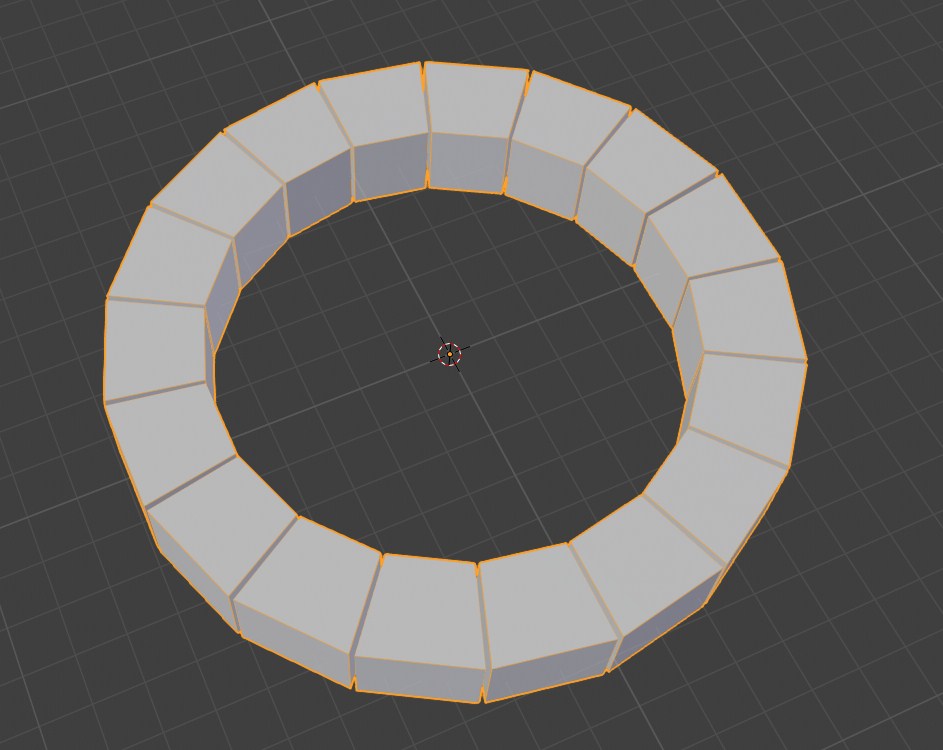
Using array with curve give the result you see in the thumbnail (main object it's a cube). There are workarounds to avoid that but they are somewhat convoluted, some addons help with that task but they are destructive (no modifiers=you can't retouch if you close the operator). The most common scenarios when you need to avoid deformation, are the one like ring chains and caterpillar tracks: rings and plates are hardsurface parts that shouldn't deform no matter what for the sake of realism.
Short story short, giving to users that option in the curve modifier to directly obtain this result, similar to objects that go along a path. No more workaround and guesswork, all into a non-destructive workflow. A basic feature but a feature that help a lot.
8 Comments
My preferred approach: array a single-vertex object and use the curve deform modifier on that. Then, take the actual object you want to array, make it a child of your single-vertex array, and use dupliverts (vertex instancing in the 2.80 interface) to make instances of your arrayed object.
Easy to set up, non-destructible, and quick to modify. Maybe a quick setup add-on could be made to do it in one or two steps, but I find that it's a great way to work.
* @Jason van Gumster * I confirm it works, in fact it's more easier to do it than reading how to do it. But still... I really feel it should be implemented directly in the curve modifier. New users should expect the result they want by array-ing objects not intended to be cables and such flexible things.
* @Jason van Gumster * I love dupli-verts/dupli-faces, but I can't figure out how to render just the duplis. Can you help or point me to some help? I'm embarressed that I don't know how to do it :D!
* @Josephbburg * Strange. For me, even though the instanced object is visible in the 3D Viewport while working, it's not visible when rendering. Is that not the case for you?
* @Jason van Gumster * Oops, you're right! I'm even more embarressed now! Haha! Now I remember, last time I tried Dupli-verts, the first thing I tried to do was a viewport render and what i couldn't figure out was how to hide the non-instanced object only. I mistakenly assumed it would do that in render, too. So the Python scriptI made that parented 100 objects to veertices and added a shrinkwrap constraint to each object- then added a visibility driver for each one was as horrible of a hack as it felt like at the time!
* @Jason van Gumster * I would actually like to have that option in curve modifier, I've just tried your method, I have no idea how I can control normals alignment of arrayed vertices, and that causes instanced object to not align to the spline with some predictable pattern, first segment seems ok, but after that instances make small turn witch every iteration. I'm sure I'm doing something silly, probably I'm not efficient enough with controling curves - My point is, it doesn't seem as easy to figure out workflow at all.
* @zerarafal * For more control of scale and orientation, I sometimes array a triangle and use duplifaces instead of dupliverts. Maybe that's helpful to you.
It seems that geometry-duplicating modifiers like the Array modifier will not see additional features until the implementation of Everything Nodes planned for 2.82. Definitely keep a tab on this idea and reignite interest if 2.82 omits such a feature.