
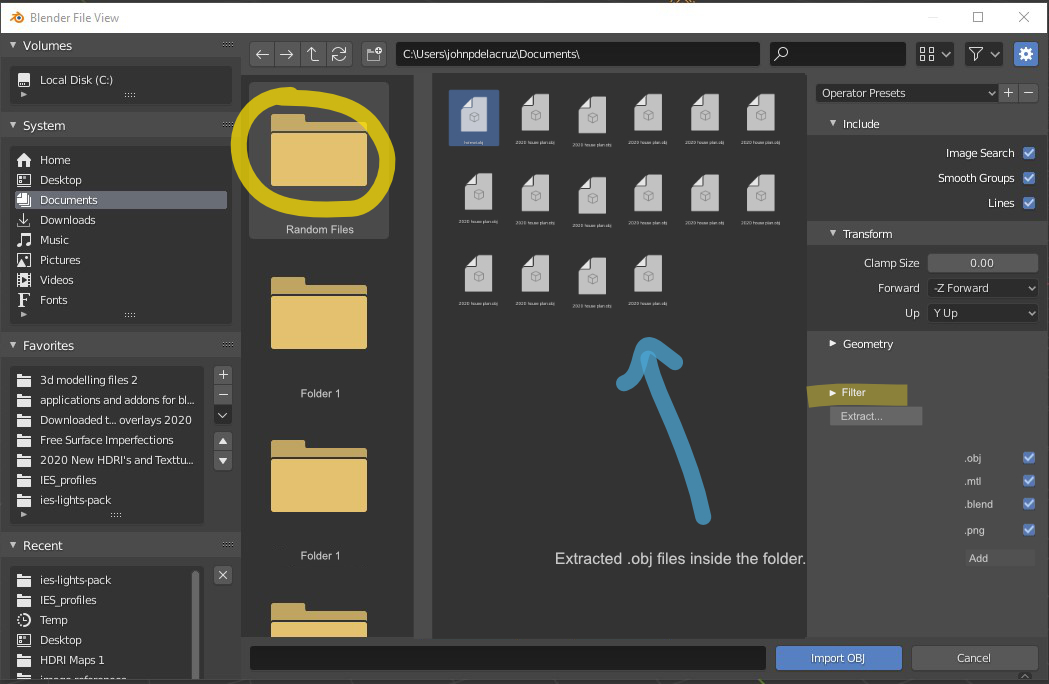
File extractor for blender asset manager.(extract .obj files by clicking only the Main Folder/no need to open subfolders)
Hello guys. I would like to propose a feature that would allow the user to extract objects by file type from a folder.
This would make browsing file types like .obj, .mtl, .blend, .png, more easier. No need to open subfolders.
Thanks.
3 Comments
would say a possible extraction software or code that can be used for video or content models and textures sort of like a preset version to basically work off of like editing the mesh or textures sort of like here's an inspired idea used from the mesh of the original then there's my version? if so im all for this idea id like an extractor that i can use for my video games that i own and have a right to be inspired or animate with is this what you are talking about?
No, not like this, it can be done easier in code.
If you want to import an .obj the file filter can be set to obj allready If you want to import a bitmap show only all bitmap types. When importing audio show wav / mp3 / ... for video mpg / avi
* @peter.boos * you are right but the main feature is not about filtering but extracting. Say there are multiple subfolders in one folder, the feauture would allow the user to extract all .objs in one clicl without gping through all the subfolders.