
Low resolution textures for a viewport
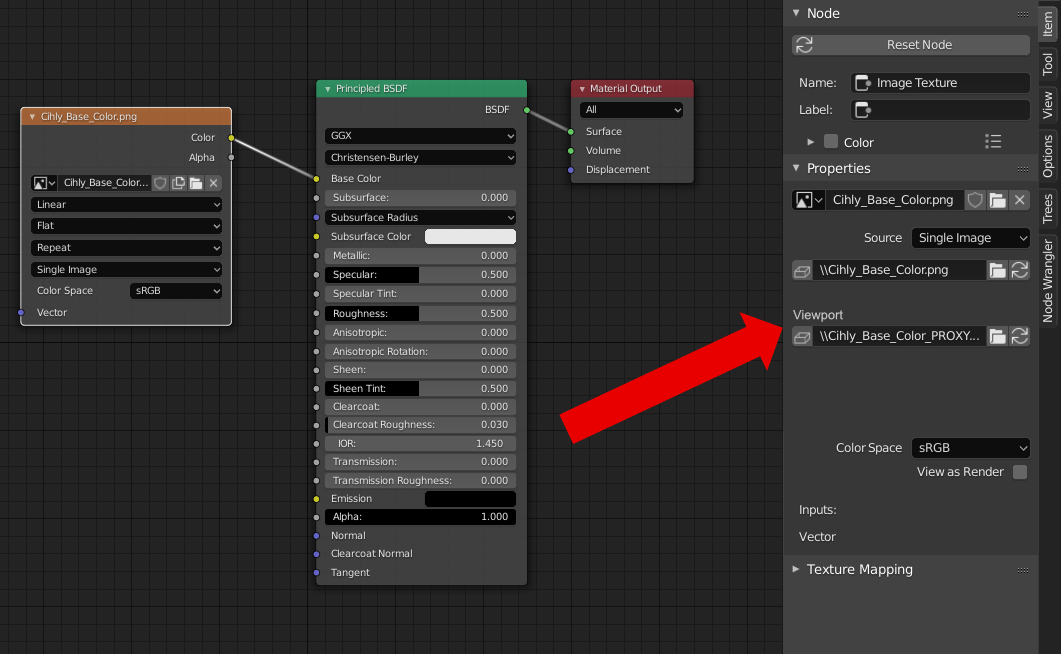
It would be great to have opportunity, use some textures for viewport (lower resolution as proxy) and another for render.
For example my current project use many 4K textures. Even I lowered max texture resolution in the option, it had no effect and still take more than 20GB in my RAM. I solved it with script for switch low/high textures. Some native implementation would be awesome. For example two different path in the Image input node.
7 Comments
Just in case you didn't know that, you can set a maximum texture size for the viewport in Blender's Preferences:
* @-L0Lock- * I know about this settings, but even you set lower resolution, it still take full size in your RAM. So if developer can change this behaviour, it solve my problem. I created thread about this: blender.stackexchange.com/questions/156802/too-much-ram-after-load-scene
I am also seeking for functions like this. It would be nice to have different maps loaded for viewport and render, but also to have an easier way of switching between resolutions, or even blender generating different resolution textures automatically...
Would you be willing to share your script?
* @ptrmaimik * It was simple python script like this:
where path is "D:\SomeTextures"
TUTORIAL PLS
What about the options in the Simplify panel in the render settings? Those only apply to Cycles viewport or render. Maybe it should be extended to eevee as well
this could be useful, but i think it's better like UE4 with mipmaps, or something like the VSE proxy