
Animating HSV values
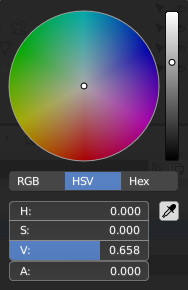
You can animate RGB values but cannot animate HSV values which is suboptimal, especially considering that HSV color picker is the default now. Empty right-click menu looks bad as well (not that it bothers me more than animating Hue by keyframing bunch of RGB values).
Is it a bug? Is it a feature? I read somewhere that Blender stores colors in HSV internally, not sure if that's true though.


5 Comments
I can at least offer a workaround for materials: Create a Combine HSV node. You can animate the values in the combine HSV node, and the color will be correct coming from the output.
For textures, you can create an HSV node, but that node is relative to the input (the same node exists in Cycles). The nodes in texture nodes could be more on par with those in Cycles/EEVEE- they're kind of inonsistent now.
Perhaps you could also put in a feature proposal to bring these node-systems into alignment. It needs to be done for Everything Nodes, anyway!
* @Josephbburg * Yeah, can't wait for Everything Nodes, it's gonna get outlandishly awesome. My problem is that I animate color strips in VSE because I render out elements of mograph videos in white color and later colorify them in VSE with whatever color I need. Cannot use any nodes with those. (Oh actually you gave me an idea, maybe I can render out a color animation into an image strip and use that instead of a plain color strip. I'll try that, should work no problem.)
There is another workaround for my situation as well but it got a bit too chthonic, didn't even try to use it:
Add drivers to the color, use 3 objects and their Y positions drive R, G and B. Positions of these three object are driven by Animation Nodes. Inside Animation Nodes there is another object and it's Y position is used as Hue and I use that Hue to construct a color and then deconstruct it back to RGB to drive positions of those 3 object that work as drivers for that original color I want to animate. Crazy stuff, makes my laptop sweat.
Screenshots to explain it better: i.imgur.com/AiJWaBo.png i.imgur.com/aY3CcJx.png
* @Dmitry * I was gonna dive into Python to give you a workaround like that, haha,. Glad you found something that will work.
It's a limitation. Color data is stored as RGB(A) and at this point, Blender can only animate the values that are actually stored. HSV values are an interpretation/view of the stored RGB values. So just like you can't currently animate the Dimensions fields in the 3D View, you can't animate HSV.
Would be nice to find a way to do it in the future, though.
So i dont know if this is still open but i fixed it by simply adding a HUE/Saturation Node to my Color and then adding a "Value" Slider to the Hue which can be animated.