
Shrinkwrap
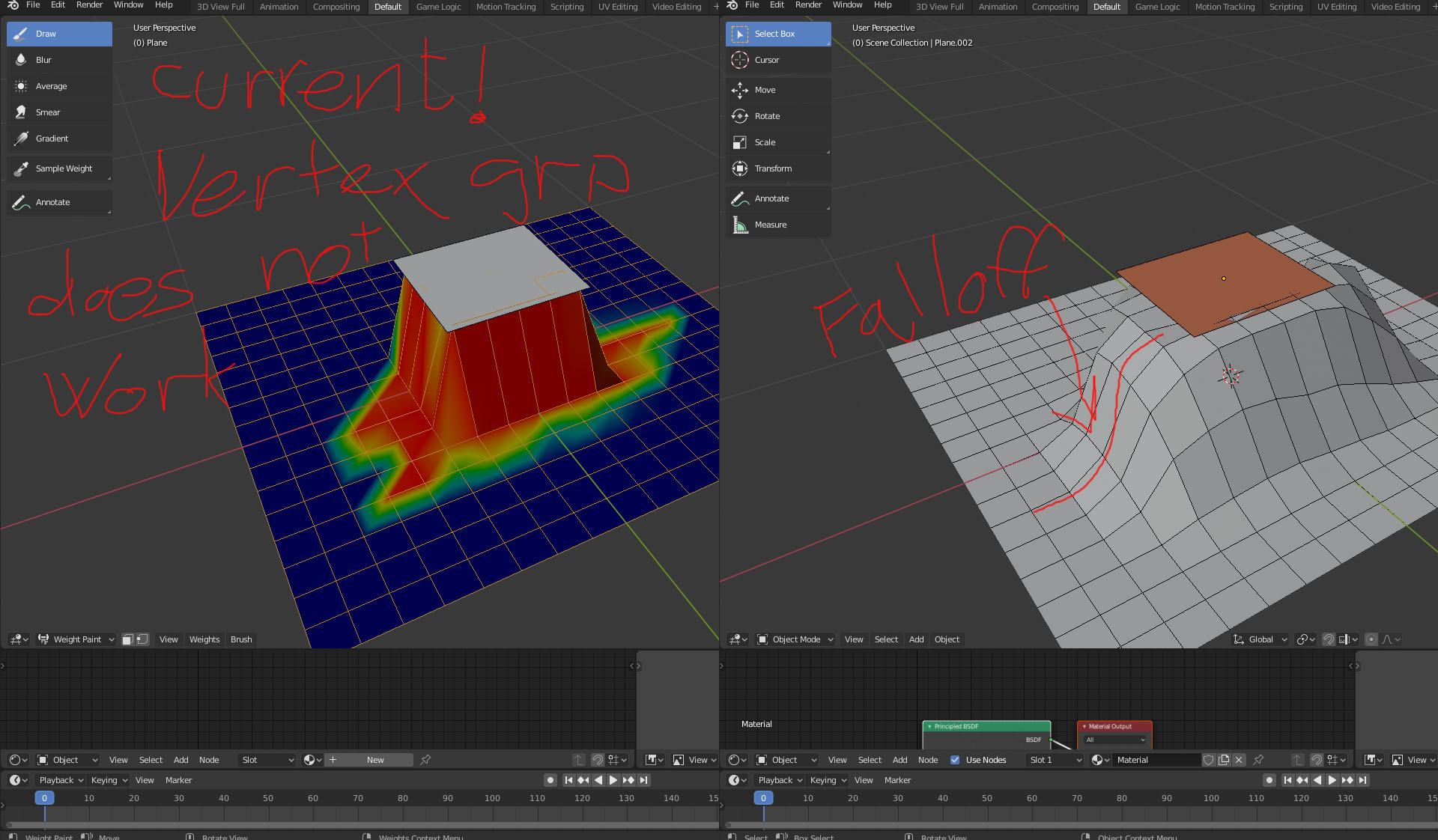
It would be cool to have a falloff on the shrinkwrap modifier. So you project pos/neg in z axis and adjust the falloff for how much of the geometry should be affected. Thats it really. How difficult would it be to implement? Like terrain conform script in 3ds max. And also if the shrinkwrap modifier could use a spline->extruded as target. one would'nt have to convert the spline to geometry to use the shrinkwrap.
11 Comments
Your vertex groups are correct, but shrinkwrap expect a surface to project onto. So make your plane as large as your painted area and it will work as expected.
* @stephen * yep, you are correct, but there are two things not great about this work around. One its a work around. And two you dont get a smooth gradient falloff. Lets say you have a landscape and want to conform it to a road going through it. You cant just make the road and shrinkrap the terrain to it, bcus it will undercut the roadmesh and make a jagged descent on the edge of the road. And with your suggestion, one makes the road wide enough to support roadsholders and then manually paint the falloff with vmap,this is tedious. Bcus as i said earlier vmap only limits influence.
* @rogerboe * Cutting road over terrain with clean border and smooth transition will require proper geometry to do so - vertices on borders. Tricky but it is not impossible.
https://youtu.be/UoneP16PaNcBy the way it is not a workaround but the way shrinkwrap does actually work.
* @stephen * youtube.com/watch
The thing is to implement a blend distance (as its called in terrain conform - a script for 3ds max from 2012) / falloff in the shrinkwrap modifier.
Your falloff concept is already possible using Vertex Groups.
You may want to modify your post and just focus on the "and also" bit. In general it's best if you only have one idea in your proposal.
* @Jason van Gumster * no its not, the vertexgrop solution only decreases the influenced area, not expanding it.
* @Craig Jones * seriously how are you failing to understand what im writing and showing. its an example to show that even if you paint outside the plane(upper) that is deforming the grid(lower) its not affecting the grid. thats why i painted outside. vertex group is not the solution to get what im asking in the rightmost image. A vertex group in shrinkwrap modifier only LIMITS influence, im asking for a falloff parameter that EXTENDS the influenced area.
* @rogerboe * Then the solution is to fix vertex groups to work with better influence.
* @Jason van Gumster * Are you kidding me. this is totally amazing. to be so misunderstood. NO the solution is not to fix vertex group. Forget vertex group. I didnt even mention it in my original post. It has nothing to do with vertex group. Ive been using 3d software since late 90s and blender since 2011. I was wondering what channel to post my proposal, and thought rightclick select was the place, i was wrong. Maybe someone else can chime in. i dont know how to be more presise than the image i posted. o my god.
* @rogerboe * We're thinking about solutions here. There exists a control mechanism there in the form of vertex groups. If it's fixed we can have the capabilities you're looking for. That's easier to develop and maintain than bolting on a new control mechanism that's only used in a single modifier.
The focus is on getting the same results in a way that fits the way Blender already works. Otherwise it's much less likely to happen.
Let's tone down the dramatic language and talk about how to get the control we want.
* @Jason van Gumster * yeah okay. The effect would be somewhat similar to propotional editing falloff in edit mode. Ive downloaded the blender sourcecode and built blender to have a look at the shrinkwrap modifier. Havent made much progress yet.