
Easier way to permanently delete unwanted materials/images/ect
To my knowledge, the only way to delete a material/image from your project. Is to go into the Blender File tab, in the outliner.
Though this is a messy process. Especially since i sometimes have accidentally made multiple materials with the same name.
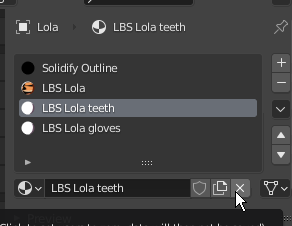
When clicking the X button
 One might instinctively think it deletes the resource. But it only unlinks it. That might be useful for some, but i'd personally prefer a new "unlink" button and have the x button actually delete it.
9 Comments
File -> clenup -> unused data blocks So you never delete needed datablocks and can still clean the unused ones.
once here {attachment removejpg}
and also with Orphan_data you already get a lot of unnecessary ballast away , {attachment deleteJPG}
And yes the X-button is unclear from the function but maybe you did not know the others
Whatever actually goes on, and the intended method. The confusion in these replies might be justification enough that it'd be due for a revision at some point. Not that i know what that'd be off the bat
IF you unlink your "material data block" from all "mesh material slots" from all meshes in your Blend file AND there is no fake user for that data block THEN it will be marked as orphan data.
All orphan data is removed from the ".blend" file when you save the file.
All orphan data is still available to you until you "purge" or reload the ".blend" file.
I like the way Blender currently works. I don't want to be deleting data blocks if other data blocks rely on it.
Instead of accidentally deleting something you thought you didn't need anymore, Blender will get rid of it when it is actually not used anymore.
<i> Example: IF 13 meshes rely on a material and you delete that material from 1 mesh THEN you just broke 12 meshes.</i>
This is how ALL data blocks in Blender work. Changing this would break consistency unless many other areas in Blender were also changed.
* @LilacDogoo *
Almost! It is cleaned up only when you OPEN the file of when you revert it (file > revert) or when you manually purge from the orphan data outliner.
A fair point!
Although it is a fool-proofing feature, and arguably goes in the way of some people:
Power user want the software to do what they want, that's why you see so many people asking the option to turn off the deletion confirmation popup.
That's why the feature to shift click the X button was added:
{attachment shift-click}
That way, the simple user don't do mistakes and the power user just have to read the tooltip to learn there's a way to do what he wants.
* @-L0Lock- *
I just ran a test and I was correct. From the File itself, it is gone.
To see the results, you do need to re-open (same as revert) or purge.
* @LilacDogoo * Well, no: Saving doesn't make the data disappear, and when you remove all user from a material, it might not appear in your material layers but the data is still in the file, just marked as orphan data. And as you noticed it, you need to save but also re-open the file, which means saving is not what makes the data gone, isn't it?
To be precise, saving doesn't do anything to orphan data. It only changes changed data in the scene (in this case, the materials assignation and its orphan state).
* @-L0Lock- * Try it.
Put a large image in your blender project and pack it.
Save your file. It will be big because your image is big.
Then delete the image from your scene so it becomes orphan data.
Save your file. It will be small because orphan data does not get saved to file unless you enabled "fake user" for that data block.
* @LilacDogoo * Writing external data inside a Blend file is yet another thing: it's an additional step and is handled differently of the data management from the scene.
The way data is stored in a scene is simple, it works like weblinks: a label, a path to whatever it refers to, and some eventual arguments. Whenever you use an image in Blender or any other DCC software, it stores only that, a shortcut to your picture file.
Packing data in a file is another step: it actually creates a full copy of your data in the file, then create a new shortcut that points to that copy and is treated in priority over the external path one.
In Blender, when you unlink a material using a packed data, it removes the full copy of the packed data, but the scene keeps the data - the shortcuts pointing to your data - intact until you trigger the final cleanup by manual purge or file revert. That's why you can still go in the orphan data graph and make it fake user: because it's not removed yet.