
Hide backfacing geometry in Edit Mode when Backface Culling is on
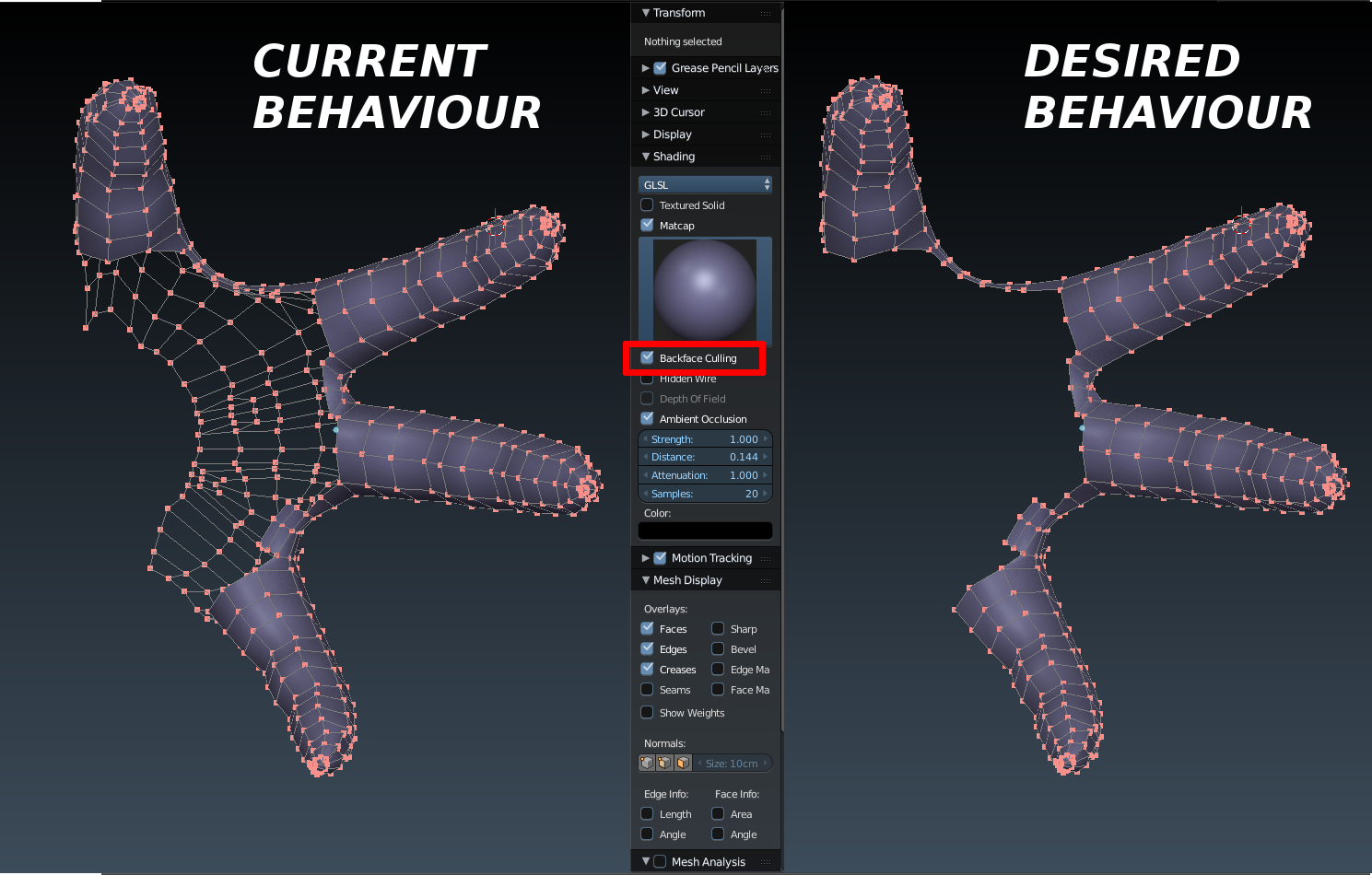
Accidently selecting vetices/faces/edges on the back of a model is a common problem especially in PBP-modeling. Of course you can select the backside and hide it, but if you need to orbit around very often, this is extremely uncomfortable. So in my opinion it should make sense to hide the backfacing geometry by checking the Backface Culling option.
This should be easy with faces, with edges and verts it could work by showing everything that is connected to a (partially) visible face and hide the rest.
Hope this makes sense. If not, sorry for that, my English is poor. I've tried my best.
16 Comments
this post is very old, but backface culling still not available in Edit Mode...would be very usefull to add this feature in 2.8...
Here's your late christmas gift from me : Backface Hiding add-on.
lol, right after publishing it on blenderartists, someone shows up with a real-time version I didn't know about : blenderartists.org/forum/showthread.php
@Caetano Veyssières: I made several updates since the first version. I encourage to try it again and read the readme.md
I'm currently making a cheap add-on that would hide the backfacing geometry by using an "update" button. So, it's not real-time hiding but I don't think python could handle it anyway.
I've got it working. I'm just trying to make it a bit more consistent and efficient before giving it away.
Can you envision an scenario where the current behavior would be desirable? Perhaps it might be better to keep backfacing geometry visible, but muted and unselectable when backface culling is enabled.
Good objection, Fweeb. I thought about that. But there's one situation where invisible backfacing geometry would become very handy:
When you're doing a retopo, most edges will be sucked under the surface of the underlying mesh and it's sometimes hard to tell where the faces are. If you X-Ray the retopo mesh, it's clearly visible, but obviously the backfacing stuff blocks the view.
But you're right, sometimes it's surely good to see all, maybe there is a way to get both.
Perhaps with the updated viewport, there could be a slider where the user can control how muted those culled backfacing vertices are.
@: Also, note that Retopoflow implements a backface occlusion. If you haven't tried it, I strongly recommend it, as its development is quite active and it seems prone to become one of the best retopology tools out there.
Hi :) Solution
blenderartists.org/t/edit-mode-retopology-hide-backface/1382294/13
I need that improvement too.
In the gif below I show how it works now, and how it could work compared to another 3d software.
drive.google.com/file/d/17E28pOD6IlYo6Vmpq8OsIBZQaEOMzbAJ/view
did you try my add-on? works with flipped normals too. Also, are you on blender.chat ? Just to tell you about a few things
@Caetano Veyssières: Hi! Yeah. Joined just now.
The question is : should we then add a Backface Culling check-box in the Mesh Display Panel (since it's not a matter of Shading) or should we have both the shading part and the mesh components part joined in one check-box? Is there any interest in having both options separated ?
Totally. In the mean time use Zacharias Reinhardt's trick : turn around the model by 90 degrees, hit Alt+B and draw a rectangle around the gometry you want to keep visible. Hit Alt+B again to uncrop. Much quicker than selecting geometry and hitting H.