
Zoom in Graph editor centered on selection
In Graph Editor, some animators would very much like to have the zoom-in centered on selection.
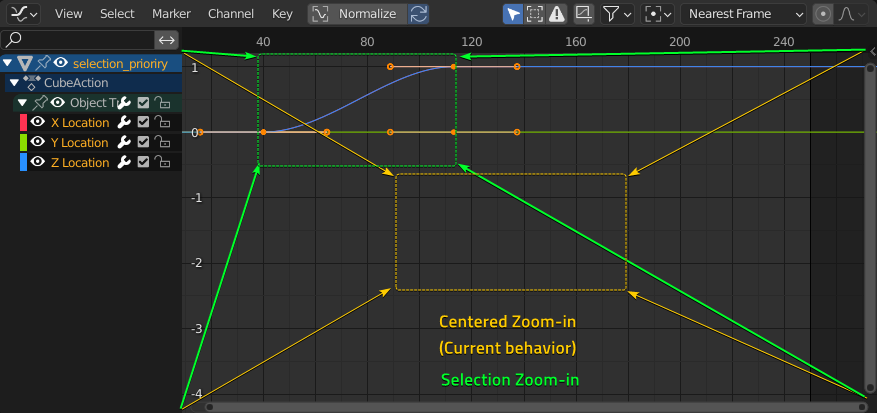
The yellow rectangle is the zoomed area with default behavior (view center)
The green rectangle would be the zoomed area with
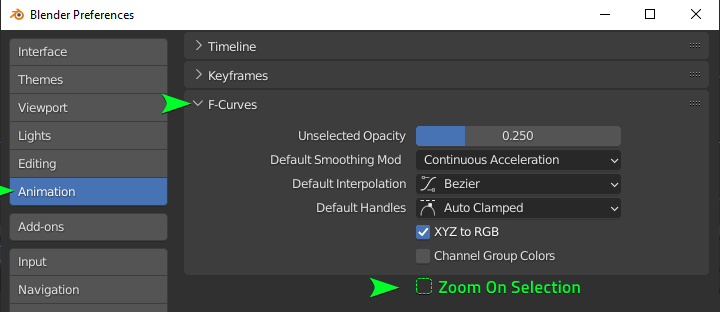
Zoom On Selection
enabled.
(just scrolling, without any manual pan)
This could be an option in
Preferences > animation > F-curves
Probably disabled by default for long time user's sake.
Side note: When searching for duplicates in RCS I found a similar idea for the 3D viewport
2 Comments
Funny, I was thinking about making proposals on how the graph centers around selection.
Strictly speaking, you can already center the Graph onto what you selected using either the View menu → Frame Selected or Numpad . :
The result is pretty efficient, though I wish there was a margin option in the user preferences, sometimes it can feel a bit claustrophobic when it fits everything too tight:
And when you "frame selected" while nothing is selected, it will frame around the available frame range, which I find pretty neat: it avoids having to make two distinct functions and makes one key do several things depending on reasonable contexts.
But my only grief about this is, when nothing is selected, it only centers the frame axes correctly, but leaves a huge gap above and bellow the keyframes:
Funnily enough, I have an idea similar to this, where zooming in and out zooms in and out around the current frame.