
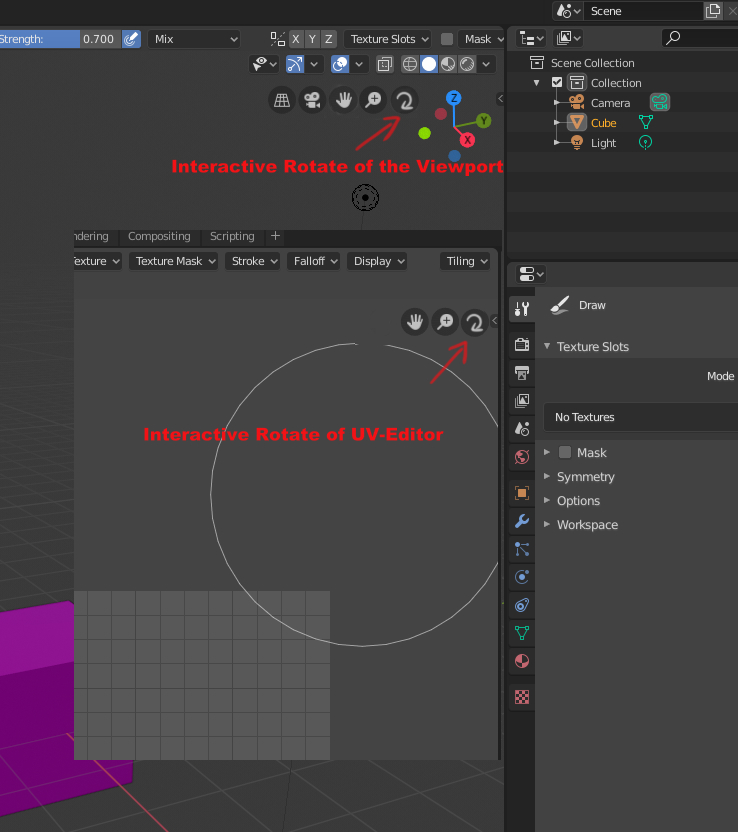
Interactive Rotate of the Viewport
I would like to see a Rotate-Function for the 3D-Viewport and also the UV-Image-Editor.
There is a funtion for "Zoom" and "Pan"
"Rotate" is missing.
I am currently playing around with grease pencil and missing the feature that every other drawing software has: Viewport rotate.
- You can hack some funtionality to rotate the camera with selecting it and pressing R, but that does changes the camera rotation-information. And is tedious.
- The viewport-Roll-function, which you can key-bind with the "view3d.view_roll" Option in the preferences does not work when you are looking through a camera in the scene. Same with the Hotkeys "Shift+Numpad4" / "Shift+Numpad6" (And it would also change the rotation-information of a scene camera, which you setup)
So... What I would like to see is a viewport-widget for rotating the viewport-canvas, NOT the camera. This is also a missing feature in the UV-Image-Editor. And would be also very welcome. (An option to keybind this functionality would be nice to have)
EDIT: After some thinking I want to define the proposal more:
I would like to see a rotate-wdget Icon in the viewport and also a possibility to keybind that function. The widget-icon would have 2 modes of operation, similar to the "Pan" and "Zoom", depending on weather you are looking through a scene camera (Numpad0) or looking through a generic viewport camera.
- The function of the widget, when you are looking through a scene-camera (Numpad0):
The widget rotates the camera-canvas and DOES NOT change any parameter of the camera itself) The camera would stay locked, only the canvas would rotate. It would be a transformation of the viewport canvas, similar to the existing "Pan" and "Zoom", just with rotation.
- The function of the widget, when you are NOT looking through a scene-camera would be "view3d.view_roll" as you allready can keybind in the preferences. (Ex: Shift+Alt+ Middlemouse-ClickDrag)
Those 2 modes of operation for a new "Rotation"-Widget would also be similar to the current implementation of the "Zoom" and "Pan"-Widget-Icons. Those widgets also have 2 modes of operation, depending on wether you are looking through a locked scene-camera or navigating around in a generic viewport camera.
10 Comments
This might be useful for you: 2D Rotation on the Viewport
* @Flareless Roam * Thanks, but it does not solve the problem.
When you are inside a camera (Numpad0) you are kicked out of the view into a generic viewport camera. And then it is behaving like normal "view3d.view_roll"
Why an addon, when you just need to change "view3d.view_roll"-keybind with the normal 2.8 installation for this behavior?
Also, after you done the "Alt+Middlemouse-thing" and you try to use the other widgets or hotkeys for "Pan" or "Zoom", it is actually changeing the position of the camera, what I do not want in 2D Drawing. It is cool with the normal "view3d.view_roll", that would also be the function I would like to see when you are outside a scene-camera view.
But when I am looking through a camera, which I setup and do not wish to change in position or focal length, I want an option to have a Rotation of the canvas on top of the camera matrix-transformation. The "Pan" and "Zoom"-Widgets do exactly that. They transform the display of the canvas not the camera (When you are looking through the camera with Numnpad0)
Sorry, I think I am missing something in the addon.
I understand. You want to rotate the view on the Z axis, or the W of the screen. Meaning... rotate the canvas, or roll the camera clockwise or counterclockwise. Indeed this is not possible with the widgets.
* @Andres Stephens - Trinumedia * It would NOT be a Z-Axis-Rotation of the selected camera, or the viewport-camera. I would like to see a 2D-Rotate of the viewport-canvas.
Similar to the existing Widgets for "Pan" and "Zoom" (When looking through a camera) The existing widgets for Zoom and Pan do not change the camera focal-length, position or zoom. The existing widgets are panning and zooming only the 2-D representation of the viewport.
So a "rotate"-widgets would do it also only in the "2D"-Representation of the camera-canvas. (When you look through the camera)
(Same for UV-Image-Editor)
* @martin.editing * Well okay, when you are not looking through a camera the position DO change with the widgets... So I guess outside of a scence-camera (not looking through it) it would be a Z-Axis-Rotate like the "view3d.view_roll"-Function that you can key-bind via preferences.
You use the colored axis widget to rotate.
* @Steve * That only orbits around in 3D. It does not rotate the viewing canvas. And even if it would rotate with some key-press combination, it moves your view out of the selected camera into a viewport camera.
Try yourself:
Comparing to the existing "Pan" and "Zoom"-Widgets, when you are inside your camera: You stay inside the camera view. Only the canvas of the view is panned or zoomed around.
I would like to see a rotate-canvas widget that lets you stay inside your camera, the position, the orientation of the camera stays the same, only the canvas rotates around.
When you are outside the camera, this widget could function like "view3d.view_roll"
Similar to the other two existing "Pan" and "Zoom"-Widgets have 2 option of functioning, depending on weather you are looking through a selected camera or just through a generic "viewport"-camera.
Uv editor also should include w space as 3ds max has - for baking priority and 3d-uv uv-3d convertations...
* @impacman * I do not understand, what you mean with w-space. (Never used 3d-Max)
I only want to be able to rotate the canvas, so you can draw on it more flexible :) Like:
(Which is now not horizontal in the image, because you have drawn on a rotated image/canvas)
* @martin.editing * UVW (for 2d) and XYZ (for 3D)