
Make important confirmation prompts impossible to miss
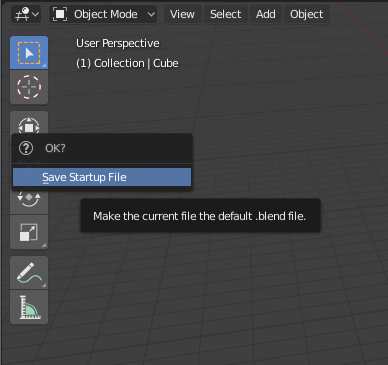
Confirmation prompts for things like Save Startup File need to be made clearer and impossible to accidentally miss.
Right now it is VERY EASY to miss the OK confirmation dialog when saving the Startup File and certain other actions because the confirmation box appears at the cursor (which is not the most noticeable position for it to appear, plus it kind of blends into the background) and the prompt disappears immediately without confirming if you move the cursor any distance away. It is very easy for users, especially those unfamiliar with this behaviour, to click this option and then miss the confirmation already moving their cursor to the next thing, mistakenly believing they successfully performed the action (eg saving config) only finding out later that nothing happened.
If there is a confirmation dialog it should go away only if you deliberately click or otherwise activate No or Cancel (or OK)... or, if it needs to be so unobtrusive as to require no effort (eg just moving cursor away), maybe the prompt shouldn't be there at all.
Either it's an important confirmation prompt and you should make it impossible to miss or circumvent, or it's a superfluous extra step that should be skipped entirely... making it both essential and easy to miss is an invitation for mistakes.
4 Comments
Real dialog boxes as you have in every other application since time immemorial please.
This Intro to Blender AnimX 2021 talk (by me) shows clearly why this is a problem that should be fixed, as it is extremely confusing especially for new users: youtu.be/1YWgtgEGycI
Of course, ENTER , O for OK, or Y for Yes etc should also confirm and N for No or C for Cancel should cancel where applicable, alongside the option to just click the appropriate choice. There definitely needs to be an individual button for No/Cancel.
Slightly moving the mouse cursor, or anything that can easily be done by accident , is not a suitable (unambiguous and consistent) way to cancel important operations.
To further illustrate this problem, just yesterday I was convinced a certain setting could not be saved because despite apparently Saving Startup File the setting was reset to factory default on startup. Only when someone else told me they were able to save this setting did I realize that the startup file had actually never been saved because I missed the confirmation prompt. This is bad .
It should be noted also this is especially likely to happen when using a tablet pen as the cursor will move across the screen even just putting your hand down, making it very likely you will accidentally skip any confirmation dialog.