
Retain Input Color Space Settings When Updating Image Texture File
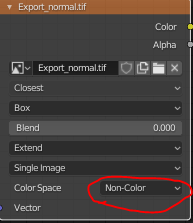
Currently, in both the 2.80 release and the latest daily build of 2.81, loading a new image in an Image Texture node provides default settings. When browsing and changing the input image, the Color Space setting automatically changes back to sRGB....so Non-color will get changed back to sRGB.
I've reported this as developer.blender.org/T70688 , and it was closed right away and noted as a feature. After responding to point out that none of the other settings are reset, I received this response: "The other settings you mention dont neccessarily depend on the type of new image you are loading, whereas the colorspace can be guessed/determined automatically, thats why blender does that for you.
This has been reported before, see T69244, T66985, T68047, but was not considered a bug."
There's a LOT of things Blender CAN do but doesn't do because it doesn't make sense. Personally, if I want to load a new image, intuitively I'll add a new image texture node....just saying.
Seems like the more we can get users to agree that this is a bug, it may be possible to get it accepted (please upvote)
7 Comments
You can source the same image multiple times with different color spaces. If you change the source directory of an Image Datablock (the little folder on the N panel, in either the Node editor or the Image editor), instead of duplicating the node with the same Image datablock.
It's not a bug, just a design decision that colorspace should belong to the Image datablock and not the node.
Honestly, it's the best compromise to achieve both workflows, because having the color space belong to the image datablock has it's advantages too.
Hmmmm, this actually looks like a bug. If you browse to a new image in the side N-menu panel, the Color Space setting does NOT change. So it appears to only be a thing if you use the browse button in the node UI.
Yeah, I second- this looks like a bug and is counter-intuitive UI behaviour.
I don't know if this strictly counts as a bug, per se, so much as an unfortunate and confusing UI choice. If I'm apprehending the API correctly, the Properties sidebar in the Shader Editor is representing a property of an Image(ID) rather than an ImageTexture Node. As such, when you click on the node, then go to properties, and then change the path, Blender is automagically tunnelling from the Node object to its associated Image object and updating the path of the Image object, while presenting to the user as if it were operating directly on the Node. This will obviously cause great confusion to some users who do not understand the data structures.
You should probably report this on developer.blender.org and explicitly see if it's a bug rather than use the voting system here for that.
* @Jason van Gumster * I HAVE reported this as developer.blender.org/T70688 , and it was closed right away and noted as a feature. After responding to point out that none of the other settings are reset, I received this response: "The other settings you mention dont neccessarily depend on the type of new image you are loading, whereas the colorspace can be guessed/determined automatically, thats why blender does that for you.
This has been reported before, see T69244, T66985, T68047, but was not considered a bug."
So, at least 3 others have reported this, yet this is still considered a "feature". And just because Blender CAN do something, maybe doesn't mean is SHOULD do that thing, imho.
Please upvote this issue....maybe we can get some fix implemented if enough people consider this a bug.
* @conrad.dueck * Thanks for sharing the link and context. You may want to include that information in your main proposal.