
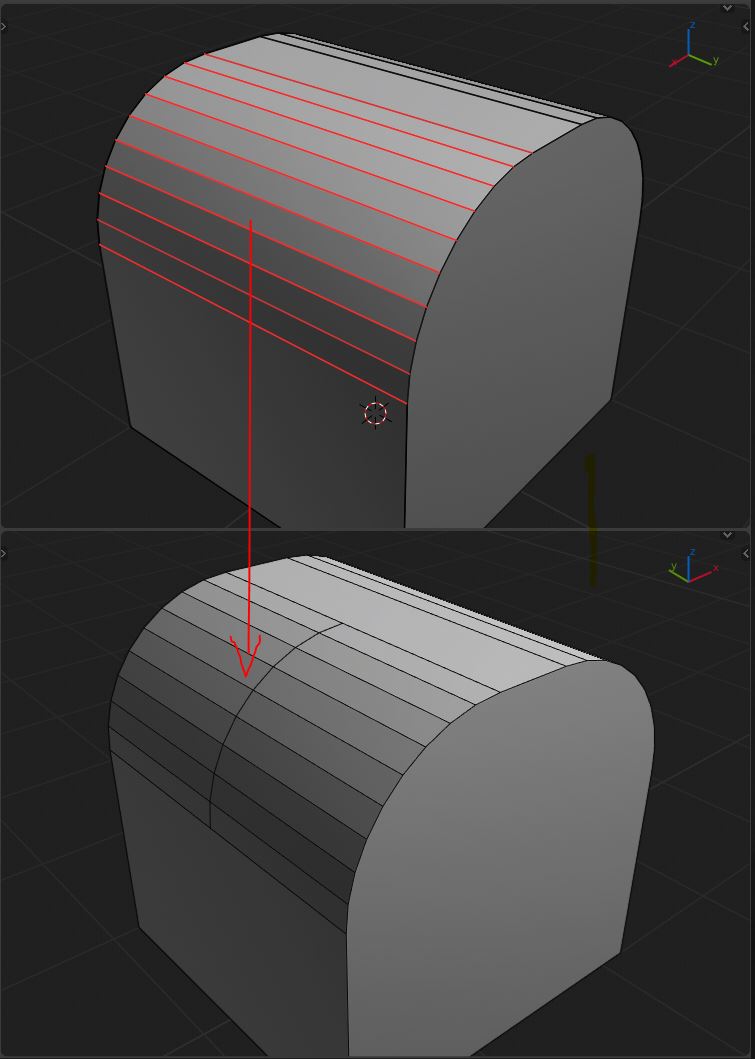
Insert Loop cuts to a selected number of loops!
This is something I really envy 3DS Max users for. For so long, Max has been known as the best software for polygonal modeling because of features like this. It gives you full control over where to place a loop. When the loop is in place, it'll be nice to be able to tweak the settings just like the regular CTRL + R. I propose that this way of inserting loops should be mapped to SHIFT + R.
8 Comments
You can use Subdivide or Subdivide Edge-Ring
* @Roman * Yup, looks like subdivide Edge-Ring, you can set up number of cuts too. So it's there. Ctrl + e -> Subdivide Edge loops and edit the amount of cuts. Can hot key it too to shift + R if you really want to, but Shift + R is reserved to repeat last action by default.
* @Roman * Just to add another option; you can hide polygons in order to stop loops where you want them when you add an edge loop.
Yes - that is a very useful feature. Modo even implements a slider on top of the UI to see a percentage counter where the cut is going to be positioned. Additionally it has two more modes:
Isn't this CTRL + Knife tool?
* @ammusionist * NO
* @ammusionist * Almost, in case you want more than one cut you have to bevel the new edge, but you'll be less precise
* @ammusionist * Not really. The knife only works in cases where your loop cut aligns perfectly to the camera, otherwise you will not be as fast or precise as with a dedicated tool. You can get there but this is about increased speed and precision.