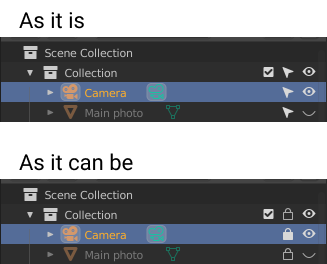
Change Disable selection Icon from arrow to lock. It's more obvious for users.
33.3%
Development Status:
Open
Upvote2Downvote4
e
evgenii1
12 Sep 2021
6 Comments
L
Lauloque
Yes and no. Locking items is a notion that already exists and has a different effect : locking transforms.
Here we are only preventing selection from the viewport, the item isn't locked.
1
e
evgenii1Author
Well, the lock means that you can't change or select something, right. So i think it will work in both cases. And lock uses everywhere (Photoshop, Figma, Sketch, etc) to make layer not selectable. It's very intuitive.
L
Lauloque
I disagree,
Right now in Blender, the lock only means a property if not editable. You can still select whatever it comes from. I.E. a locked object is selectable, locked channels in the graph or dopesheet are selectable. Only editing them is prevented.
Selectability just prevents from selecting, not editing. Not only that, but it always remains selectable in the outliner.
Finally, If one wants to make comparison with other softwares, one MUST take into account their radical different needs.
Painting programs are not object-oriented tools. Most of whatever-settings layers might have, are either tool-oriented or contained in the layer stack. You spend most of your time with a painting tool, and you always select the layer you paint on in the layer stack in the first place. So you rarely need to have distinct different options for editability and selectability from the canvas.
Actually, some painting programs will instead offer different data locks, I.E. alpha lock which allows you to paint on a layer without changing the alpha. Photoshop does this by its layer hierarchy, some other will give a different checkbox besides the lock in which case the icon is not a lock so as to not confuse the two options.
But 3DCC softwares are different, they do have different needs. When you work on a scene, you don't might need to lock objects but keep them selectable to access their properties. You don't want to rely only on the outliner for that when you have a viewport. And you also need to be able to edit objects whilst not impacting your selection range in the viewport, so you also need a clear different setting for selectability not linked to editability.
TL;DR:
Different needs, different effects. Since we do have distinct tools, there should be a distinct UI isn't it?

6 Comments
Yes and no. Locking items is a notion that already exists and has a different effect : locking transforms.
Here we are only preventing selection from the viewport, the item isn't locked.
Well, the lock means that you can't change or select something, right. So i think it will work in both cases. And lock uses everywhere (Photoshop, Figma, Sketch, etc) to make layer not selectable. It's very intuitive.
I disagree,
Right now in Blender, the lock only means a property if not editable. You can still select whatever it comes from. I.E. a locked object is selectable, locked channels in the graph or dopesheet are selectable. Only editing them is prevented.
Selectability just prevents from selecting, not editing. Not only that, but it always remains selectable in the outliner.
Finally, If one wants to make comparison with other softwares, one MUST take into account their radical different needs.
Painting programs are not object-oriented tools. Most of whatever-settings layers might have, are either tool-oriented or contained in the layer stack. You spend most of your time with a painting tool, and you always select the layer you paint on in the layer stack in the first place. So you rarely need to have distinct different options for editability and selectability from the canvas.
Actually, some painting programs will instead offer different data locks, I.E. alpha lock which allows you to paint on a layer without changing the alpha. Photoshop does this by its layer hierarchy, some other will give a different checkbox besides the lock in which case the icon is not a lock so as to not confuse the two options.
But 3DCC softwares are different, they do have different needs. When you work on a scene, you don't might need to lock objects but keep them selectable to access their properties. You don't want to rely only on the outliner for that when you have a viewport. And you also need to be able to edit objects whilst not impacting your selection range in the viewport, so you also need a clear different setting for selectability not linked to editability.
TL;DR:
Different needs, different effects. Since we do have distinct tools, there should be a distinct UI isn't it?
Makes sence. Than, maybe, we should think of having third state of the lock. Like Checkbox has 3 states (on, off, undetermined) but one visual metaphor. Here is the example drive.google.com/file/d/15aPYbWl5JH6WoStkqDQm94k5oDTP5Tlk/view
This would be confusing, three states checkboxes are uncommon, and you still have the issue of using a lock icon for different notions.
Ok.