
Assemblies Assemble!
Collection’s have been a great improvement to Blender. Compared with the original 16 layers button thing of old they’ve been a world ahead. But they still don’t fully realise good grouped object management in the viewport.
Currently a collection is a group of objects that can be linked, viewed, hidden etc… together, but a serious feature they lack is the ability for them to be selected, edited or act as a whole. You can of course Shift+G to select all within a collection in the 3D view or right click in the menu but having to do that every time isn’t great or intuitive. Neither is having an empty be the parent because scenes become cluttered with too many names and object outlines, and selecting an empty in all of that isn't practical.
The basics of what I'm proposing already exists in software, think folders and files in operating systems, but applying this principle within Blender's objects management system.
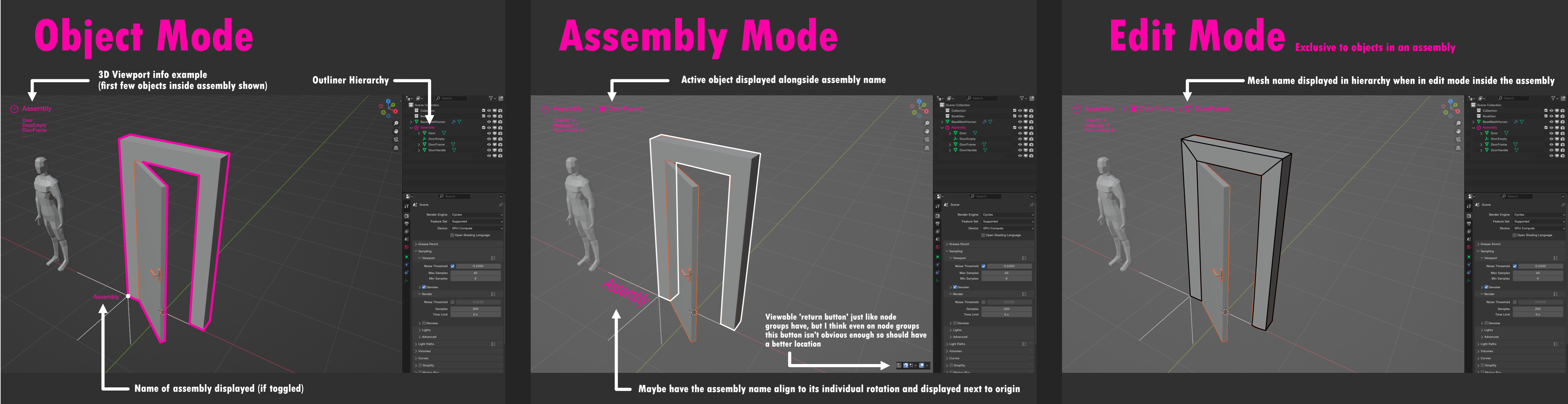
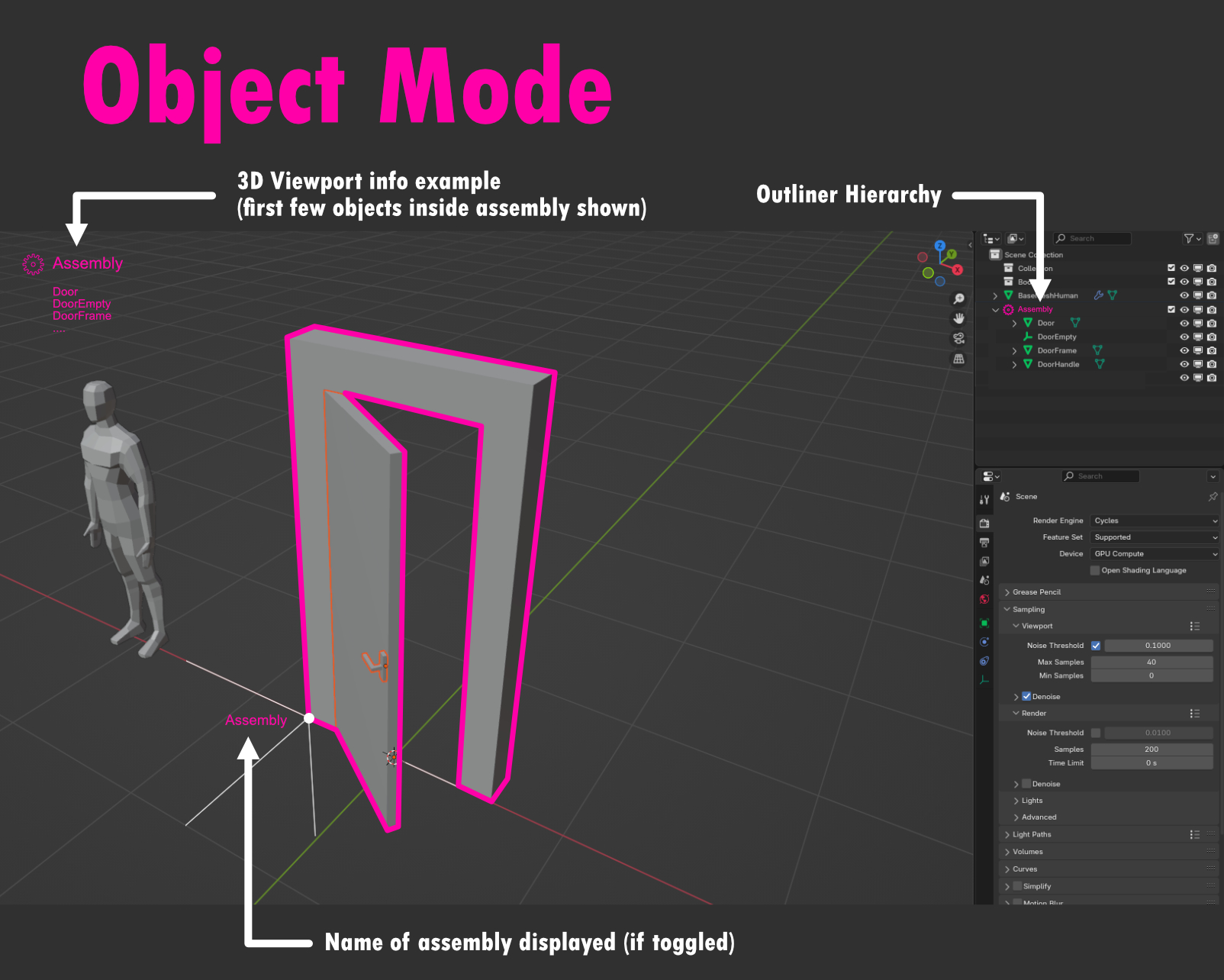
Firstly, assemblies are groups of objects that are selectable together. They share a common viewport outline under normal conditions. Like collections they have a name and a drop down list (that can be custom ordered rather than alphabetical). Crucially it does not matter which part of the assembly you select, you select them always as a WHOLE so they do not behave like parent and child objects in that sense.
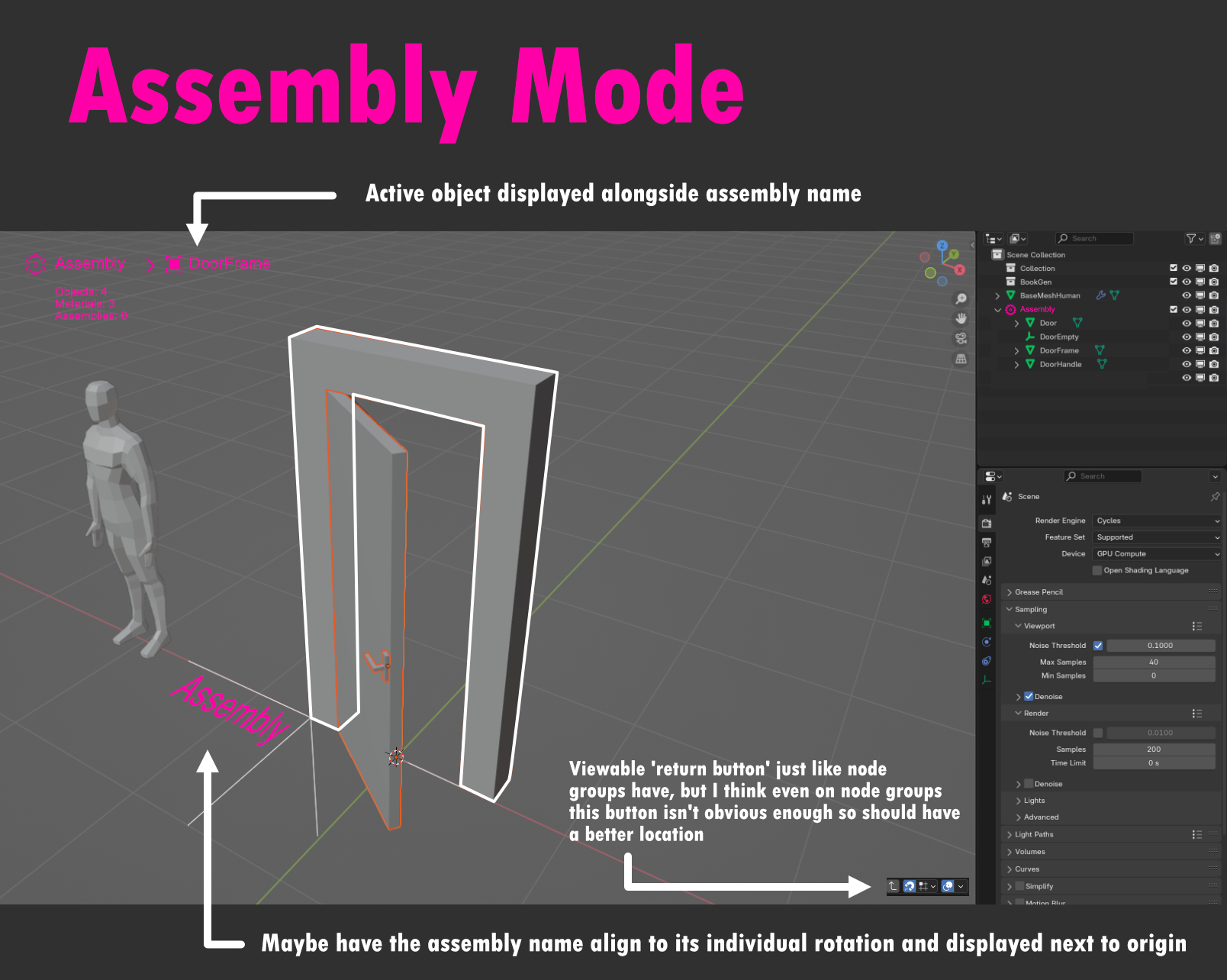
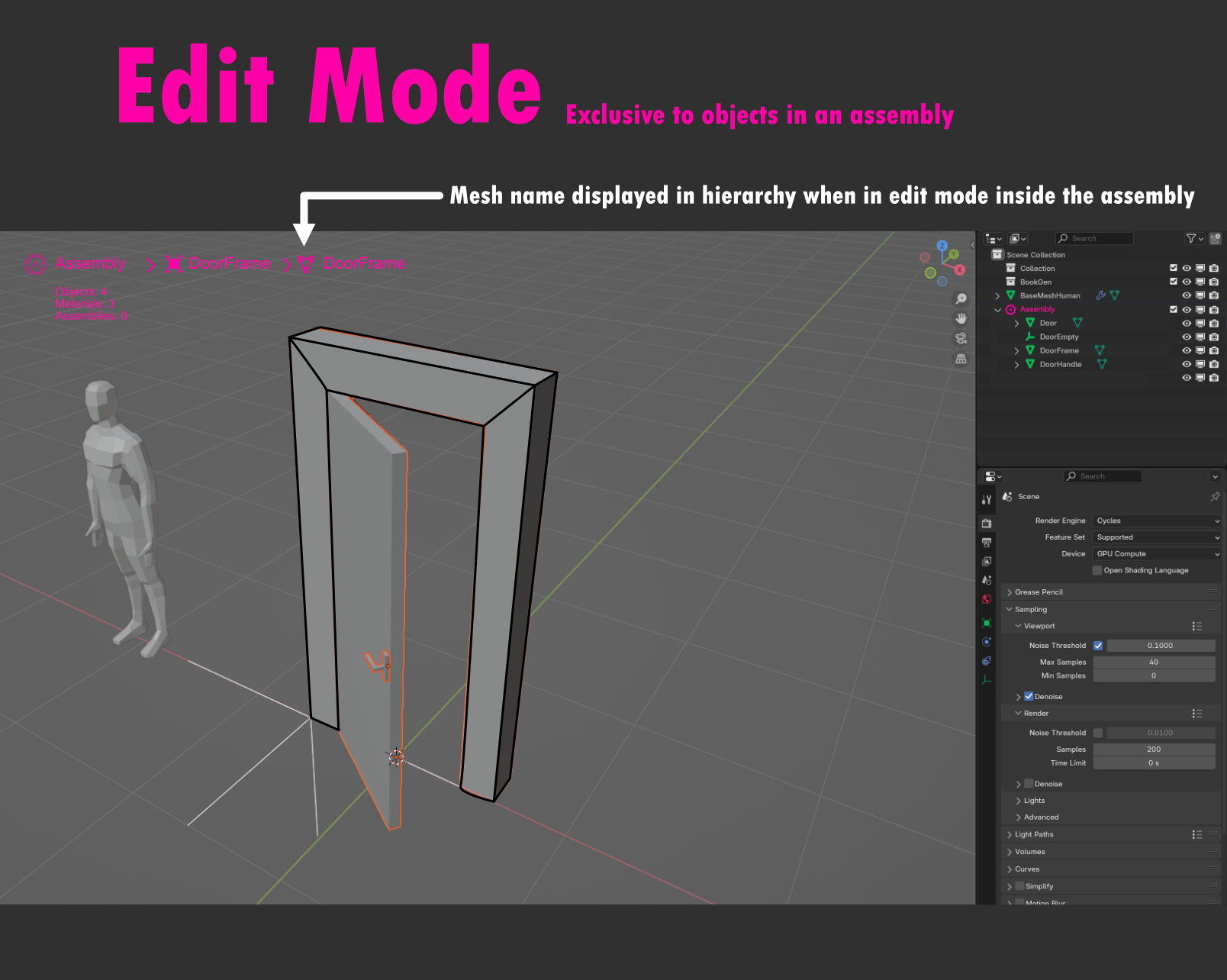
Second, they can only be edited as singular objects by pressing ‘TAB’. This would require a custom viewport colour outline for assemblies so that they’re are easily distinguishable from regular objects. This operation would act in the same fashion to node groups that also use 'TAB' to enter and exit out of them. The objects inside the assembly would now display as singular objects within this assembly mode and ‘TAB’ would return you to object mode (unless an assembly inside the current one is being selected).
Third, an object can be designated as the origin. For my example it would be an empty but it would be any object desired and the right hand side bar would display this as ‘assign object as origin’ option and have a display for the current origin object.
Fourth, on entering the assembly mode with ‘TAB’ the interface dims the other objects outside of the assembly and makes the assembly ‘In front’, with these being default but also a toggle and slide feature in the right side bar.
Fifth, the origin of the assembly acts as the ‘location and rotation origin’ so that if the assembly has been rotated, upon entering the assembly mode, the origin object will now act as the viewports origin so that editing the objects inside the assembly would be at an orthogonal perspective. For example if a watch is on a model’s wrist at an angle, it would align to its individual origin angle (sourced from the origin object) and become straight like a T-Pose within the viewport once you enter the assembly mode to edit it. The viewport aligns to your assembly's origins.
My principle here is that assemblies do not replace collections. Collections do not go inside assemblies but you can have an assembly inside another assembly and assemblies can go in a collection. An example could be a room. A room could be a collection in a scene of a house, but a door is an assembly. The door, its handle and the frame (maybe a door knock) all make up the door ‘assembly’. They can each have different materials, scales etc… but they are selectable as ONE. Watches, a piano, an oven…. all of these would be examples of possible assemblies that under normal interaction act as one SELECTABLE unit but are each individual objects.
In essence Assemblies deal with physical groups of objects and collections move to being theoretical groups of objects handled within the outliner.
Additional features could be:
- Assemblies displace the original ‘Parent and Child’ system and that you edit their relationship inside an assembly, but having minimal experience with animation I wouldn’t want to presume that this would be either useful or functional.
- Just as objects and lights get an individual icon in the properties panel side bar, assemblies would display their own icon when selected and display relevant data and options accordingly.
- And lastly materials from all objects in the assembly would be displayed as a collective when the assembly is the active ‘object’.
- The 'M' shortcut would be used for adding objects or combining objects into an assembly. This would supersede it being used for collections which would be designated to something else.
Hope others see the usefulness and application of this too.
P.S If such a proposal already exists I have missed it in the list and it deserves to be much higher to get more attention.
7 Comments
I don't like the whole proposal, but I think having the hyerarchy on the top-left just like in node trees would be super useful, then you would be able to select the hyerarchy level you want
Beside the editing procedure described this are basically Groups, requested many times here and featuring own transforms, pivot, accepting modifiers and materials as a superobject. I love the pink !
Yes I agree, I actually checked after I submitted and saw I had previously liked a request that was also a 'Groups' idea from 7 years ago. I think it can still hold though because now collections have been added it's really how to work with them in this new system and the extra functions to improve on the basic principle is worth exploring.
I choose assembly because 'assemblage' is a vague Dutch translation and thought I could appeal to the devs that way, but you're actually selling me on the Superobject name😄
Haha,yes! naming probably matters too since we use a set of tools not only Blender. I prefer Groups because it is the most intuitive and is the same thing in other software. For some of us Assemblies has already a specific meaning in other software (in Max is a group of meshes +lights with a parametric control gizmo, in Unreal is different things). Superobject while descriptive enough is maybe too abstract, more suited in scientific and math software.
Anyway here is just one of the more involved discussions on this devtalk.blender.org/t/groups-in-blender/23292
Yeah, it's nearly word for word one part of that devtalk post. We know this exists so that's why it keeps surfacing in various forms.
I noticed you could link collections across scenes that makes the whole collection a single 'Object' so there's definitely a way of implementing this That uses existing code. A workaround is to have a scene for collections and then link them into a main scene where they can act as single objects but beyond having one window/screen open for editing those collections the functionality of that is just horrific.
this would be a cool thing to have, i would love to see this in blender.