
Add "Use Duplicates" (not instancing) in Screw Modifier to make it on par with Spin Tool
The Spin tool with the option "Use Duplicates" (not instancing) is a must-have when modeling anything curvy or circular if you want to keep your blocks, bricks, planks or whatever separated. However, using a tool instead of a modifier makes it really tedious sometimes, since you can't adjust it on the fly and also can't fine tune it easily... or change the design later, in that case you'll have to redo from the start.
I propose to add the option "Use Duplicates" (not instancing!) to the Screw Modifier.
Here's the mockup:
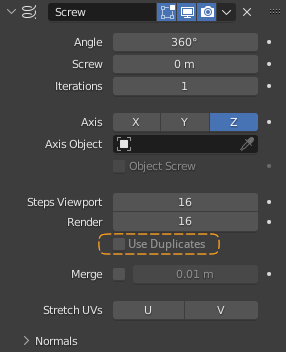
Edit: It's not about instancing. It's purely for modeling convenience and saving modeling time.
6 Comments
This would probably have the same problem that the array modifier has. It won't actually use "duplicates", It will create new geometry that uses more memory.
You'd be better of using the old "dupliverts" feature in many situations. For every situation I encounter (disclaimer, I'm an amateur) the Geometry Nodes way of duplicating things in a circle or spiral is much better than screw or array or dupliverts.
The Spin tool also doesn't give you instances, it's not about that. The point is to have a tool that would allow you to adjust and fine tune your design on the fly without wasting time on setting up the Spin tool and your 3D cursor to then realize that you need to adjust the center of rotation or the size of the mesh, or location. Basically the current approach makes you redo a bunch of steps and also keep track of 3D cursor, its relative position to the mesh, and also don't forget your view angle because the Spin tool takes into account your view as the plane on which to rotate.
You can already archive the result you want by using the array modifier with an object offset.
Thank you for taking your time to respond with a screenshot.
I'm aware that the Array can do that but in reality it's a very limited workaround, even though there is something that the Array modifier can provide for if you need circular things. However, If you need a perfect circle or even a half circle, in the Spin tool you can just set whatever angle you want with whatever numbers of steps to fill the range with, not so easily with the Array. With Array you would need take into account the amount of steps, the size of the mesh, the center of rotation and calculate and adjust it all manually if you wish to change anything. A simple task of changing the number of steps requires you to shift the offset object rotation to some magic number (i'm sure someone can derive a formula) with no simple in-head calculation.
In the end it turns out to be even more tedious than using the Spin tool.
This feature is unlikely to be added for the same reason that "Array modifier rotation offset" isn't added; that is because modifiers that instance geometry are considered an anti-feature .
It's not about instancing, I don't need it. It's about distributing an object's mesh (or a vertex group if you will) equally in a radial manner.