
← All ideas
  • Published 18 Feb 2022

GreasePencil workflow

Hello everybody! I'd like to present you an idea for the greasepencil tool. I love greasepencil and since it got 800 times faster I can't stop drawing. Thanks blender! In my workflow I've been faced with a tedious process for how brushes and panels are currently organized. Below I'm attaching an ideal prototype. I'm aware that it would take a long time to make it, but if you should also like it for an addon, I'd love to collaborate in the development.

Thanks for your attention! Artboard-1.png
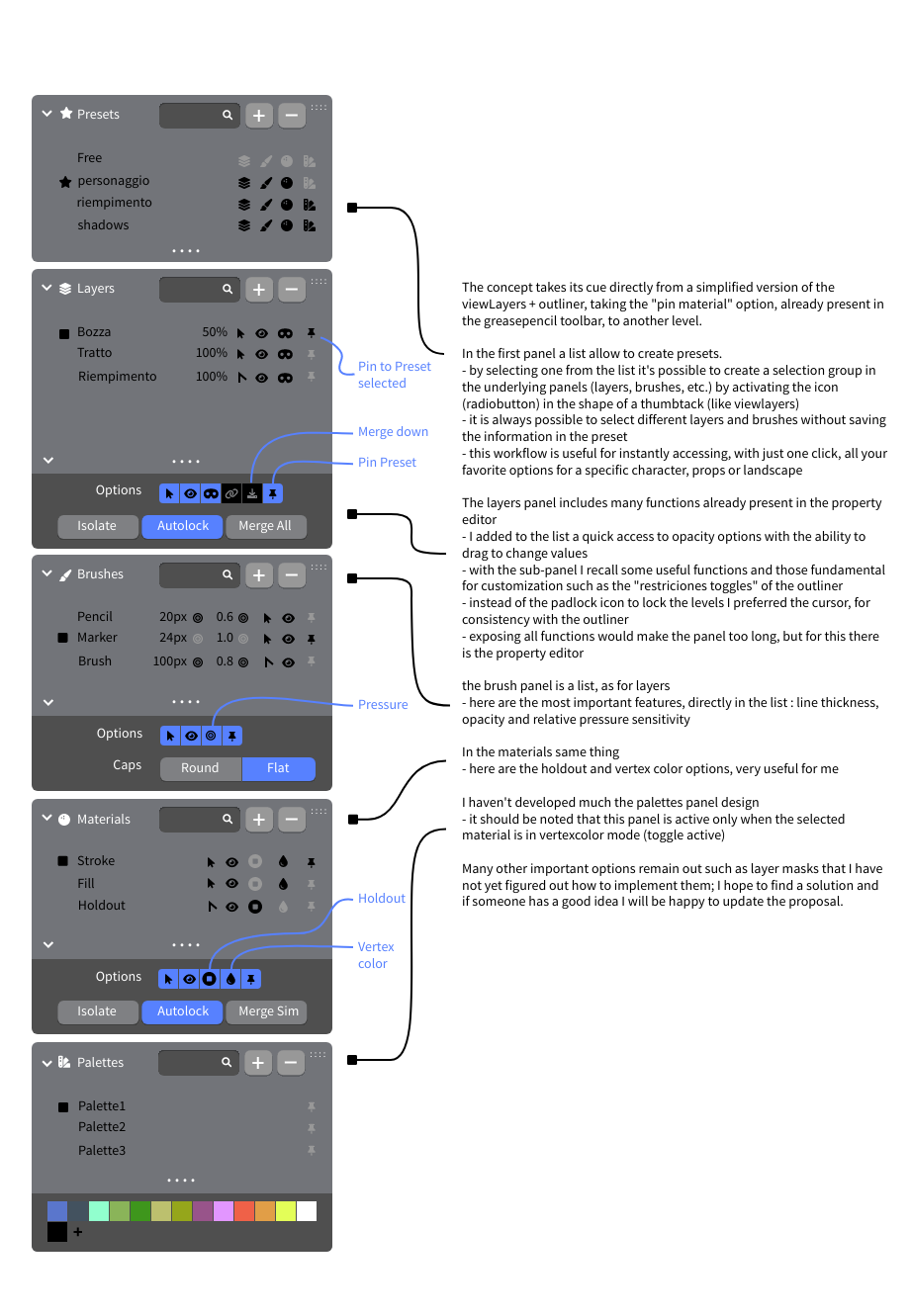
100%

Development Status: Open

Upvote 6 Downvote 0
emiliano
18 Feb 2022

2 Comments

oscarbaechler

This is, in fact, a grease pencil breakthrough! Your proposal covers many of the layout ideas I've missed from other programs. However, I think much of it already is possible, albeit through customization, and therefore better as a suggestion to change/add as custom files with UI presets, rather than as a major change to the UI.

  1. Instead of new Presets addition to the Properties window, those presets can just be stored in a Workspace. In fact, I've saved in my defaults my solution to your UI problem.
  2. For Layers, Brushes, Materials, and Palettes, Just add 4 separate Properties windows and hide the header on all of them.
  3. You've got a clean UI here, which can be created by assuming a Workspace like a Photoshop or Krita default workspace.
  4. If your right click BETWEEN two tabs of the properties window, you can Flip to Left/Right. If you right-click on the header, you can hide the header.
  5. Some window customization works: dragging materials to the top = it's the top tab. Some don't; Palette is a sub-panel of the Color panel on the materials tab, so there's no way to collapse the material tab and see the Palette first. Therefore, I propose Palette should be a separate window from Color, shown or hidden upon choosing Vertex Color. Then it can be a separate tab, dragged to the top.
  6. Brushes is the biggest problem you highlighted. Our ONLY option to view brush presets is clicking on it in the header, or clicking on the thumbnail in the Brushes panel. We should have a View option that shows a list of names, or even a procedurally generated pressure-sensitive stroked path WITH that brush, a la photoshop.

Here is an attempt to replicate this as best as I was able. 1drv.ms/u/s%21ArOIL0T67Z2ZlZ9TACM5mrhgcuNBpQ

emiliano Author

thank you! with your layout is much more practical! meanwhile I have found a solution that comes close to the idea of presets by creating various brushes with different pinmodes. the fact remains that choosing brushes from a list and pinmode for layers would be great.

1