
Create your own menu with your own hotkeys inside
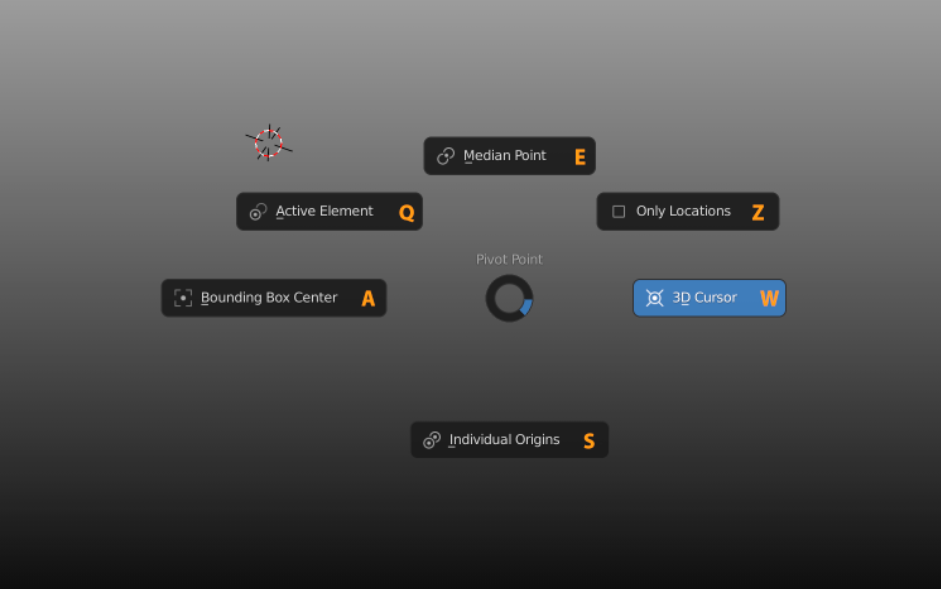
Hi! I have long wanted to create my own menu with my own hotkeys inside, but nothing has worked out so far. I tried to do this using the pie menu, but as it turned out later, the hotkeys inside the pie menu (1-9) are hardcoded inside the blender and I cannot change them. When creating a regular menu, the maximum that can, be selected by the first letter in the name of the function, which also does not suit me) I am interested in the possibility of making a menu, the list of functions of which will be tied not only to numbers, but also to letters and freely customize. Below are screenshots of how it should look. With this opportunity, you can significantly speed up the work and comfort of work in a blender. Anyone have any ideas how to implement this?
Or can someone agree to implement such an addon for money? I’m ready to pay, or if there are enough willing, I can arrange fees or donations, and post this addon after the implementation. I think it would be a very handy thing.
I am attaching photoshop screenshots of how it should be:
P.S.
It worked! ibb.co/fQ1cY7D ibb.co/4FSznqr
A couple of years ago, when I tried PME, I did not think that it was possible to hook hotkeys to the names of the menu selection. It's out now. It doesn't look very good, but I'm not going to watch, just press and press and press)
9 Comments
Download pie menu editor.... Paid addon
* @mrajendra2150 * * @IIIFGIII *
There is no function for reassigning hotkeys, I bought both the PME and the Wazou RMB Pie Menu (free), you can do anything with them, except for changing hot keys, everything is hardcoded into the numbers 1- 9, with the expectation that people will use the numeric keypad, but of course no one does this, because it's not convenient) And they cannot be reassigned, as I understand it, without a special add-on or patch. In fact, we need a patch for the Blender core so that we can set-up custom keymaps for the pie menu items, right built-in in Blender.
* @qkpemp * Other than using 1-9 numbers u can also use key character buttons (those underlined like A in Active Element).
And adding something to PME pies show same characters. if u add few with same characters in their own menus - it will assign some new character to next added. So it looks more like this characters are autogenerated per menu/PIE and this auto generator leave somewhere deep inside API.
I get your point, but - why the hell you need custom hotkeys inside PIE. PIEs about assign many operators to one hotkey and then choose which one to use by fast mouse move to some direction, blindly on muscle memory after practice. Instead you want to have more hotkeys on top.
* @IIIFGIII * It worked! ibb.co/fQ1cY7D ibb.co/4FSznqr
A couple of years ago, when I tried PME, I did not think that it was possible to hook hotkeys to the names of the menu selection. It's out now. It doesn't look very good, but I'm not going to watch, just press and press and press)
* @IIIFGIII * thanks a lot!!
* @IIIFGIII * This is all purely individual, it is much more convenient and easier for me to pound the keys like a mad pianist) associations with the keys are better created in my head than with the mechanical movement of the mouse in the right direction. Plus, the cursor stays in place and moves in any case longer than pressing.
* @qkpemp * Individual - maybe. I use hotkeys like pianist as well, but to remember additional keys inside each custom pies (I have dozens of such) will take too much memory space in my head.
Then you can put pie inside pie when smooth moves become really handy. Like this my custom pie for default/custom transform orientations and pivot points ( for gif I move slower than obviously).
* @qkpemp * what is the point of pie menus then if you have to press another key, it will slow down your operation. Although i agree that this functionality should be in-built in the blender with an option to change the position,color and shape of pie menu.
PME exist and cost not much more than few burger + cola... Don't be so greedy, just buy addon, it is worth it.
Feature should not be only developed, but also maintained well. Those who made PME maintain it well and update all the time.