
Dedicated Retopology Mode
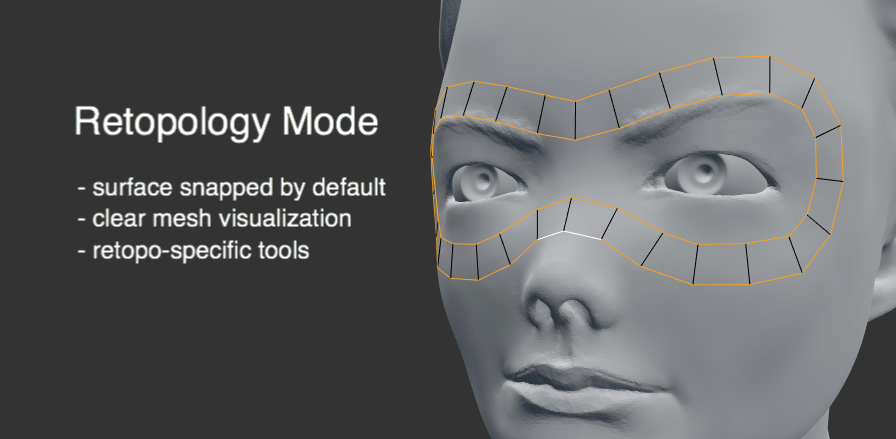
I think it’s time for Blender to get a dedicated retopology mode, enabling artists to retopologize high-resolution surfaces (such as dynamic topology meshes).
This retopology mode should exist as a parallel mode to Edit Mode, utilizing many of the same tools but with all tools inherently snapping geometry to a source object’s surface.As sculpting becomes the preferred modeling method, particularly for organic models, retopology has become an essential part of the modelers workflow.
The Problem
Currently Blender’s built-in retopology tools are woefully insufficient. By default we have:
- Face Snapping to other objects
- Shrink-wrap modifier
- Bsurfaces (as an add-on)
Each of these tools work well for various tasks, but they are not directly designed for retopology, so their use as retopology tools is more a convienent mis-use.
Proposed Solution
To provide a full suite of retopology tools it’s time to add a dedicated Retopology mode for mesh objects. There’s a few key details about this retopology mode:
- The mode requires a source object to be designated, either through an option or by selection
- All operations on the target obect (the retopologized mesh) should inherently snap to the surface of the source object
- Mesh drawing of the target object should draw wireframes on top of the source object, making for clear visualization (a bit like XRay + Hidden Wire in Edit Mode currently)
This mode should then contain a subset of tools, many could be a variation of Edit Mode tools, which are designed for retopology from the beginning.
Here are a few examples of how existing mesh tools could work in retopology mode:
- Loop Cut and Slide: cut in a new loop which conforms to the source surface, even during a slide.
- Subdivide: subdividing a selection would snap the newly created geometry to the surface; e.g. enabling you to subdivide a cube and have it immediately transform into a sphere
- Extrude: extruding a selection would conform it to the surface, enabling you to quickly extrude a series of edges without worrying about the snapped location
12 Comments
I wanted to open a thread about Retopo Tools then I found this. So I'll just add this here .
The Quad-Draw Retopo Tool in Maya
youtu.be/xpDWta5O3n8
And from the video what we see is that you can clearly see what is the hi-poly and what is the low poly.
And also the behavior of the Quad Draw - Tool with the modifiers .
just wonderful to see a full retopo tools like this:
TopoLogiK Teaser from clovis gay on Vimeo.
No need Modo or others. Need with autoretopo function, like this: Instant Meshes youtube.com/watch Sketch Retopo youtube.com/watch Some users created addons youtube.com/watch
Sources:
Dedicated Retopology Mode not quite important mar 2016 82 like with mine. drag and drop modifiers very important ^^ more 300 votes. while noobs are voting real subjects stay buried
Hey Jonathan, this sounds similar to your retopoflow add-on inside of Blender as a mode, no? I like the idea of a dedicated retopology mode, with a specific set of tools dedicated to those type of tasks.
In essence, yes. The core of RetopoFlow lies in it's innate ability to snap all generated geometry to the surface of a source object . This is where a retopology mode is most similar to RetopoFlow. However, past that it gets far more into individual specifics, such as precise tools and workflow choices.
Gotcha. Thanks.
What about a new modifier?
By "modifier" I assume you mean using a modifier to generate a retopologized mesh ? If so, this is something that's been discussed before and has good promise, but it also brings with it a lot of weird workflow kinks. For example, it would be very weird if you had to first add a modifier to a high-resolution object in order to then create a new, low-res mesh of that same object for reotpology.
Would this use a regular mesh object or would it use a new object type? Something that didn't store every vertex position, but rather stored strokes like contours?
Fundamentally it'd be a mesh creation mode, but it could certainly be extended to include additional attributes used to create and modify the mesh (such as strokes).