
User defined width for custom nodes
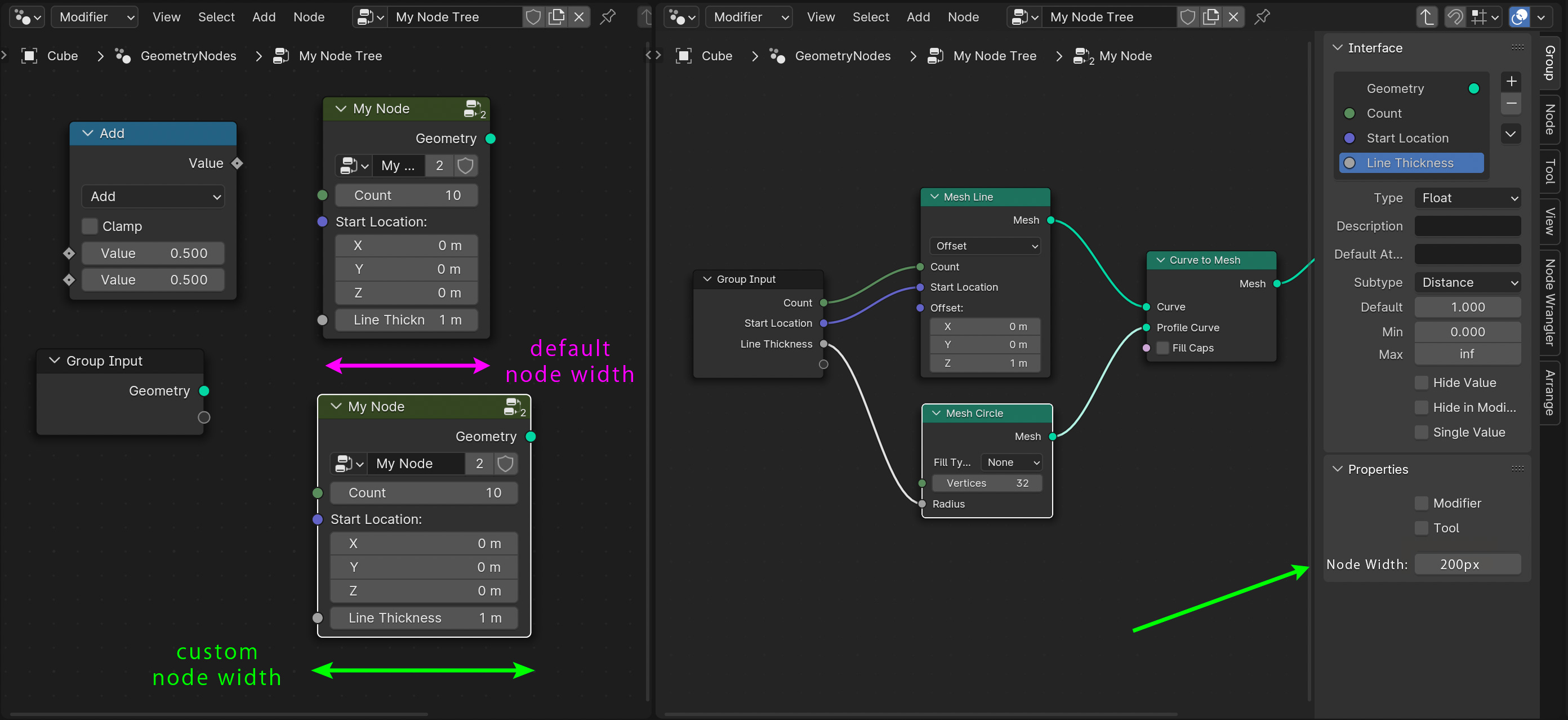
It would be useful if blender would let you set a default node width for a custom (group) node so that when the group node is instantiated it is created with the width predefined by the user (e.g. the creator of the group node).
When creating a group the Property Panel would have a Node Width setting initialized with the default value for nodes, and the users (node creators) could change it to better suit their needs.
This feature is useful if the group nodes have properties with labels longer than they can be displayed within the default node's UI layout at default width. Often times I find myself having to resize my group nodes after instantiation just so I can see the property names. While users can resize the nodes after instantiation, it is an extra step the user always have to do if they want to see the node property labels. (note the truncation of the “Line Thickness” property label). Sometimes a better/shorter naming may be possible, but other times it is not.
This feature can apply to all node systems, not just Geometry Nodes. And it should be a property that stays with the group node even when it is stored as an asset.
1 Comment
I love this idea! I'd also like the ability to double-click a node to quickly set its width to allow for that of text (such as input/output or the name) within the node to fit the node, rather than it clipping. Similar to Excel's double-click column/row functionality.